Even on a quiet day here at UnlockBase we receive around 600 emails asking a wide variety of questions about the many aspects of unlocking cellphones. A question that has been asked a lot lately is what is the difference between Android FRP Lock and Samsung Reactivation Lock? Well, many of the most recent Android Phones including models from Samsung, HTC, and Sony can become stuck on activation screen requesting for your ID and password, while others are requesting your Google Account. Samsung phones will ask for a Reactivation Lock ID & password, so that people can be identified along the same lines as apple iCloud Lock. To clarify things, here we provide detailed information on the difference between the two.
What is Factory Reset Protection (FRP) Lock ?
Android Factory Reset Protection (FRP) is a new feature designed to protect your device. It has been added to several Samsung devices that are running Android OS 5.1 or higher.
This feature enables you to set up your device to prevent other people from using it in the event that it has been reset to factory settings without your permission. For example, if your device is lost, stolen, flashed, or wiped, only someone with your Google account or screen lock information can perform a factory data reset and use the device.
When a device is factory reset, the device will not be able to be setup without the user entering the Google Account associated with the device (for hard reset) or screen lock information (for reset in Settings menu). It’s essential that you set up a Google account in order to use the FRP feature. It is also highly recommended that you set a secure screen lock on your device.
What is Reactivation lock and how do I use it on my Samsung?
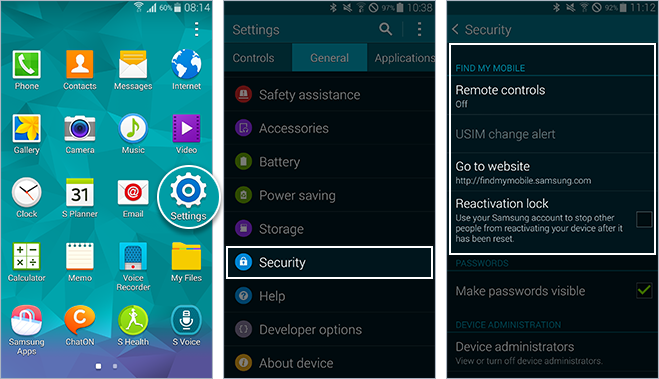
Similar to FRP, Reactivation lock lets you use your Samsung account to prevent others from activating your device if ever it is lost or stolen. With Reactivation lock turned on, you will be required to enter your Samsung account credentials (sCloud) prior to performing a factory reset on the device, so your Samsung account login should be something you can easily remember.
All products, and company names, logos, and service marks (collectively the "Trademarks") displayed are registered® and/or unregistered
trademarks™ of their respective owners.
The authors of this web site are not sponsored by or affiliated with any of the third-party trade mark or third-party registered trade mark owners,
and make no representations about them, their owners, their products or services.
We have updated the HTC unlocking code Database with 3,376,399 new IMEI entries, last update was in Nov 2015.
With this update, we are now able to source the Unlock Code of no less than 206,494,226 HTC Cell Phones, and almost 99% of latest HTC phone models are available in our Database, including HTC Desire 620, Nexus 9, Desire 816G, One, M8 Eye, Desire Eye, Desire 612, Desire 820, Desire 510, M8, Butterfly 2, One Remix. You can check for free whether the Unlock Code of your HTC phone is available in our Database by using our Widget to get real time status, just visit the widget page to do this: http://www.unlockbase.com/widget/htc.php
All products, and company names, logos, and service marks (collectively the "Trademarks") displayed are registered® and/or unregistered
trademarks™ of their respective owners.
The authors of this web site are not sponsored by or affiliated with any of the third-party trade mark or third-party registered trade mark owners,
and make no representations about them, their owners, their products or services.
If you’re on the lookout for a large phone, a phone large enough to comfortably watch movies, TV shows and your favorite YouTube videos, then the new 5.7 inch LG V10 could be the phone you need.
Introduced at the beginning of October 2015, the LG V10 is the latest flagship phone from LG. Perhaps the key attribute of this phone is the fact it boasts an always on secondary 2.1-inch display above its main 5.7-inch quad HD screen to keep you abreast of information such as the date, time, weather, and battery life as well as app shortcuts and playback controls. This changes when you have the main display on, with the secondary panel giving you quick-access to apps, music controls, favorite contacts and notifications.
16 megapixel rear and two front selfie cameras
Like the LG G4, the V10 features a hexa-core Snapdragon 808 processor, with 4GB (1GB more than the LG G4) of RAM, 64GB of storage, a 16-megapixel rear camera, and not one but two 5-megapixel front cameras for wide-angle selfies. The phone runs on Android 5.1, and on T-Mobile, the V10 includes support for band 12 LTE connectivity. The battery is a 3,000 mAh cell, said to be pretty thirsty for regular charging.
Expert movie making
The V10’s strongest suite however, despite the two selfie cameras, is actually for video making on the go. The phone has a number of settings you can play with to fine tune your videos including the shutter speed, white balance, focus, frame-rate and a 21:9 aspect ratio which means you can shoot footage and watch it back on your widescreen TV in perfect Cinemascope quality with no distortion. 4K recording is also supported and there’s both optical and electronic image stabilization thanks to Steady Record, to ensure your footage doesn’t become a hand-held jerky nightmare. Also new is a 15 second Auto Edit which creates highlights of what you have just shot with none of the blurriness or shakes. If you are familiar with LG G4, you’ll be familiar with the rest of the controls on the camera on the V10 as it is based on the LG G4 which has been hailed as having one of the best Android phone cameras on the market.
While the phone is available in the States and key markets in Asia, it is not yet available in Europe. Why? We don’t know.
The LG V10 T-Mobile deal
A 24 month contract on the LG V10 from T-Mobile will mean you can walk out the door with it for $0 down. Monthly repayments are $25.00. If you go the JUMP! On Demand route, again, it’s nothing down, but 18 payments of $25.00. If you want to own the phone outright the cost is $599.99
T-Mobile currently has a promo that pays out a $100 prepaid card when you buy the LG V10 and LG G Pad F 8.0 together when you buy one device on an Equipment Installment Plan, then buy the second on EIP within 30 days. Up till November 15 early bird T-Mobile customers were receiving a free 200GB microSD card, an extra 3000mAh battery, and a battery-charging cradle, but whether this deal will be repeated is unlikely.
About T-Mobile USA
With a workforce of 45,000, T-Mobile USA is a national provider of wireless voice, messaging, and data services capable of reaching over 293 million Americans where they live, work, and play. Around the country coverage can be quickly checked online by punching in your zip code. T-Mobile claims to have America’s fastest LTE network, and to be America’s fastest improving network having more than doubled their LTE coverage within 2 years, and by the end of 2015, they state they will have increased their reach to more than 300 million people across the country. The service provider’s Extended Range LTE is claimed to reach 2 times farther and works 4 times better in buildings.
Unlock your LG V10 (H901) with UnlockBase
Although it’s only been out for little over a month, of course UnlockBase already unlocks this phone for you. For this we use the Mobile Device Unlock App for Android specific to T-Mobile and the cost is $44.90. Delivery time is between 1 to 2 working days.
UnlockBase is the most experienced remote online unlock service on the web with over 5 million phones unlocked worldwide and counting. We won’t be beaten on price, if you find a genuinely cheaper deal to unlock this phone we will either match or beat the price you have been offered.
All products, and company names, logos, and service marks (collectively the "Trademarks") displayed are registered® and/or unregistered
trademarks™ of their respective owners.
The authors of this web site are not sponsored by or affiliated with any of the third-party trade mark or third-party registered trade mark owners,
and make no representations about them, their owners, their products or services.
Did you know that the average person checks their phone over 150 times per day, and a smartphone often sits in the pocket of the user for up to 15 and sometimes 18 hours per day? Cell phones emit Electromagnetic Fields/Radiation (EMF/EMR) which are invisible rays being emitted through our ears every time we use the cell phone.
UnlockBase is the largest remote online cellphone site on the web, so because we are unlocking thousands of phones every year, we believe it’s important to educate our customers about using their cellphones safely.
The consequences EMFs are having or are likely to have on our health and wellbeing continue to be debated and argued between doctors and scientists. But with well over 4 billion people now using cellphones around the world and the number increasing everyday, it’s becoming increasingly vital that we understand how this form of radiation works and its potential risks. The majority of research agrees that this form of radiation contributes to human tissues, to varieties of brain cancers such as glioma and meningioma (cancers in the brain) and sleep dysfunction and forgetfulness.
Protecting yourself from these issues should therefore be of primary concern. You can do this in a number of practical and inexpensive ways.
1) Don’t carry your cellphone in your jeans pocket. Think about it, if scientists and doctors believe cellphones are messing with our brain cells, think what a switched on cellphone might be doing close to your genitals. Ideally, carry your cellphone in a bag or an outer garment such as a coat or jacket.
2) Don’t sleep with your cellphone. Many people actually sleep right next to their cellphone, while the vast majority keep the phone within at least 6 feet of themselves at night. If you sleep an average of 6-10 hours a night with your phone within a 6′ radius from your head, then you increase your exposure. Turn off your phone off, or put it on airplane mode. It’s the same for wi-fi routers, keep them out of the bedroom. In fact some sleep experts even recommend removing electronics from the bedroom altogether.
3) Invest in an EMF Proof Headset. This technology is now widely available for less than the cost of a couple of drinks in the bar. One of the market leaders in this EMF Proof head set technology is Blue Tube. Blue Tube technology works just like a stethoscope and allows the user to hear their telephone conversations without the use of wires, which conduct potentially harmful cellphone transmissions directly into the ear. Alternatively, use the speaker function on your phone and keep the phone as far away from yourself as possible.
4) Use an Anti-radiation case for your cellphone. Protect yourself further by slipping your phone into an anti-radiation case when you are carrying the phone. Making and receiving calls while the phone is in the case can reduce EMF radiation to the brain by up to 96%.
5) Turn off your cell phone when not needed. Or at least keep it a few feet away from your body. Even when not in use, as long as your phone is turned on, it continues to emit EMR as it connects to its base station.
6) Limit cellphone use for children. Yes, this may be one of the most difficult things to do, but EMR radiation has far more impact on children than on adults due to the lack of bone density in a child’s skull. You have no doubt noticed how hot your phone feels after a long call. Imagine how much EMR radiation is being released into a child’s brain if he or she makes long calls.
7) Consider a Quantum Balance Crystal.Quantum Balance Crystals (QBCs) have hundreds of thousands of nano-scale quartz crystals that are invisible to the naked eye embedded in a high-grade natural resin. These pendants help counteract the chaotic electromagnetic spectrum that may be bombarding your body and bring your body back into color and energy balance. The dyes used are plant based and the color energy positively influences the balancing of the body’s energy centers, or chakras.
All products, and company names, logos, and service marks (collectively the "Trademarks") displayed are registered® and/or unregistered
trademarks™ of their respective owners.
The authors of this web site are not sponsored by or affiliated with any of the third-party trade mark or third-party registered trade mark owners,
and make no representations about them, their owners, their products or services.
A brand new offering from Alcatel, just released earlier this month, and described as the smartphone that gives you a vibrant onscreen experience packed with all the technology you need to power your mobile life.
The OneTouch Fierce XL (OT-5054N) features a 5.5-inch HD (720p) display screen, and is powered by the Qualcomm ® Snapdragon™ Quad-Core processor with 2GB of RAM, so it’s powerful enough to make multi-tasking nice and easy. The OS is Android 5.1 1 Lollipop. It comes with 16GB of available internal storage, generous for a phone in its price bracket, and you can also add an extra 32GB with a MicroSD card. The display resolution is 720p, which translates to 1,280 x 720 pixels.
The Alcatel OneTouch Fierce XL runs on a long-lasting 2500mAh battery offering 12 hours of talk time and 360 hours of standby. The phone also includes an 8MP auto-focus camera enhanced with Polaroid ™ software to enable editing, framing and sharing photos, as well as a not overly exciting 2MP front camera.
But what’s particularly fun about this phone is that in Polaroid mode you can get that old-fashioned instant camera look through the use of filters. This mode allows you to not only add the classic white border to your photos, but to also add the Polaroid classic border logo, as well as date, location, and text tags.
This big but budget priced Android phone was launched on November 2 through Metro PCS for just $140 on pay as you go. But it gets even better. Metro PCS has slashed the $140 price tag in half to offer the ONETOUCH Fierce at a 50% discount offered via a $70 rebate, so the phone, a full 5.5 inch phablet style device, is now down to only $70 overall.
As for Alcatel, its strategy these days to compete with the bigger players is to offer competitively priced Android phones tailored to exact cellphone provider specifications. That said, it is also possible to track down a Windows 10 version of the new phone. According to Alcatel, the phone supports WiFi Calling, HD voice, and VoLTE, and also supports 4G LTE Cat 4 networks. The phone also offers what is known as “enhanced Google Translate”, which allows for instant translations from or to 89 languages via writing, scanning, and speaking.
As for looks, well there’s nothing too radical going on here, it’s a Samsung inspired lookalike with a slim bezel designed with a sleek matte silver finish and rounded corners. The slim 9.45mm silhouette enables the phone to fit in purses and pockets with ease.
Service provider Metro PCS claims to offer coverage to 96% of America, and runs through T-Mobile from coast to coast. Metro PCS are one of the pioneers in offering pay as you go contracts so you are not necessarily stuck with the same phone for two whole years.
Get your Alcatel OneTouch Fierce XL unlocked now by UnlockBase.
The phone only went on sale on November 2. One week later and UnlockBase, the web’s leading remote unlock online service, has already got the Device Unlock App ready for you if you want to break out of jail and go with the sim card of your choice, and with our Price Match Promise we will unlock it for $24.00 or less if you can show us a genuinely better deal.
In fact UnlockBase offers unlock services for 1,119 Alcatel cell phone models. Since our launch we have successfully helped over 60,239 customers to unlock Alcatel cellphone devices.
So whether you want to unlock the latest OneTouch Fierce XL or an older Alcatel model, with UnlockBase you will find a solution fast. There’s no need to send us your phone, just provide us the Serial Number (IMEI) of your phone and we will promptly unlock it remotely.
All products, and company names, logos, and service marks (collectively the "Trademarks") displayed are registered® and/or unregistered
trademarks™ of their respective owners.
The authors of this web site are not sponsored by or affiliated with any of the third-party trade mark or third-party registered trade mark owners,
and make no representations about them, their owners, their products or services.
Today we released an extremely HOT and important update for UnlockBase Cable Unlock Software after adding Direct Unlock support by Cable (using Original USB Cable) for all Samsung Galaxy S6 Edge+ and Samsung Galaxy Note 5. This includes the version locked with “Device Unlock App” from T-Mobile USA (World First). The exact list of supported versions are below:
You can order your license from here: https://www.unlockbase.com/cable-unlock/ or from the section “Cable Unlock” of your UnlockBase Wholesale account. And below you will find Video Proof and Guidelines for these two models:
All products, and company names, logos, and service marks (collectively the "Trademarks") displayed are registered® and/or unregistered
trademarks™ of their respective owners.
The authors of this web site are not sponsored by or affiliated with any of the third-party trade mark or third-party registered trade mark owners,
and make no representations about them, their owners, their products or services.
We finally have updated the HTC unlock code Database with 7,745,997 new IMEI entries, last update was in Mai 2015.
With this update, we are now able to source the Unlock Code of no less than 203,117,827 HTC Cell Phones, and almost 99% of latest HTC phone models are available in our Database, including HTC Desire 620, Nexus 9, Desire 816G, One, M8 Eye, Desire Eye, Desire 612, Desire 820, Desire 510, M8, Butterfly 2, One Remix. You can check for free whether the Unlock Code of your HTC phone is available in our Database by using our Widget to get real time status, just visit the widget page to do this: http://www.unlockbase.com/widget/htc.php
All products, and company names, logos, and service marks (collectively the "Trademarks") displayed are registered® and/or unregistered
trademarks™ of their respective owners.
The authors of this web site are not sponsored by or affiliated with any of the third-party trade mark or third-party registered trade mark owners,
and make no representations about them, their owners, their products or services.
It wasn’t so long ago that all you needed to bring with you on a holiday was a simple cell phone, after all, a smart phone is designed to take pictures, to play music and videos, send messages, and slip easily into your pocket. How could you possibly need anything else? Yes, but standing still is not something smart phones do. Suddenly a whole industry has grown up around smartphones that means without the accessories your cellphone is somehow naked and incomplete. Here is an overview of some of the new must haves that have evolved seemingly in the blink of an eye.
Sim Free Phone
This is a definite ‘don’t leave home without it’ item if you want to save serious money on overseas surfing and call charges. If you have a good quality smartphone tied to a network provider UnlockBase can quickly unlock it for you and free your phone up so that when you travel you can simply slip a local SIM card into your phone and pay local rates instead of what can easily be extortionate network provider rates. Don’t leave it till it’s too late. Get your phone unlocked now!
DiCAPac Action Floating Selfie Stick with Water Proof Bluetooth Remote
It’s no longer enough to have just an ordinary selfie stick. For your exotic beach side holidays you need a floating selfie stick that enables you to capture the action in the pool or indeed the sea. The DiCAPac Action Floating Selfie Stick boasts a water proof Bluetooth remote, in addition to the selfie stick being 100% waterproof, as the name suggests, it floats so you will not lose it as you enjoy yourself in the pool.
Olixar ToughBeats Outdoor Wireless Bluetooth Speaker
These small Bluetooth speakers pack a punch and at the same time enable you to stream your music via Bluetooth no matter where in the world you happen to be. Designed to withstand the elements, you can also answer calls hands-free. The speakers are small enough to carry with you in a bag or rucksack or fit into a bag and share your vast library of cool sounds with your friends.
Local SIM cards
A much smarter way to bypass all roaming charges and let your smart phone live like a local in your chosen destination is to simply dust off your spare phone, fit it with a WorldSim or simply buy a new local sim card as soon as you arrive. Of course to do this you first need to make sure your phone is unlocked. Luckily, this has become incredibly easy through reliable online cellphone unlock companies such as UnlockBase. Most phones can be unlocked in a matter of minutes, leaving you free to insert the sim card of your choice.
Proximo Key Fob Bluetooth Tracker
Available for both iPhone and Galaxy S, Proximo ensures you never lose your phone. The Proximo Fob works with the free app on your phone, alerting you as soon as your phone or keys get too far away from each other.
Olloclip Clip-on Lenses
Companies such as Olloclip have opened up huge photography possibilities for travelers using a smart phone. Their range of clip on accessories include wide angle lenses, telephoto lenses and macro lenses to enable you to take professional looking pictures on your iPhone or Samsung Galaxy.
Noise cancelling headphones
Noise cancelling headphones can quickly carry you away to your own little cocoon of pleasurable sounds on your smartphone. The Bose QuietComfort headphones may not be the cheapest on the market, but the quality is undeniable.
Chargekey
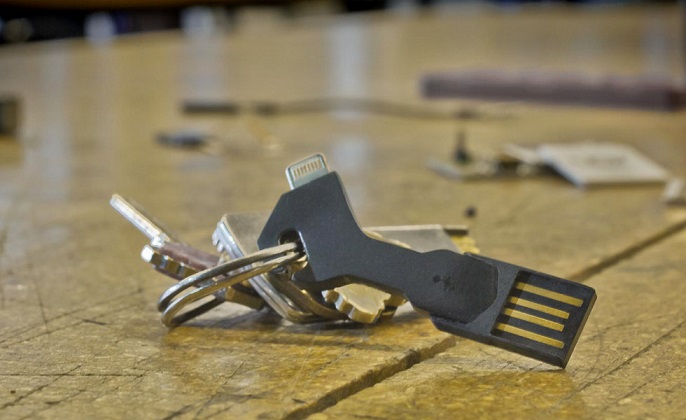
Fiddling about with cables to charge your phone, and the very act of needing to constantly keep it charged while out and about can be a hassle. With Chargekey you have re-charging power on the go. Chargekey is the world’s most portable USB charging cable for iPhone & Android. It fits perfectly on your key chain and charges and syncs just like your regular cable charging device.
So the next time you are planning an overseas trip, get creative about what accessories you bring with you to enhance the fun of using your smartphone and how your handle your call charges. Or if it’s all too much hassle, just leave your phone at home and send a postcard!
All products, and company names, logos, and service marks (collectively the "Trademarks") displayed are registered® and/or unregistered
trademarks™ of their respective owners.
The authors of this web site are not sponsored by or affiliated with any of the third-party trade mark or third-party registered trade mark owners,
and make no representations about them, their owners, their products or services.
An unlocked cell phone is a cell phone that can be used with any GSM compatible carrier worldwide, as long as you are in possession of a SIM card provided by a carrier or a SIM service provider.
But right now the chances are, your cell phone is locked to one particular service provider. And when you try to leave that company, you could find that your phone won’t work, especially if you are still working your way through your 24 month contract. That’s because the carrier that you purchased the phone from does not want you to leave them and go somewhere else, possibly with better rates, so the phone is locked. If you travel to another country and try to use a different company’s cell phone service on your old phone, that won’t work either, and you will find once more that it is still locked to your original carrier.
Does it have to be this way? Well it certainly used to be, but now it is actually legal to unlock your cellphone and escape from a contract that is tying you down. While it may be legal, don’t think that the carrier is going to make it easy.
However, depending on what kind of phone you have and what carrier you acquired your cell phone from, you might be able to unlock your phone through a reliable online unlock service such as UnlockBase, which has one of the world’s largest databases of both cellphones and carriers throughout the world. You can enjoy the freedom to use the phone you love with the carrier of your choice or even switch phone numbers and service accounts.
3 ways to get hold of an unlocked cell phone:
1) The first and most obvious method is to buy one, brand new, straight out of the store or off the internet. If you find the price is too steep for the model you want there are stores that specialize in selling refurbished and unlocked pre-owned cellphones, which are significantly cheaper than the brand new models. But if you insist on the latest model, you will have to pay the necessary money upfront.
2) The second method is certainly always worth a try and should really be your first resort. This method is to try and unlock the cellphone you have been given by your carrier. This is achieved by trusted companies, such as UnlockBase, who use unlock codes which they can send to you online once they know your IMEI number. Just about all phones acquired from carriers in North American and European countries are locked to their service provider by using certain software codes or by being hard coded with specific propriety settings. It’s possible to unlock these codes, but you need to know what you are doing. If you try it by yourself with only a little knowledge, you could find your phone is not only still locked, but you have also managed to lock yourself out, and then the phone is no longer of any use to you whatsoever. Attempting to unlock a cellphone using the wrong code can permanently damage the device.
3) The third method involves a little travel, but can be a rewarding and fascinating experience. In several Far Eastern countries, the exact cellphone model you want is sitting there unlocked in a store, surrounded by several other models of which you have never even heard of. It’s no exaggeration to say that many Asian countries are completely obsessed with mobile phones, and yet not remotely interested in being tied to any particular carrier. The end result is plenty of choices of unlocked phones with some highly competitive prices for the most popular models. This is because bargaining and low pricing are all part of the South Eastern Asian shopping experience. However, one word of caution with this approach; and that is, beware of cheap Chinese imitations of some of the most popular cellphones such as Samsung, Nokia, Microsoft, Sony and especially the Apple iPhone. They may look very similar, but if the price is too low, be suspicious and walk away, these phones do not pass the exacting standards of the original manufacturers.
It really doesn’t matter which brand you are looking for, be it an unlocked Blackberry, LG, HTC, Sony Xperia or iPhone, that works under any carrier. Nowadays it’s easy and economical to find cell phones from any manufacturer to suit your needs without having to commit to a specific service provider.
All products, and company names, logos, and service marks (collectively the "Trademarks") displayed are registered® and/or unregistered
trademarks™ of their respective owners.
The authors of this web site are not sponsored by or affiliated with any of the third-party trade mark or third-party registered trade mark owners,
and make no representations about them, their owners, their products or services.
When you insert a SIM card from a different cellphone operator than the original, your Samsung phone asks for an unlock code and prompts you to enter the “Network blocking control key” or “SIM Network Unlock PIN“. So at this point you decide to go online and receive a cellphone unlock code.
If upon entering your unlock code you receive a message such as:
– “Failed to unlock network”,
– or “Failed to request“,
– or “Your attempt failed“,
– or “Unlock Code Request Unsuccessful“
There are three possible scenarios:
Scenario #1 (in 90% of cases):
You (or the previous owner) entered too many wrong codes, it’s what we call in our industry “Phone Freeze”. (if so, see the solutions below).
Scenario #2 (In 9% of cases):
Non-original ROM. You (or the previous owner) may have installed or flashed your Samsung with a Custom ROM that is not genuine (like Avatar, or Cyanogen MOD to name two), therefore the code provided will not work (if so, see the solutions below).
Scenario #3 (In 1% of cases):
The code is actually wrong. Yes, we do not claim to be perfect, sometimes the computerized processing of orders produces the wrong code or, very rarely, even Samsung or the cellphone operator has supplied a false code base.
Scenario #4 (New since Summer 2015):
Well the last scenario is even worse than the previous one. Since summer 2015 two networks (MetroPCS and T-Mobile in USA) started to release Samsung cell phone coming with an app install by default called “Device Unlock App”. Those are simply not asking for code, and even if you use some secret code to make those ask for a code, they will simply not work. Do not order code if your phone is one of those since the code you will receive will be simply useless.
How to use the code if your Samsung Cell Phone is “FREEZE”
The message “Network unlock failure” or “Phone Freeze” means that someone has already tried to unlock the phone with a bad code, and the number of attempts has exceeded the allocated number of times permitted, (it’s usually a maximum of 3 trials tries for a wrong code). In this case it is very likely that if you bought a used phone, the previous owner attempted to unlock it out with a bad code by visiting an untrustworthy free unlock website.
At UnlockBase, our codes are 100% correct since they come directly from the Samsung factory.
If you choose a manufacturer code, you receive two codes:
Code 1 => NETWORK unlock code or code (called NCK Code).
Code 2 => UNFREEZE (or Defreeze) Key to unlock the test counter (called MCK Key).
The purpose is to “unfreeze” the phone with the code and thereby unlock the phone from the NETWORK.
Methods for removing Samsung Freeze with MCK code
Depending on your model, several methods exist to unfreeze with the MCK code your Samsung:
Unfreeze Solution #1:
Turn off your phone, take out the SIM card and then replace it with a non-compatible SIM card
(if the phone application demands it, type the PIN number of the SIM card).
When the message “Phone Freeze” appears, call for the unfreeze code and confirm with the button “call” or “#” or “OK” (Note: be careful when entering this code, nothing will appear on your mobile screen, this is normal, you must enter this code blind.)
Unfreeze Solution #2:
Again, insert a non-compatible SIM card into your phone (if the phone application demands it type the PIN number of the SIM card). When the message “Phone Freeze” appears, enter the code: #7465625*638*UNFREEZECODE# (and replace UNFREEZECODE by the MCK Code we provide.)
Unfreeze Solution #3:
Insert a non-compatible SIM card into your phone,
(If the phone application demands it, type the PIN number of the SIM card)
Enter the unlock code 1 (NCK / Network): then press OK. Answer the phone “unlocking the failed network”,
Next enter the second code (MCK/Unfreeze), then press OK. Answer the phone “unlocking the failed network”,
Re-enter the unlock code and the phone will be unlocked,
Turn off and restart your Samsung mobile phone.
Unfreeze Solution #4:
Insert a non-compatible SIM card into your phone,
(If the phone application demands it, type the PIN number of the SIM card)
Emergency call only: Press CALL button and enter the unfreeze (MCK Code) directly,
The phone will ask you the code for the network, enter the NETWORK code that was supplied.
Unfreeze Solution #5:
Insert a non-compatible SIM card into your phone, and turn on the phone,
(If the phone application demands it, type the PIN number of the SIM card)
The phone is blocked, Click Call and enter the following code *7465625*638*CODE#
(where CODE is the unlock code of the operator)
The phone does not accept the code and returns the error:
‘Phone Freeze. SIM not available. Please contact your operator‘
Turn off your phone and remove the phone battery
Replace the battery and turn the phone back on
The phone is now unlocked and everything works
Note that there is no trial “tries” limit to enter the unfreeze code, so do not hesitate to keep trying to enter the correct code and then get the ‘unfreeze’ sign with the display inviting you to enter the NETWORK code.
To received the UNFREEZE CODE, make sure you order “FACTORY CODE”
If you choose the operator solution, which is the cheapest solution, you will receive only the unlock code (NCK Code). For the network code + unfreeze code, choose the option ‘factory code’. It’s usually more expensive but it’s also much more reliable and faster.
The Ultimate Solution: Unlocking software + USB cable
As stated earlier, if you flashed your Samsung with a non-original ROM, it is almost certain that the code will not be accepted. In this case you will need to find the original firmware and use Odin to re-flash the firmware with an original Android version, and if possible one that corresponds to the distribution of the original operator. If in spite of all this, your phone does not accept the unlock code, we can provide you with software to unlock your Samsung, provided that the model is compatible (90% of the models to date are supported).
All UnlockBase customers are offered this method after having tried everything else and still fail to enter the provided code. This requires a Windows PC, USB cable and some studying of our tutorial but at UnlockBase we never give up so easily!
All products, and company names, logos, and service marks (collectively the "Trademarks") displayed are registered® and/or unregistered
trademarks™ of their respective owners.
The authors of this web site are not sponsored by or affiliated with any of the third-party trade mark or third-party registered trade mark owners,
and make no representations about them, their owners, their products or services.