Buying a used cellphone can be a great idea: you can save money, obtain an already unlocked phone, or buy a brand or a particular model you couldn’t otherwise afford. It sounds ideal, but unfortunately, buying a cellphone that is blacklisted can mean not only is your phone completely useless to you, you could potentially end up with a knock at the door from the police asking some difficult questions.
Think it can’t happen to you? In 2013 over 3.2 million cellphones were stolen in the United States alone, double the amount stolen in the previous year, so this is a fast growing problem. It means millions of cellphones are out there being advertised daily on online auction sites and listing sites around the world that could well be stolen, and you won’t know anything about it until you arm yourself with what to look for and what questions to ask.
Every mobile device in the world, whether it’s a cell phone or a tablet, has a unique serial number known as the IMEI (International Mobile Equipment Identifier). In a growing number of countries, operators enable consumers to report a mobile phone or device as lost or stolen using the device’s unique identity number, the IMEI. The operator can block the phone from their mobile network, which is called IMEI blacklisting. Participating operators have an up to date Device Check database which contains the IMEI for devices reported as stolen or lost, as well as the device model and capabilities.
Groupe Speciale Mobile (GSM), established in 1982, defines the GSM standard as the internationally accepted digital cellular telephony standard. Global mobile connections now exceed some 10 billion connections, and as of 2015, exceeds the total population of the globe.
As a means of controlling this vast number of global connections, which is increasingly important in an age of international organized crime and terrorism, blacklisted IMEIs are provided to the GSMA central IMEI Database which allows operators to exchange data and to block devices on multiple networks both nationally and internationally.
Each time you make a call your SIM card immediately identifies you as a subscriber to that particular carrier. If your account is in order, then you can make the call and use the services of your service provider. Before that can happen, however, the network will check your phone’s IMEI, which is a number that is unique to every GSM handset.
Like IMEI, Code Division Multiple Access (CDMA) devices also use something similar called an Electronic Serial number, or ESN. The IMEI or ESN identifies the phone to your carrier and it checks that the handset is valid to use. If the phone is locked to another carrier or if it’s lost or stolen your service provider can use the IMEI to “blacklist” a device which means you won’t be able to make calls.
So for example, it’s the IMEI, and not your customer profile that lets a large carrier such as AT&T know that you are using an iPhone. Even if you switch to a different type of phone, a BlackBerry or an Android, your service provider will know which phone you are using. Even when you jailbreak a phone, your IMEI will still give your chosen service provider the information they need to know.
Each time you switch your phone on or attempt to make a call, the network systems check the IMEI number of the handset you are using as soon as you insert a SIM card.
In the USA, the cellphone blacklist is operated by the CTIA, which works with leading cellphone providers including AT&T, Cellcom, Nex-Tech Wireless, Sprint, T-Mobile USA, and Verizon Wireless to provide a vast database of blacklisted phones. They are also linked to the GSM IMEI database.
In the UK, when the SIM card is inserted, the IMEI number of your handset is cross referenced with the Central Equipment Identity Register (CEIR), which is also known as the IMEI database. If the IMEI number of your handset is on the CEIR/IMEI blacklist then the network will either refuse to send a signal to your phone (No signal strength at all or will supply a signal but will not allow any outgoing or incoming calls.
If your IMEI number is on the CEIR your handset is blacklisted and therefore of no use to you or anyone else except for spare parts.
Despite huge efforts by service providers and international cellphone network organizations to clamp down on stolen cellphones, inevitably the system has its shortcomings and criminals can still get around the blacklist database by sending blacklisted handsets overseas, which is why cellphone theft still tops the list of stolen items. It’s a crime worth billions every year to international organized crime syndicates. The so called petty criminal who pickpockets your handset while you gaze into a shop window could be passing the phone on as his part in a global crime syndicate. Also, IMEI’s can in some circumstances be changed or rewritten. Don’t be tempted to try it, it’s against the law and will result in a jail term, but it still goes on.
Another major reason criminals want to get hold of your cellphone is not just to sell it on the international market, it’s the chilling fact that while 77% of users use their cellphones for online banking transactions, less than a quarter of these have any type of security on their phones! Accessing sensitive banking details on an unprotected cellphone is much easier than robbing a bank!
There are also several examples of incomplete data with all of the blacklist databases because the submitting of details is still voluntary. For example, a handset that is barred in the USA could still work in Mexico and vice versa, and a cellphone bought or stolen in the UK can work in a different country. A large number of UK barred handsets find their way to Italy, Spain and France.
There is an important difference between unlocking and unblocking a cell phone. Unlocking a cellphone from a service provider to be able to choose another is perfectly legal, but when a mobile phone is “unblocked” criminals can change the IMEI number and make the cellphone operational again. This practice is illegal and only the manufacturers are allowed to alter it.
Unblocking mobile phones is a criminal offence and carries custodial sentences. It is even an offence to simply offer to unblock or reprogram a phone.
If you are buying a phone online, and amazingly, 74% of consumers do, and you see one you want to buy on an auction site or a listing site, first determine whether the phone in the picture is the exact same phone you are actually being offered. No matter what site you are on you should expect to be able to glean some basic stats about the phone: the color, the correct model number, its storage capacity; all these are vital details in the device description.
The next step is to see if you can contact the seller to ask for the IMEI, if he or she refuses to give you this important piece of information, be wary and walk away. It could mean they have something to hide, and the fact is, there are so many other options you could explore rather than running the risk of a blacklisted phone. For example, Amazon and eBay have a safeguard of profiles and seller reviews that make them more trustworthy than buying from unmonitored websites. Also, Swappa and Glyde, have policies and safeguards in place for buyers. For example, Glyde holds the seller’s payment in escrow until the buyer has checked the device and confirmed that it’s clean and offers a full refund policy if not satisfied.
If you pay for your phone through PayPal or with a credit card you should be able to obtain a refund if the phone proves to be blacklisted.
If you are buying an iDevice, Apple now has a service on iCloud.com called Check Activation Lock Status. This enables you to quickly see if a device was obtained illegally. If you have managed to obtain the IMEI serial number from your seller, you can tell if someone used ‘Find My iPhone’ to switch on Activation Lock.
Activation Lock was introduced in iOS 7. It locks down the device, making it unusable until the correct Apple ID and password have been entered. So if you do purchase a bad Apple so to speak, you won’t be able to use it. You can also check how much warranty is left on the device by checking the serial number too.
Buying a cellphone online is always a case of ‘buyer beware’, which is essential for any major purchase from a complete stranger on the internet.
IMEI stands for International Mobile Station Equipment Identity. It’s the key identifier of each and every cellphone around the world. You can check your phone’s IMEI quickly and easily on a number of free sites:
So it really is very easy to do some basic homework before you allow yourself to become stuck with a blacklisted mobile phone. If in doubt you can also check with the service provider that is hosting the phone or even your own current provider. You can quickly look for free IMEI services in your own country by checking on the internet.
There is also a paid for service called Checkmend but beware, if you use this site and the IMEI is blacklisted, you might just be approached by your local Law Enforcement agency who have direct access to the searches made on the Checkmend website. This could result in an unwanted visit to the police station at an unsociable hour of the day.
What to do once you are certain your phone is not blacklisted
This is the easy bit. If you obtain a clean cellphone but you are not happy with the service provider that is hosting it, or you simply want an unlocked phone, UnlockBase offers the web’s largest database of service providers and cellphone models that can be safely, quickly and economically unlocked via remote unlocking, and it can all be done in a matter of minutes. Also, UnlockBase won’t be beaten on price, so if you find a genuine deal elsewhere that unlocks the same model for less, UnlockBase will match it or beat it for price, and you can’t say fairer than that!
Buying a new cellphone can be a fun and rewarding experience provided you exercise caution and know your facts prior to purchase. Study this article well, ask questions, don’t be fobbed off and walk away if you are in the least bit suspicious. Also, let your friends know about this article by sharing it.
A complete guide to Blacklisted Cell Phones – the eBook
All products, and company names, logos, and service marks (collectively the "Trademarks") displayed are registered® and/or unregistered
trademarks™ of their respective owners.
The authors of this web site are not sponsored by or affiliated with any of the third-party trade mark or third-party registered trade mark owners,
and make no representations about them, their owners, their products or services.
Psychologists say it takes as little as seven repetitions of a certain activity such as smoking or imbibing alcohol on a daily basis for it to become habit forming. Now there is a new temptation which has become more potently addictive than even cigarettes or alcohol for people of all walks of life all around the world. Not only that, many of the addicts are children under the age of ten. The new addiction is the constant checking and playing with smartphone devices.
In recent research conducted by the Center for Internet and Technology Addiction, researchers found that 91% of respondents could be classified as overusing, abusing, and overly dedicating themselves to the use of their smartphones.
The first signs to determine smartphone device abuse is whether or not the respondent checks the phone right before they go to bed, if they habitually play video games on their device late into the night, and if the smartphone is the first thing they check in the morning when they open their eyes. It’s the same hard to break habit that many nicotine addicted smokers have. Research has also shown that stimulating the brain late at night when it is preparing for sleep can create restlessness and persistent insomnia.
One only has to walk the streets or wait in a subway of any city in any part of the world to witness the face down, eyes glued to the smartphone problem first hand. People now use their smartphone very much like a drug. They are bored so they play with the phone. They’re tired, so they pick up the phone. They feel anxious they haven’t heard from someone so they absent mindedly check the phone. They’re angry, so they soothe themselves with a video game on the phone.
They want to find something out, so the first resort is the phone. Apps have quickly rushed to bolster this addiction by offering easy to use solutions for every possible human need from where to eat, to fall in love, and to unlock a cellphone. (That at least, is simple, just visit UnlockBase for the web’s largest database of cellphone models and internet providers, for fast, fuss-free cellphone unlocking.)
Back to cellphone addiction, and there is no question that the smartphone has replaced the need for human social interaction in many instances. It’s easy to avoid and deflect uncomfortable social situations by pretending to be consulting your smartphone. It’s also becoming easier and less inhibiting for hundreds of thousands of people around the world to converse not via the spoken word but via Wattsapp or Viber or one of the other many instant free messaging apps that are readily available. As a direct result of the power of these apps, network providers have been forced to offer what was once one of their biggest profit earners, the text message, as a free unlimited option.
The second more serious phase of cellphone addiction is when it starts to impact on day to day life, whether it be in the car, at the office or at home. 98% of respondents to the research conducted by the Center for Internet and Technology Addiction admitted that texting while driving is dangerous, however nearly 75% admit to having done it. It’s a fineable offence in many countries, but every year several horrific accidents are caused by drivers driving and consulting their cell phone, with an inevitable lack of attention to the road.
At the office too much time on your smartphone can mean you miss deadlines or fail to pick up on instructions given to you, while at home, you know the smartphone is ruling your life when you just want to come home, flop in a chair and play a game rather than talk to your partner or your kids.
Are you addicted to your cellphone? Do you have any of these compulsive cellphone habits? The first step to a cure is admitting to them.
You take a photo of every meal you eat and post it on Facebook
You check the LED light on your mobile for messages dozens of times an hour
You drop the phone on your face because you have dozed off
You choose clothes based on their suitability for carrying your cellphone
Your cellphone holder takes pride of place on your car windscreen
All products, and company names, logos, and service marks (collectively the "Trademarks") displayed are registered® and/or unregistered
trademarks™ of their respective owners.
The authors of this web site are not sponsored by or affiliated with any of the third-party trade mark or third-party registered trade mark owners,
and make no representations about them, their owners, their products or services.
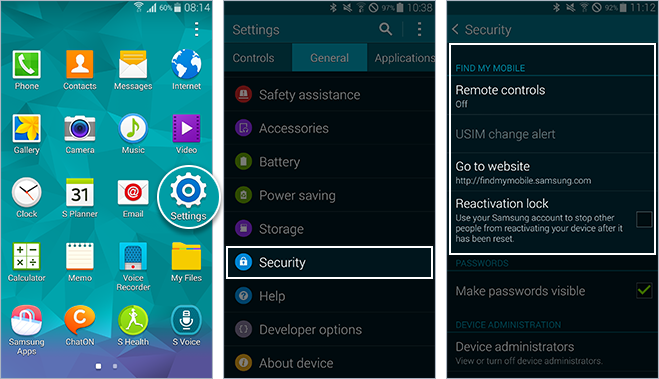
Even on a quiet day here at UnlockBase we receive around 600 emails asking a wide variety of questions about the many aspects of unlocking cellphones. A question that has been asked a lot lately is what is the difference between Android FRP Lock and Samsung Reactivation Lock? Well, many of the most recent Android Phones including models from Samsung, HTC, and Sony can become stuck on activation screen requesting for your ID and password, while others are requesting your Google Account. Samsung phones will ask for a Reactivation Lock ID & password, so that people can be identified along the same lines as apple iCloud Lock. To clarify things, here we provide detailed information on the difference between the two.
What is Factory Reset Protection (FRP) Lock ?
Android Factory Reset Protection (FRP) is a new feature designed to protect your device. It has been added to several Samsung devices that are running Android OS 5.1 or higher.
This feature enables you to set up your device to prevent other people from using it in the event that it has been reset to factory settings without your permission. For example, if your device is lost, stolen, flashed, or wiped, only someone with your Google account or screen lock information can perform a factory data reset and use the device.
When a device is factory reset, the device will not be able to be setup without the user entering the Google Account associated with the device (for hard reset) or screen lock information (for reset in Settings menu). It’s essential that you set up a Google account in order to use the FRP feature. It is also highly recommended that you set a secure screen lock on your device.
What is Reactivation lock and how do I use it on my Samsung?
Similar to FRP, Reactivation lock lets you use your Samsung account to prevent others from activating your device if ever it is lost or stolen. With Reactivation lock turned on, you will be required to enter your Samsung account credentials (sCloud) prior to performing a factory reset on the device, so your Samsung account login should be something you can easily remember.
All products, and company names, logos, and service marks (collectively the "Trademarks") displayed are registered® and/or unregistered
trademarks™ of their respective owners.
The authors of this web site are not sponsored by or affiliated with any of the third-party trade mark or third-party registered trade mark owners,
and make no representations about them, their owners, their products or services.
We have updated the HTC unlocking code Database with 3,376,399 new IMEI entries, last update was in Nov 2015.
With this update, we are now able to source the Unlock Code of no less than 206,494,226 HTC Cell Phones, and almost 99% of latest HTC phone models are available in our Database, including HTC Desire 620, Nexus 9, Desire 816G, One, M8 Eye, Desire Eye, Desire 612, Desire 820, Desire 510, M8, Butterfly 2, One Remix. You can check for free whether the Unlock Code of your HTC phone is available in our Database by using our Widget to get real time status, just visit the widget page to do this: http://www.unlockbase.com/widget/htc.php
All products, and company names, logos, and service marks (collectively the "Trademarks") displayed are registered® and/or unregistered
trademarks™ of their respective owners.
The authors of this web site are not sponsored by or affiliated with any of the third-party trade mark or third-party registered trade mark owners,
and make no representations about them, their owners, their products or services.
If you’re on the lookout for a large phone, a phone large enough to comfortably watch movies, TV shows and your favorite YouTube videos, then the new 5.7 inch LG V10 could be the phone you need.
Introduced at the beginning of October 2015, the LG V10 is the latest flagship phone from LG. Perhaps the key attribute of this phone is the fact it boasts an always on secondary 2.1-inch display above its main 5.7-inch quad HD screen to keep you abreast of information such as the date, time, weather, and battery life as well as app shortcuts and playback controls. This changes when you have the main display on, with the secondary panel giving you quick-access to apps, music controls, favorite contacts and notifications.
16 megapixel rear and two front selfie cameras
Like the LG G4, the V10 features a hexa-core Snapdragon 808 processor, with 4GB (1GB more than the LG G4) of RAM, 64GB of storage, a 16-megapixel rear camera, and not one but two 5-megapixel front cameras for wide-angle selfies. The phone runs on Android 5.1, and on T-Mobile, the V10 includes support for band 12 LTE connectivity. The battery is a 3,000 mAh cell, said to be pretty thirsty for regular charging.
Expert movie making
The V10’s strongest suite however, despite the two selfie cameras, is actually for video making on the go. The phone has a number of settings you can play with to fine tune your videos including the shutter speed, white balance, focus, frame-rate and a 21:9 aspect ratio which means you can shoot footage and watch it back on your widescreen TV in perfect Cinemascope quality with no distortion. 4K recording is also supported and there’s both optical and electronic image stabilization thanks to Steady Record, to ensure your footage doesn’t become a hand-held jerky nightmare. Also new is a 15 second Auto Edit which creates highlights of what you have just shot with none of the blurriness or shakes. If you are familiar with LG G4, you’ll be familiar with the rest of the controls on the camera on the V10 as it is based on the LG G4 which has been hailed as having one of the best Android phone cameras on the market.
While the phone is available in the States and key markets in Asia, it is not yet available in Europe. Why? We don’t know.
The LG V10 T-Mobile deal
A 24 month contract on the LG V10 from T-Mobile will mean you can walk out the door with it for $0 down. Monthly repayments are $25.00. If you go the JUMP! On Demand route, again, it’s nothing down, but 18 payments of $25.00. If you want to own the phone outright the cost is $599.99
T-Mobile currently has a promo that pays out a $100 prepaid card when you buy the LG V10 and LG G Pad F 8.0 together when you buy one device on an Equipment Installment Plan, then buy the second on EIP within 30 days. Up till November 15 early bird T-Mobile customers were receiving a free 200GB microSD card, an extra 3000mAh battery, and a battery-charging cradle, but whether this deal will be repeated is unlikely.
About T-Mobile USA
With a workforce of 45,000, T-Mobile USA is a national provider of wireless voice, messaging, and data services capable of reaching over 293 million Americans where they live, work, and play. Around the country coverage can be quickly checked online by punching in your zip code. T-Mobile claims to have America’s fastest LTE network, and to be America’s fastest improving network having more than doubled their LTE coverage within 2 years, and by the end of 2015, they state they will have increased their reach to more than 300 million people across the country. The service provider’s Extended Range LTE is claimed to reach 2 times farther and works 4 times better in buildings.
Unlock your LG V10 (H901) with UnlockBase
Although it’s only been out for little over a month, of course UnlockBase already unlocks this phone for you. For this we use the Mobile Device Unlock App for Android specific to T-Mobile and the cost is $44.90. Delivery time is between 1 to 2 working days.
UnlockBase is the most experienced remote online unlock service on the web with over 5 million phones unlocked worldwide and counting. We won’t be beaten on price, if you find a genuinely cheaper deal to unlock this phone we will either match or beat the price you have been offered.
All products, and company names, logos, and service marks (collectively the "Trademarks") displayed are registered® and/or unregistered
trademarks™ of their respective owners.
The authors of this web site are not sponsored by or affiliated with any of the third-party trade mark or third-party registered trade mark owners,
and make no representations about them, their owners, their products or services.
Did you know that the average person checks their phone over 150 times per day, and a smartphone often sits in the pocket of the user for up to 15 and sometimes 18 hours per day? Cell phones emit Electromagnetic Fields/Radiation (EMF/EMR) which are invisible rays being emitted through our ears every time we use the cell phone.
UnlockBase is the largest remote online cellphone site on the web, so because we are unlocking thousands of phones every year, we believe it’s important to educate our customers about using their cellphones safely.
The consequences EMFs are having or are likely to have on our health and wellbeing continue to be debated and argued between doctors and scientists. But with well over 4 billion people now using cellphones around the world and the number increasing everyday, it’s becoming increasingly vital that we understand how this form of radiation works and its potential risks. The majority of research agrees that this form of radiation contributes to human tissues, to varieties of brain cancers such as glioma and meningioma (cancers in the brain) and sleep dysfunction and forgetfulness.
Protecting yourself from these issues should therefore be of primary concern. You can do this in a number of practical and inexpensive ways.
1) Don’t carry your cellphone in your jeans pocket. Think about it, if scientists and doctors believe cellphones are messing with our brain cells, think what a switched on cellphone might be doing close to your genitals. Ideally, carry your cellphone in a bag or an outer garment such as a coat or jacket.
2) Don’t sleep with your cellphone. Many people actually sleep right next to their cellphone, while the vast majority keep the phone within at least 6 feet of themselves at night. If you sleep an average of 6-10 hours a night with your phone within a 6′ radius from your head, then you increase your exposure. Turn off your phone off, or put it on airplane mode. It’s the same for wi-fi routers, keep them out of the bedroom. In fact some sleep experts even recommend removing electronics from the bedroom altogether.
3) Invest in an EMF Proof Headset. This technology is now widely available for less than the cost of a couple of drinks in the bar. One of the market leaders in this EMF Proof head set technology is Blue Tube. Blue Tube technology works just like a stethoscope and allows the user to hear their telephone conversations without the use of wires, which conduct potentially harmful cellphone transmissions directly into the ear. Alternatively, use the speaker function on your phone and keep the phone as far away from yourself as possible.
4) Use an Anti-radiation case for your cellphone. Protect yourself further by slipping your phone into an anti-radiation case when you are carrying the phone. Making and receiving calls while the phone is in the case can reduce EMF radiation to the brain by up to 96%.
5) Turn off your cell phone when not needed. Or at least keep it a few feet away from your body. Even when not in use, as long as your phone is turned on, it continues to emit EMR as it connects to its base station.
6) Limit cellphone use for children. Yes, this may be one of the most difficult things to do, but EMR radiation has far more impact on children than on adults due to the lack of bone density in a child’s skull. You have no doubt noticed how hot your phone feels after a long call. Imagine how much EMR radiation is being released into a child’s brain if he or she makes long calls.
7) Consider a Quantum Balance Crystal.Quantum Balance Crystals (QBCs) have hundreds of thousands of nano-scale quartz crystals that are invisible to the naked eye embedded in a high-grade natural resin. These pendants help counteract the chaotic electromagnetic spectrum that may be bombarding your body and bring your body back into color and energy balance. The dyes used are plant based and the color energy positively influences the balancing of the body’s energy centers, or chakras.
All products, and company names, logos, and service marks (collectively the "Trademarks") displayed are registered® and/or unregistered
trademarks™ of their respective owners.
The authors of this web site are not sponsored by or affiliated with any of the third-party trade mark or third-party registered trade mark owners,
and make no representations about them, their owners, their products or services.
A brand new offering from Alcatel, just released earlier this month, and described as the smartphone that gives you a vibrant onscreen experience packed with all the technology you need to power your mobile life.
The OneTouch Fierce XL (OT-5054N) features a 5.5-inch HD (720p) display screen, and is powered by the Qualcomm ® Snapdragon™ Quad-Core processor with 2GB of RAM, so it’s powerful enough to make multi-tasking nice and easy. The OS is Android 5.1 1 Lollipop. It comes with 16GB of available internal storage, generous for a phone in its price bracket, and you can also add an extra 32GB with a MicroSD card. The display resolution is 720p, which translates to 1,280 x 720 pixels.
The Alcatel OneTouch Fierce XL runs on a long-lasting 2500mAh battery offering 12 hours of talk time and 360 hours of standby. The phone also includes an 8MP auto-focus camera enhanced with Polaroid ™ software to enable editing, framing and sharing photos, as well as a not overly exciting 2MP front camera.
But what’s particularly fun about this phone is that in Polaroid mode you can get that old-fashioned instant camera look through the use of filters. This mode allows you to not only add the classic white border to your photos, but to also add the Polaroid classic border logo, as well as date, location, and text tags.
This big but budget priced Android phone was launched on November 2 through Metro PCS for just $140 on pay as you go. But it gets even better. Metro PCS has slashed the $140 price tag in half to offer the ONETOUCH Fierce at a 50% discount offered via a $70 rebate, so the phone, a full 5.5 inch phablet style device, is now down to only $70 overall.
As for Alcatel, its strategy these days to compete with the bigger players is to offer competitively priced Android phones tailored to exact cellphone provider specifications. That said, it is also possible to track down a Windows 10 version of the new phone. According to Alcatel, the phone supports WiFi Calling, HD voice, and VoLTE, and also supports 4G LTE Cat 4 networks. The phone also offers what is known as “enhanced Google Translate”, which allows for instant translations from or to 89 languages via writing, scanning, and speaking.
As for looks, well there’s nothing too radical going on here, it’s a Samsung inspired lookalike with a slim bezel designed with a sleek matte silver finish and rounded corners. The slim 9.45mm silhouette enables the phone to fit in purses and pockets with ease.
Service provider Metro PCS claims to offer coverage to 96% of America, and runs through T-Mobile from coast to coast. Metro PCS are one of the pioneers in offering pay as you go contracts so you are not necessarily stuck with the same phone for two whole years.
Get your Alcatel OneTouch Fierce XL unlocked now by UnlockBase.
The phone only went on sale on November 2. One week later and UnlockBase, the web’s leading remote unlock online service, has already got the Device Unlock App ready for you if you want to break out of jail and go with the sim card of your choice, and with our Price Match Promise we will unlock it for $24.00 or less if you can show us a genuinely better deal.
In fact UnlockBase offers unlock services for 1,119 Alcatel cell phone models. Since our launch we have successfully helped over 60,239 customers to unlock Alcatel cellphone devices.
So whether you want to unlock the latest OneTouch Fierce XL or an older Alcatel model, with UnlockBase you will find a solution fast. There’s no need to send us your phone, just provide us the Serial Number (IMEI) of your phone and we will promptly unlock it remotely.
All products, and company names, logos, and service marks (collectively the "Trademarks") displayed are registered® and/or unregistered
trademarks™ of their respective owners.
The authors of this web site are not sponsored by or affiliated with any of the third-party trade mark or third-party registered trade mark owners,
and make no representations about them, their owners, their products or services.
Today we released an extremely HOT and important update for UnlockBase Cable Unlock Software after adding Direct Unlock support by Cable (using Original USB Cable) for all Samsung Galaxy S6 Edge+ and Samsung Galaxy Note 5. This includes the version locked with “Device Unlock App” from T-Mobile USA (World First). The exact list of supported versions are below:
You can order your license from here: https://www.unlockbase.com/cable-unlock/ or from the section “Cable Unlock” of your UnlockBase Wholesale account. And below you will find Video Proof and Guidelines for these two models:
All products, and company names, logos, and service marks (collectively the "Trademarks") displayed are registered® and/or unregistered
trademarks™ of their respective owners.
The authors of this web site are not sponsored by or affiliated with any of the third-party trade mark or third-party registered trade mark owners,
and make no representations about them, their owners, their products or services.
We finally have updated the HTC unlock code Database with 7,745,997 new IMEI entries, last update was in Mai 2015.
With this update, we are now able to source the Unlock Code of no less than 203,117,827 HTC Cell Phones, and almost 99% of latest HTC phone models are available in our Database, including HTC Desire 620, Nexus 9, Desire 816G, One, M8 Eye, Desire Eye, Desire 612, Desire 820, Desire 510, M8, Butterfly 2, One Remix. You can check for free whether the Unlock Code of your HTC phone is available in our Database by using our Widget to get real time status, just visit the widget page to do this: http://www.unlockbase.com/widget/htc.php
All products, and company names, logos, and service marks (collectively the "Trademarks") displayed are registered® and/or unregistered
trademarks™ of their respective owners.
The authors of this web site are not sponsored by or affiliated with any of the third-party trade mark or third-party registered trade mark owners,
and make no representations about them, their owners, their products or services.
It wasn’t so long ago that all you needed to bring with you on a holiday was a simple cell phone, after all, a smart phone is designed to take pictures, to play music and videos, send messages, and slip easily into your pocket. How could you possibly need anything else? Yes, but standing still is not something smart phones do. Suddenly a whole industry has grown up around smartphones that means without the accessories your cellphone is somehow naked and incomplete. Here is an overview of some of the new must haves that have evolved seemingly in the blink of an eye.
Sim Free Phone
This is a definite ‘don’t leave home without it’ item if you want to save serious money on overseas surfing and call charges. If you have a good quality smartphone tied to a network provider UnlockBase can quickly unlock it for you and free your phone up so that when you travel you can simply slip a local SIM card into your phone and pay local rates instead of what can easily be extortionate network provider rates. Don’t leave it till it’s too late. Get your phone unlocked now!
DiCAPac Action Floating Selfie Stick with Water Proof Bluetooth Remote
It’s no longer enough to have just an ordinary selfie stick. For your exotic beach side holidays you need a floating selfie stick that enables you to capture the action in the pool or indeed the sea. The DiCAPac Action Floating Selfie Stick boasts a water proof Bluetooth remote, in addition to the selfie stick being 100% waterproof, as the name suggests, it floats so you will not lose it as you enjoy yourself in the pool.
Olixar ToughBeats Outdoor Wireless Bluetooth Speaker
These small Bluetooth speakers pack a punch and at the same time enable you to stream your music via Bluetooth no matter where in the world you happen to be. Designed to withstand the elements, you can also answer calls hands-free. The speakers are small enough to carry with you in a bag or rucksack or fit into a bag and share your vast library of cool sounds with your friends.
Local SIM cards
A much smarter way to bypass all roaming charges and let your smart phone live like a local in your chosen destination is to simply dust off your spare phone, fit it with a WorldSim or simply buy a new local sim card as soon as you arrive. Of course to do this you first need to make sure your phone is unlocked. Luckily, this has become incredibly easy through reliable online cellphone unlock companies such as UnlockBase. Most phones can be unlocked in a matter of minutes, leaving you free to insert the sim card of your choice.
Proximo Key Fob Bluetooth Tracker
Available for both iPhone and Galaxy S, Proximo ensures you never lose your phone. The Proximo Fob works with the free app on your phone, alerting you as soon as your phone or keys get too far away from each other.
Olloclip Clip-on Lenses
Companies such as Olloclip have opened up huge photography possibilities for travelers using a smart phone. Their range of clip on accessories include wide angle lenses, telephoto lenses and macro lenses to enable you to take professional looking pictures on your iPhone or Samsung Galaxy.
Noise cancelling headphones
Noise cancelling headphones can quickly carry you away to your own little cocoon of pleasurable sounds on your smartphone. The Bose QuietComfort headphones may not be the cheapest on the market, but the quality is undeniable.
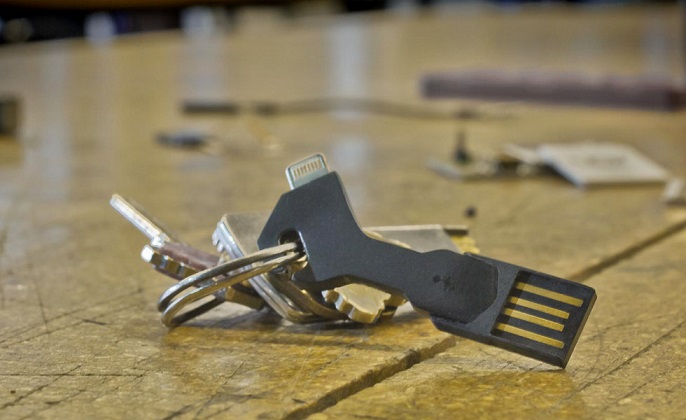
Chargekey
Fiddling about with cables to charge your phone, and the very act of needing to constantly keep it charged while out and about can be a hassle. With Chargekey you have re-charging power on the go. Chargekey is the world’s most portable USB charging cable for iPhone & Android. It fits perfectly on your key chain and charges and syncs just like your regular cable charging device.
So the next time you are planning an overseas trip, get creative about what accessories you bring with you to enhance the fun of using your smartphone and how your handle your call charges. Or if it’s all too much hassle, just leave your phone at home and send a postcard!
All products, and company names, logos, and service marks (collectively the "Trademarks") displayed are registered® and/or unregistered
trademarks™ of their respective owners.
The authors of this web site are not sponsored by or affiliated with any of the third-party trade mark or third-party registered trade mark owners,
and make no representations about them, their owners, their products or services.