Not sure how to unlock your Samsung phone? Don’t worry, look out for our Video Tutorial:
Samsung Galaxy Trend Lite 2 (SM-G318H) Unlock Tutorial
Samsung Galaxy Grand Plus (GT-I9060I) Unlock Tutorial
Samsung Galaxy J1 (SM-J100H) Unlock Tutorial
All products, and company names, logos, and service marks (collectively the "Trademarks") displayed are registered® and/or unregistered
trademarks™ of their respective owners.
The authors of this web site are not sponsored by or affiliated with any of the third-party trade mark or third-party registered trade mark owners,
and make no representations about them, their owners, their products or services.
After more than 10 years in the Remote Unlocking industry, this summer UnlockBase has finally launched its own unlocker software! This new software will be supported and updated on a regular basis to cater to the latest and most difficult to unlock cell phones and to ensure that all our dealers stay in complete control of future unlocking needs. With evolving security protection it becomes ever more challenging to unlock cell phones but with UnlockBase, you’re guaranteed a top notch team of Hacker and Reverse Engineers to support your unlocking needs.
At the moment this software support is only for Samsung
However no less than 276 models are ready for Direct Unlock (see full list below).
All products, and company names, logos, and service marks (collectively the "Trademarks") displayed are registered® and/or unregistered
trademarks™ of their respective owners.
The authors of this web site are not sponsored by or affiliated with any of the third-party trade mark or third-party registered trade mark owners,
and make no representations about them, their owners, their products or services.
Every week, no, make that every day, at UnlockBase, we get customers writing in with a variety of problems relating to any number of different cellphones. In this article we look at a problem that occurs most often with Samsung phones but can apply to other Android phones in general. First, to acquaint you with the problem, here is a typical customer complaint:
“We kept getting the ‘Not registered on Network’ message when trying to make calls. Many times the network connection was lost for a while. Then we realized by trying to make a call that for a period of time people were unable to get a hold of us or send text messages. We tried everything to try to resolve the issue, and ultimately we replaced our phones with another Samsung Galaxy S5. Guess what, the issue is still there and we still get ‘Not registered on network’ errors. Is this an Android issue or an Android issue? It’s no surprise that Google said that it’s a T-Mobile issue and not an Android issue. Please help!”
The ‘not registered on network’ error
This annoying problem is often found in Samsung Galaxy devices, particularly when users update their Galaxy phone to the latest Android version and something went wrong. Please take note of the following models:
Galaxy S7 Edge
Galaxy S7
Galaxy S6 Edge
Galaxy S6
Galaxy S5
Galaxy S4
Galaxy S3
Galaxy Note 5
Galaxy Note 4
Galaxy Note 3
Galaxy Note 2
What Does Not Registered on Network Error Mean?
The reason why you see Not Registered on Network error is because your SIM card is unable to connect to your carrier’s network. And when you can’t connect to the network, you won’t be able to make or receive calls and text messages. Aside from Samsung, this is a common issue among Android phones, regardless of who your carrier is or your phone’s make and model.
What causes Not Registered on Network error?
Based on the customer’s experience above, their device is unable to detect the network and up comes the “Not Registered on Network” message. There are many ways this can happen, and below are the reasons why:
The IMEI number was changed. This usually occurs after getting an update and the device IMEI number (serial number) is changed to “SN 0000″ and it shows that your device SN number has been broken and need to be fixed.
You’re APN or network settings are not properly set up. Another reason is when you try to use the SIM Card from a new Network Provider and your Samsung fails to keep up when you’re trying to switch networks and needs a little help from you involving manually providing the new APN settings / Networks name in order to fix it.
Your device has been blacklisted. Another reason for this error is if unfortunately your device has been Blacklisted, and by that we mean if your phone is reported as “Lost” or “Stolen” in the national blacklist database in your country. In this situation you have no choice but to take the following steps :
Go to the police and report the scam,
Try to get your money back from the seller,
Change the IMEI of your Phone (which is illegal),
Sell your cellphone overseas.
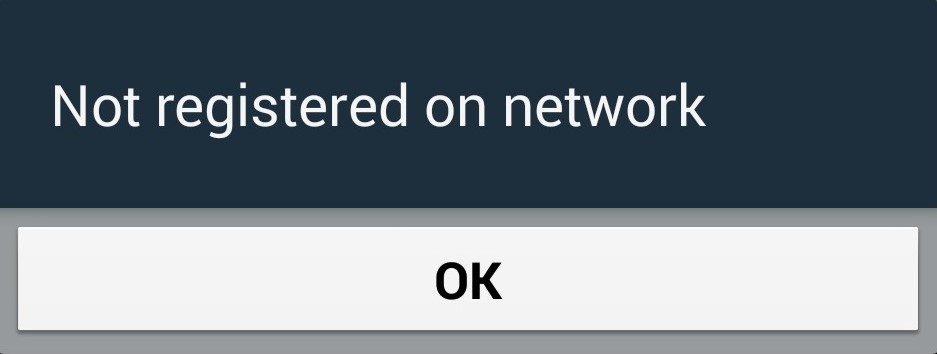
If the problem was the APN or network settings, the ‘Not registered on network’ error will show itself when you attempt to make a call or text. This occurs because your Service Provider is simply NOT notified of your IMEI number so on the screen you will see “Not registered on Network“. They even have the cheek to supply an OK button for you to press which does nothing to solve your problem at all! Frustrating, but don’t worry, we can solve this issue.
First you should be aware that your phone is already unlocked. It’s not the case that you have to unlock your device in order to remove the ‘Not registered on Network’ error.
For everybody else here are the four ways to fix this problem and finally have use of your cellphone.
How to Fix ‘Not Registered on Network’ – The Solutions
Here we provide several methods to help you overcome this issue, one of them should work for you. But before you do so, we’d like you to try the basic troubleshooting steps first to see if they could resolve your issue. Minor hiccups in your phone’s operating system can sometimes cause connection errors, so it’s worth trying these steps before going with the more complicated ones.
Restart your phone.
Disconnect from WIFI.
Re-insert the SIM card.
Update the operating system. Software updates fix bugs on our device.
Change the network mode either to 3G or 2G.
Reset network settings. Proceed with caution. Backup your device properly. This will put your phone back to its default factory settings. This will erase all passwords, data, settings, and applications.
Try using a different SIM card.
Call your carrier.
If these troubleshooting steps don’t work, you may proceed with the steps we detailed below. Warning: The following solutions require steps that might cause you to lose your device warranty. Please proceed with caution. We are not liable for any damages or warranty loss.
Method #1 – Manually select your new Network Provider:
Go to Settings.
Then go to Wireless and networks.
Tap Mobile Networks (If not found then tap first ‘More settings’).
Now tap Networks operators.
After you have completed searching select your Network Operator (Like AirTel, T-Mobile, Vodafone, O2, EE, Lycamobile, MetroPCS, Family Mobile, etc.).
That’s it, problem solved.
Updated Fix: In Mobile Networks, set Network mode as WCDMA only and restart your phone.
Method #2 – Root your device and Install a Patch:
Root your Galaxy device.
Download from Google Play and install “Busy Box” on your device.
Download this “Ariza patch” and install it on your Galaxy device.
Now, open the app from the app drawer.
Just click on the button saying “PATCH” and it’s done.
Method # 3 – Update your Device and Samsung Account Software (Make sure you are connected to a wireless connection) :
Get Your Galaxy Up and Running. Charged and ready.
Place Your SIM Card In Phone.
Navigate to Settings of your Phone.
Scroll Down To the Extreme bottom.
Select Software Update.
Wait for the cellphone to reboot and complete update.
Method # 4 – Remove and Insert SIM:
Turn off your phone by holding both the Power Button and Home together.
While the phone is off, wait for 2 minutes.
After 2 minutes remove the battery and the sim card from the phone.
Press the Power button and the Home button together 10 consecutive times.
Next, hold the power and home key for 1-3 minutes.
Now insert your Sim card and battery.
Turn on your Samsung Galaxy.
With your phone on, remove then re-insert your sim card 5 times.
Still confused? Watch this easy to understand video for a better insight into how to resolve this issue easily.
All products, and company names, logos, and service marks (collectively the "Trademarks") displayed are registered® and/or unregistered
trademarks™ of their respective owners.
The authors of this web site are not sponsored by or affiliated with any of the third-party trade mark or third-party registered trade mark owners,
and make no representations about them, their owners, their products or services.
Today, UnlockBase is proud to officially present the first Direct Remote Unlock solution working with Original USB Cable to Unlock any Samsung Galaxy S6 and S6 Edge. Absolutely all versions, networks, and country are supported, including the Samsung Galaxy S6 / S6 Edge with the “Android Device Unlock App“. If your phone is asking for “SIM Network Unlock PIN” the software will read the Unlocking Code, if the phone has a Device Unlock App, then it will perform a Direct Unlock. Turnaround time is instant, 24/7! No need to wait to receive your code!
Below is the exact list of Supported models / variants:
2 – Enable Developer Options by following these guidelines:
a) Step 1: Go to Settings> About device.
b) Step 2: Tap Build number 7 times.
After tapping build number two or more times, the notifications will be shown on the screen telling you the progress:
“You are now X steps away from being a developer”
After tapping the build number 7 times, you will be notified you are a developer.
When the Developer options are unlocked, you should see something like this.
Now, Galaxy S6 developer options will be available in the Settings menu.
3 – Enable USB Debugging, by opening Settings > Developers Option > USB Debugging
4 – Then install and launch “UnlockBase Cell Phone Unlocker v1.0”
5 – Enter the License Number and press “Apply”
6 – Then follow the guideline of this Video Tutorial:
A: Our solution use one TEMP ROOT, our software will try it on your cell phone automatically during the unlock process, you can see that in the Video Tutorial above.
Q: Is it permanent unlock ? Even if I flash the phone ?
A: It’s 100% permanent Unlock, once you unlock your phone with our solution you can do whatever you like (Upgrade or Downgrade Firmware, or even install custom firmware like Cyanogen or Avatar). Your phone will remain unlocked no matter what, for life !
Q: Do you offer unbranded version of your Software ?
A: No we don’t offer unbranded version of UnlockBase Cell Phone Unlocker software.
Q: I install the software and see the Icon on my Desktop, but when I double click it do not open, what to do ?
A: Please right-click the icon on your Desktop and select “Run as administrator”
Q: Where I can download the most recent version of the software ?
A: After you place your order you will receive by email the License and the link to download the software. If during support session we ask you to download the latest version of the software or installer, please always use the link you received in the first email we sent you as we’ll always update the archive of this Direct Download link with the latest upgrade of our software !
Q: My Samsung is CDMA, can you unlock it ?
A: Unfortunately we only unlock GSM phone, we don’t unlock CDMA version from Sprint, BoostMobile, StraightTalk, or Verizon… It’s very important to always invest in GSM Phone whenever possible, specially if you are an international traveler to make sure you can use it worldwide. CDMA is a standard that only work with some networks from the USA, and Japan….
Q: My cell phone is not detected, what should I do ?
1 – Make sure you install our Driver, click-here to download and install them again,
2 – Verify if USB Debugging is selected in your Samsung phone,
3 – Change USB Port of your computer until phone detected,
4 – Last resort change USB cable (most of the time cable is simply faulty).
Q: I get the error « Error ! (Push_Filed) », can you still unlock my phone ?
A: Unfortunately this mean our software cannot Auto Root your phone at the moment. You can still manually root your phone with third party software (Like PingPong, iRoot, or KingoRoot) and then use our software to Unlock It. However we cannot provide support for these Third Party rooting software so if you prefer to give up or if it’s too technical for you then please contact us by email and we will Void the license and refund your transaction.
All products, and company names, logos, and service marks (collectively the "Trademarks") displayed are registered® and/or unregistered
trademarks™ of their respective owners.
The authors of this web site are not sponsored by or affiliated with any of the third-party trade mark or third-party registered trade mark owners,
and make no representations about them, their owners, their products or services.
Today we have added a new exclusive service to Unlock Samsunglocked by Cricket USA. Our supplier will deliver unlock code for any Samsung from this Network in less than 4 business days. This service support any Samsung from Cricket USA including but not limited to: Samsung Galaxy Grand Prime, Galaxy S4, Galaxy S5, and the latest Galaxy S6. Unlock Samsung from Cricket USA by Code today with UnlockBase, all we need is the IMEI of your Samsung Galaxy !
Service Name: Cricket USA – Samsung Galaxy Grand Prime, S4, S5 and S6 – [Tool ID: 818]
All products, and company names, logos, and service marks (collectively the "Trademarks") displayed are registered® and/or unregistered
trademarks™ of their respective owners.
The authors of this web site are not sponsored by or affiliated with any of the third-party trade mark or third-party registered trade mark owners,
and make no representations about them, their owners, their products or services.
Update as of 9th November 2017: This article NO LONGER applies to all Samsung models. No need to install a custom firmware to unlock all Samsung models. Please check the New Samsung Unlock Guide here: https://www.unlockbase.com/unlock-phone/samsung/galaxy-s6/For T-Mobile and MetroPCS users, please check updated Mobile Device Unlock App for permanent unlock. Click here.Reason: Installing custom firmware doesn’t guarantee permanent unlock for T-Mobile and MetroPCS phones with pre-installed Mobile Device Unlock App. Please click above links for updated unlock processes. Thank you.
Update 1st July 2015:Don’t want to wait? Use UnlockBase Cell Phone Unlocker software to Direct Unlock with Original USB Cable for any Samsung Galaxy S6 & S6 Edge, instantly 24/7. It’s the cheapest option on the market today!
Update 19th June 2015: Too complicated ?! Don’t want to risk to flash your phone with new firmware ?! Please take a look to our new Official mobile “Device Unlock” app method to unlock your Samsung using official Android App.
THE METHOD BELOW IS NO LONGER WORKING WITH LATEST VERSION OF S6 EDGE PLEASE DISCARD THIS BLOG POST
The Samsung Galaxy S6 Edge (SM-G925T) from T-Mobile USA is using a custom firmware preventing the phone from being unlocked by code as there is no way to enter it (these phone are simply not asking for “SIM Network Unlock PIN”). Before this post, the only way to Unlock the phone was by using the official T-Mobile “Mobile Device Unlock App” which is an Android app called “Device Unlock” that allows you to request and apply a mobile device unlock directly from the device. And absolutely no code that you’ll be able to buy online will work using this app.
Original “Locked Screen” of a Samsung Galaxy S6 Edge from T-Mobile USA
So what do you do if you get an Unlock Code but you cannot use it?
Now there is a solution consisting of an upgrade to the firmware of the phone with Telus Canada Firmware instead of T-Mobile USA, and this will allow the phone to ask for the Unlock Code. Below you will find a tutorial about how to do this. Once you flash (update) your Phone with this New Firmware, please make sure that your Samsung SM-G925T is now asking for “SIM Network Unlock PIN”. And if the answer is yes you can then click this link to order the Unlock Code of your Samsung Galaxy 6 Edge from T-Mobile USA.
Service Name:Samsung T-Mobile USA [NEW GEN 2015] – NCK + SPCK (1<>4 Hours Mon-Fri) – [Tool ID: 775]
Please note:This method has been proven to work because it uses Samsung’s Official programs and the Official stock Telus Canada provided Images. As with any Official carrier or manufacturer firmware flashing this must be done at Your Own Discretion. The instructions are outlined CLEARLY and you must follow the instructions exactly. If any issues arise we cannot take responsibility for any issues. If you do not want to proceed, unfortunately we are unable to provide refunds as stated on our website before ordering. Please contact us for more information. You MUST perform these instructions and make sure the phone prompts with a NON accepted sim before you order or No Refunds!
Step by Step Tutorial Firmware Upgrade
Samsung Galaxy S6 Edge (SM-G925T) to Telus Canada Firmware
Update as of 9th November 2017: This article NO LONGER applies to all Samsung models. No need to install a custom firmware to unlock all Samsung models. Please check the New Samsung Unlock Guide here: https://www.unlockbase.com/unlock-phone/samsung/galaxy-s6/For T-Mobile and MetroPCS users, please check updated Mobile Device Unlock App for permanent unlock. Click here.Reason: Installing custom firmware doesn’t guarantee permanent unlock for T-Mobile and MetroPCS phones with pre-installed Mobile Device Unlock App. Please click above links for updated unlock processes. Thank you.
Disclaimer: UnlockBase is not responsible if users break / brick or damage their phone while trying to use this method. You must not use this firmware for any other Android Cell Phone other than the Samsung Galaxy S6 Edge (SM-G925T) from T-Mobile USA. Do so at your own risk. If you’re not sure what you are doing, please seek assistance at a local cell phone service center in your area.
Make sure your phone battery is charged more than 60%.
Enable USB Debugging, by open Settings > Developers Option > USB Debugging If Developers Option is hidden, go to Settings > About Phone > Built Number (tap on it for 5-8 times)
Run Odin3 v3.10.0 as administrator (Right-Click: Run as Administrator).
Switch OFF your Samsung Galaxy S6 Edge.
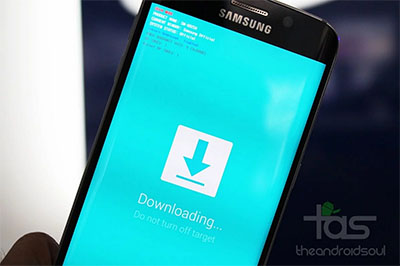
Boot in download mode, by pressing the Volume Down + Home + Power Key simultaneously.
When you see the screen below:
Samsung Galaxy S6 Edge in Download Mode
Tap Volume Up button to enter Download Mode.
Connect the Samsung Galaxy S6 Edge to your PC with the USB cable.
Odin will automatically detect your phone and show the “Added!” message.
In the Odin, click on AP or PDA and then choose :- For Galaxy S6 Edge (SM-G925T) : G925W8VLU1AOCG_G925W8OYA1AOCG_G925W8VLU1AOCG_HOME.tar.md5 file.
Ensure Auto Reboot and F. Reset Time options are selected selected in Odin
while the Re-Partition option is unchecked (this is very important).
Click Start in Odin and wait for the software to update your phone.
Once the root installation is done, your phone will reboot
and soon a PASS message with a green background appears in the left-most box at the very top of Odin.
You can close Odin after device turns on.
Your Samsung Galaxy S6 Edge is now fully updated with MetroPCS Firmware!
AFTER FLASHING A SAMSUNG GALAXY S6 EDGE FROM T-MOBILE WITH THIS FIRMWARE THE PHONE WILL FINALLY ASK FOR A NETWORK CODE WHEN YOU PUT A NON APPROVED CARRIER’S SIM CARD ON THE PHONE.
AFTER YOU HAVE UNLOCKED YOUR PHONE YOU CAN STILL FLASH A T-MOBILE FIRMWARE BACK TO THE DEVICE SO THAT IT GOES BACK TO ORIGINAL STOCK AND SO DOES NOT LOSE WARRANTY. BUT THE PHONE WILL RELOCK AS SOON AS YOU FLASH IT BACK WITH T-MOBILE FIRMWARE.
Troubleshooting : I am stuck on the SAMSUNG BOOT LOGO! What do I do?
First, do not worry, your phone is not broken. Simply follow the instructions below:
a. Wait at least 5 minutes to make sure you are stuck on the logo screen
b. Pull the battery out and wait 30 seconds, then put the battery back in
c. Turn the phone on by: HOLDING VOLUME UP + HOME + POWER you will soon see the RECOVERY page
Tip: when the phone turns on let go of the power button ONLY, when you see the recovery let go of everything
d. Scroll down to WIPE factory user data reset and select it
when prompted scroll to YES and select it to do a factory wiping
e. Scroll down to WIPE CACHE PARTITION and select it,
when prompted scroll to YES and select it to do a wipe on cache
Tip: Use the volume rockers to navigate and the power button to Select your option
f. Reboot the phone, you should load properly now
Update as of 9th November 2017: This article NO LONGER applies to all Samsung models. No need to install a custom firmware to unlock all Samsung models. Please check the New Samsung Unlock Guide here: https://www.unlockbase.com/unlock-phone/samsung/galaxy-s6/For T-Mobile and MetroPCS users, please check updated Mobile Device Unlock App for permanent unlock. Click here.Reason: Installing custom firmware doesn’t guarantee permanent unlock for T-Mobile and MetroPCS phones with pre-installed Mobile Device Unlock App. Please click above links for updated unlock processes. Thank you.
All products, and company names, logos, and service marks (collectively the "Trademarks") displayed are registered® and/or unregistered
trademarks™ of their respective owners.
The authors of this web site are not sponsored by or affiliated with any of the third-party trade mark or third-party registered trade mark owners,
and make no representations about them, their owners, their products or services.
Reason: Installing custom firmware doesn’t guarantee permanent unlock for T-Mobile and MetroPCS phones with pre-installed Mobile Device Unlock App. Please click above links for updated unlock processes. Thank you.
Update 1st July 2015:Don’t want to wait? Use UnlockBase Cell Phone Unlocker software to Direct Unlock with Original USB Cable for any Samsung Galaxy S6 & S6 Edge, instantly 24/7. It’s the cheapest option on the market today!
Update 19th June 2015: Too complicated ?! Don’t want to risk to flash your phone with new firmware ?! Please take a look to our new Official mobile “Device Unlock” app method to unlock your Samsung using official Android App.
The Samsung Galaxy S6 (SM-G920) cell phone from T-Mobile USA is using a custom firmware preventing the phone from being unlocked by code as there is no way to enter it (these phone are simply not asking for “SIM Network Unlock PIN”). Before this post, the only way to Unlock the phone was by using the official T-Mobile “Mobile Device Unlock App” which is an Android app called “Device Unlock” that allows you to request and apply a mobile device unlock directly from the device. And absolutely no code that you’ll be able to buy online will work using this app.
Original “Locked Screen” of a Samsung Galaxy S6 from T-Mobile USA
So what do you do if you get an Unlock Code but you cannot use it?
Now there is a solution consisting of an upgrade to the firmware of the phone with MetroPCS Firmware instead of T-Mobile, and this will allow the phone to ask for the Unlock Code. Below you will find a tutorial about how to do this. Once you flash (update) your Phone with this New Firmware, please make sure that your Samsung SM-G920T is now asking for “SIM Network Unlock PIN”. And if the answer is yes you can then click this link to order the Unlock Code of your Samsung Galaxy 6 from T-Mobile USA.
Service Name:Samsung T-Mobile USA [NEW GEN 2015] – NCK + SPCK (1<>4 Hours Mon-Fri) – [Tool ID: 775]
Please note:This method has been proven to work because it uses Samsung’s Official programs and the Official stock MetroPCS provided Images. As with any Official carrier or manufacturer firmware flashing this must be done at Your Own Discretion. The instructions are outlined CLEARLY and you must follow the instructions exactly. If any issues arise we cannot take responsibility for any issues. If you do not want to proceed, unfortunately we are unable to provide refunds as stated on our website before ordering. Please contact us for more information. You MUST perform these instructions and make sure the phone prompts with a NON accepted sim before you order or No Refunds!
Step by Step Tutorial Firmware Upgrade
Samsung Galaxy S6 (SM-G920T) to MetroPCS Firmware
Reason: Installing custom firmware doesn’t guarantee permanent unlock for T-Mobile and MetroPCS phones with pre-installed Mobile Device Unlock App. Please click above links for updated unlock processes. Thank you.
Disclaimer: UnlockBase is not responsible if users break / brick or damage their phone while trying to use this method. You must not use this firmware for any other Android Cell Phone other than the Samsung Galaxy S6 (SM-G920T) from T-Mobile USA. Do so at your own risk. If you’re not sure what you are doing, please seek assistance at a local cell phone service center in your area.
Make sure your phone battery is charged more than 60%.
Enable USB Debugging, by open Settings > Developers Option > USB Debugging If Developers Option is hidden, go to Settings > About Phone > Built Number (tap on it for 5-8 times)
Run Odin3 v3.10.0 as administrator (Right-Click: Run as Administrator).
Switch OFF your Samsung Galaxy S6.
Boot in download mode, by pressing the Volume Down + Home + Power Key simultaneously.
When you see the screen below:
Samsung Galaxy S6 in Download Mode
Tap Volume Up button to enter Download Mode.
Connect the Samsung Galaxy S6 to your PC with the USB cable.
Odin will automatically detect your phone and show the “Added!” message.
In the Odin, click on AP or PDA and then choose :- For Galaxy S6 (SM-G920T) : G920T1UVU1AOCH_G920T1TMB1AOCH_TMB_HOME.tar.md5 file.
Ensure Auto Reboot and F. Reset Time options are selected selected in Odin
while the Re-Partition option is unchecked (this is very important).
Click Start in Odin and wait for the software to update your phone.
Once the root installation is done, your phone will reboot
and soon a PASS message with a green background appears in the left-most box at the very top of Odin.
You can close Odin after device turns on.
Your Samsung Galaxy S6 is now fully updated with MetroPCS Firmware!
AFTER FLASHING A SAMSUNG GALAXY S6 FROM T-MOBILE WITH THIS FIRMWARE THE PHONE WILL FINALLY ASK FOR A NETWORK CODE WHEN YOU PUT A NON APPROVED CARRIER’S SIM CARD ON THE PHONE.
AFTER YOU HAVE UNLOCKED YOUR PHONE YOU CAN STILL FLASH A T-MOBILE FIRMWARE BACK TO THE DEVICE SO THAT IT GOES BACK TO ORIGINAL STOCK AND SO DOES NOT LOSE WARRANTY. BUT THE PHONE WILL RELOCK AS SOON AS YOU FLASH IT BACK WITH T-MOBILE FIRMWARE.
Video Tutorial from YouTube about the Flashing Process
Troubleshooting : I am stuck on the SAMSUNG BOOT LOGO! What do I do?
First, do not worry, your phone is not broken. Simply follow the instructions below:
a. Wait at least 5 minutes to make sure you are stuck on the logo screen
b. Pull the battery out and wait 30 seconds, then put the battery back in
c. Turn the phone on by: HOLDING VOLUME UP + HOME + POWER you will soon see the RECOVERY page
Tip: when the phone turns on let go of the power button ONLY, when you see the recovery let go of everything
d. Scroll down to WIPE factory user data reset and select it
when prompted scroll to YES and select it to do a factory wiping
e. Scroll down to WIPE CACHE PARTITION and select it,
when prompted scroll to YES and select it to do a wipe on cache
Tip: Use the volume rockers to navigate and the power button to Select your option
Reason: Installing custom firmware doesn’t guarantee permanent unlock for T-Mobile and MetroPCS phones with pre-installed Mobile Device Unlock App. Please click above links for updated unlock processes. Thank you.
All products, and company names, logos, and service marks (collectively the "Trademarks") displayed are registered® and/or unregistered
trademarks™ of their respective owners.
The authors of this web site are not sponsored by or affiliated with any of the third-party trade mark or third-party registered trade mark owners,
and make no representations about them, their owners, their products or services.
We can source the Unlock Code for any Samsung from Argentina. However if you have a Samsung Galaxy Core from this country, you will need to Flash / Upgrade the firmware of the phone to be able to enter the Unlock Code in your Cell Phone. Why ? Simply because the network provider from Argentina use by default for the Samsung SM-G350 (Galaxy Core Plus) and SM-G355 (Galaxy Core 2) a custom firmware that avoid anybody to enter code like explained in this tutorial to Unlock Samsung Galaxy Avant from T-Mobile USA. You can follow the guideline of our previous post for Galaxy Avant and then :
All products, and company names, logos, and service marks (collectively the "Trademarks") displayed are registered® and/or unregistered
trademarks™ of their respective owners.
The authors of this web site are not sponsored by or affiliated with any of the third-party trade mark or third-party registered trade mark owners,
and make no representations about them, their owners, their products or services.
Reason: Installing custom firmware doesn’t guarantee permanent unlock for T-Mobile and MetroPCS phones with pre-installed Mobile Device Unlock App. Please click above links for updated unlock processes. Thank you.
Update 19th June 2015: Too complicated ?! Don’t want to risk to flash your phone with new firmware ?! Please take a look to our new Official mobile “Device Unlock” app method to unlock your Samsung using official Android App.
The Samsung Galaxy Avant (SM-G386T) cell phone from T-Mobile USA is using a custom firmware preventing the phone from being unlocked by code as there is no way to enter it (the phone is simply not asking for “SIM Network Unlock PIN”). Before this post, the only way to Unlock the phone was by using the official T-Mobile “Mobile Device Unlock App” which is an Android app called “Device Unlock” that allows you to request and apply a mobile device unlock directly from the device.
So what do you do if you get an Unlock Code but you cannot use it?
Now there is a solution consisting of an upgrade to the firmware of the phone with MetroPCS Firmware instead of T-Mobile, and this will allow the phone to ask for the Unlock Code. Below you will find a tutorial about how to do this. Once you flash (update) your Phone with this New Firmware, please make sure that your Samsung SM-G386T is asking for “SIM Network Unlock PIN”. And if the answer is yes you can then click this link to order the Unlock Code of your Samsung Galaxy Avant from T-Mobile USA.
Service Name:Samsung T-Mobile USA [NEW GEN 2015] – NCK + SPCK (1<>4 Hours Mon-Fri) – [Tool ID: 775]
Step by Step Tutorial Firmware Upgrade
Samsung Galaxy Avant (SM-GT386T) to MetroPCS Firmware
Reason: Installing custom firmware doesn’t guarantee permanent unlock for T-Mobile and MetroPCS phones with pre-installed Mobile Device Unlock App. Please click above links for updated unlock processes. Thank you.
Disclaimer: UnlockBase is not responsible if users break / brick or damage their phone while trying to use this method. You must not use this firmware for any other Android Cell Phone other than the Samsung Galaxy Avant (SM-G386T) from T-Mobile USA. Do so at your own risk. If you’re not sure what you are doing, please seek assistance at a local cell phone service center in your area.
Make sure your phone battery is charged more than 60%.
Enable USB Debugging, by open Settings > Developers Option > USB Debugging If Developers Option is hidden, go to Settings > About Phone > Built Number (tap on it for 5-8 times)
Run Odin3 v3.09 as administrator (Right-Click: Run as Administrator).
Switch OFF your Samsung Galaxy Avant SM-G386T
Boot in download mode, by pressing the Volume Down + Home + Power Key simultaneously.
When a construction Android robot icon with a warning triangle appears on screen:Tap Volume Up button to enter Download Mode:
Connect the Samsung Galaxy Avant SM-G386T (T-Mobile) to your PC with the USB cable.
Odin will automatically detect your phone and show the “Added!” message.
In the Odin, click on AP or PDA and then choose G386T1UVU1ANH3_G386T1TMB1ANH3_G386T1UVU1ANH3_HOME.tar file.
Ensure Auto Reboot and F. Reset Time options are selected selected in Odin
while the Re-Partition option is unchecked (this is very important).
Click Start in Odin and wait for the software to update your phone.
Once the root installation is done, your phone will reboot
and soon a PASS message with a green background appears in the left-most box at the very top of Odin.
You can close Odin after device turns on.
Your Samsung Galaxy Avant SM-G386T is now fully update with MetroPCS Firmware!
AFTER FLASHING A SAMSUNG SM-G386T T-MOBILE WITH THIS FIRMWARE THE PHONE WILL ASK FOR A NETWORK CODE WHEN YOU PUT A NON APPROVED CARRIER’S SIM CARD ON THE PHONE. AFTER YOU HAVE UNLOCKED THE SM-G386T YOU CAN FLASH A T-MOBILE FIRMWARE BACK TO THE DEVICE SO THAT IT GOES BACK TO STOCK AND THE CUSTOMER DOES NOT LOSE WARRANTY. PHONE WILL REMAIN UNLOCKED.
Reason: Installing custom firmware doesn’t guarantee permanent unlock for T-Mobile and MetroPCS phones with pre-installed Mobile Device Unlock App. Please click above links for updated unlock processes. Thank you.
All products, and company names, logos, and service marks (collectively the "Trademarks") displayed are registered® and/or unregistered
trademarks™ of their respective owners.
The authors of this web site are not sponsored by or affiliated with any of the third-party trade mark or third-party registered trade mark owners,
and make no representations about them, their owners, their products or services.
When it comes to unlocking cell phones, you need to know whether or not it is CDMA or GSM. Most carriers in the United States — U.S. Cellular, Sprint and Verizon — use CDMA technology. T-Mobile and AT&T on the other hand use GSM technology. To keep things simple, if you want to unlock your phone, you must first identify what carrier the phone was originally used with. If it was with AT&T or T-Mobile, then you’ll need to go about the unlocking process keeping in mind that the phone operates off of GMS technology.
Here’s a quick look at the best and easiest phones to unlock over a GSM network.
Samsung Galaxy S5
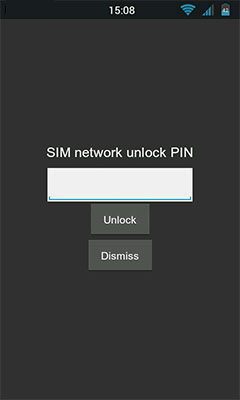
Keep in mind that if you want to unlock your GSM phone, it will have to be used with a different carrier who also uses GSM technology. To unlock a Samsung S5, first remove the current SIM card and insert one from the carrier you want to switch to. Now, turn the phone back on. The phone will ask for an unlock code (SIM Network Unlock PIN). Enter the code that you purchased from a service provider. If it then asks for a Network Code, enter it as well. The phone should now be unlocked.
Samsung Galaxy Note 4
The Galaxy Note 4 is the flagship for Samsung when it comes to screen size and resolution. Fortunately, you can easily unlock your Samsung Galaxy Note 4 in as little as three steps. First, give the IMEI number of your phone to a service provider who sells unlock codes. To get this number, go to SETTINGS >> About device >> Status. Then, follow the directions given to you by the service provider and type in the unlock code when asked for it. That’s it; your phone should be unlocked.
HTC One M8
Need to unlock HTC One M8? This is another GSM phone that is incredibly easy to unlock. Simply remove the nanoSIM and replace it with one from the carrier you want to switch to. After turning the phone back on, enter the unlock code you received from an unlock service provider, and voila! Your phone is unlocked and can be used on any GSM network.
All products, and company names, logos, and service marks (collectively the "Trademarks") displayed are registered® and/or unregistered
trademarks™ of their respective owners.
The authors of this web site are not sponsored by or affiliated with any of the third-party trade mark or third-party registered trade mark owners,
and make no representations about them, their owners, their products or services.