Want to get a 5G smartphone but the budget’s tight? Trying to get the network that can deliver the level of performance needed for an increasingly connected society?
With the Galaxy A32 5G ($279.99), Samsung got your back. This budget phone should keep you satisfied for a long time because of its excellent battery life, respectable performance, and years of promised Android upgrades and security updates.
Why is a 5G smartphone a smart choice today?
Hardware specs that won’t become obsolete in a short period of time are important to consider when buying a gadget. Purchasing a 5G phone assures that you have a device that is compatible with a new wireless standard that is expected to last for the next ten years.
5G allows you to make the most of your time because it is a superior technology. Consider how much time you could have spent doing something more productive instead of waiting for a download or even a video to finish buffering.
Unlocking Samsung A32: Design and Build Quality
Pros
The battery life is excellent.
The headphone jack is still present.
A Micro SD card slot is available.
There is 5G support available.
The main camera can record in 4K at 30 frames per second.
The front-facing camera is adequate
Cons
The display is low-cost and outdated technology, with poor quality and resolution.
The shiny plastic rear catches scratches and fingerprints.
The camera does not have optical image stabilization.
Photos taken in night mode are noisy.
In low light, the display does not dim enough.
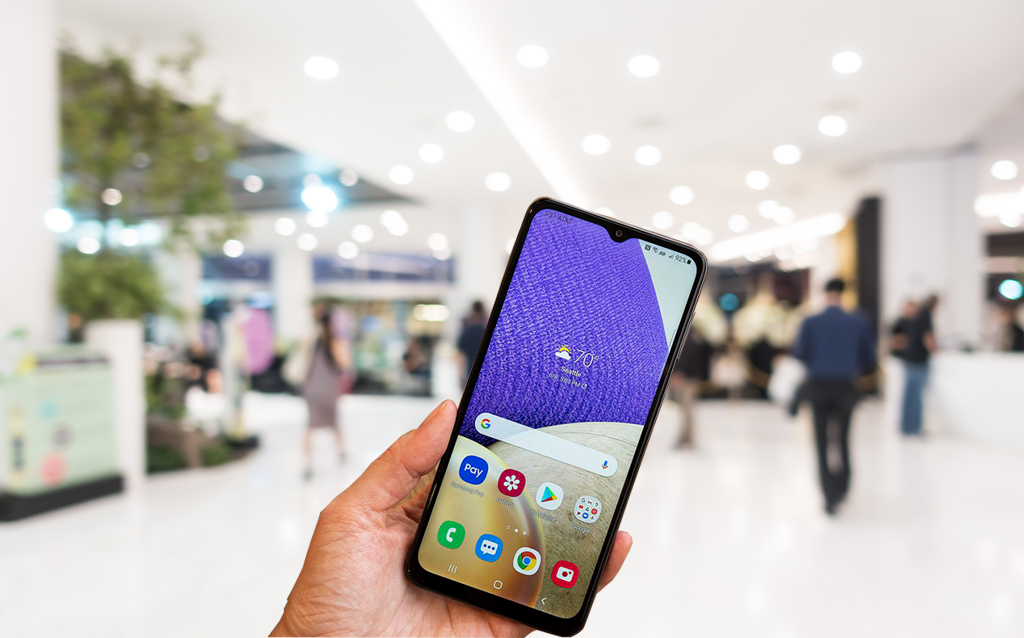
The phone’s measures 6.5 by 3.0 by 0.4 inches. The Galaxy A32 5G’s slippery finish makes it more prone to unintentional drops than models with textured backs, which is common for a device with a 6.5-inch display. During my testing, the phone slipped from my grasp a few times. Fortunately, the phone’s polycarbonate body and Gorilla Glass 5 display were unaffected.
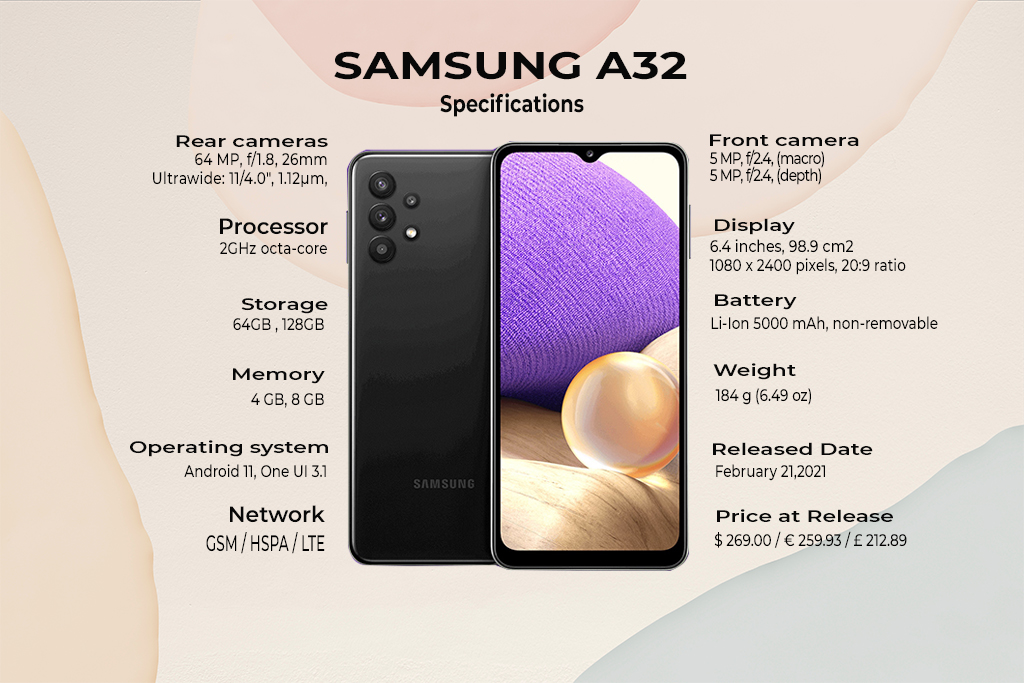
The Galaxy A32 5G comes pre-installed with Android 11 and One UI 3.1. Samsung’s custom skin gets better with each update, and the latest adds deep integration with Microsoft Office, an updated camera app, an improved Eye Comfort Shield mode that adjusts the screen’s display automatically throughout the day, and the ability to replace Samsung Daily on the home screen with Google Discover.
You have a Samsung A32 but it’s not unlocked yet? Visit our website and unlock your phone today! Experience the full potential of the 5G network, don’t let your carrier hinder you from doing something more.
The Samsung Galaxy A32 5G checks virtually all of the boxes for what we want in a cheap phone at its pricing. It performs well in all basic tasks, has a long battery life, will receive several Android updates, and has a decent camera stack. Its performance is practically on par with the Galaxy A52 5G, which is substantially more expensive.
Let us know your thoughts in the comments below!
All products, and company names, logos, and service marks (collectively the "Trademarks") displayed are registered® and/or unregistered
trademarks™ of their respective owners.
The authors of this web site are not sponsored by or affiliated with any of the third-party trade mark or third-party registered trade mark owners,
and make no representations about them, their owners, their products or services.
iOS 15 is now available for download. It adds a load of new features and improvements to your iPhone, including a simpler way to use Safari, preconfigured modes for changing your home screen arrangement quickly, and major FaceTime improvements. We’ll go over all of the new features, including what’s new in iOS 15
Apple unveiled iOS 15, the company’s newest significant update for the iPhone operating system, during WWDC in June 2021. On September 20, 2021, iOS 15 was released for iPhone, bringing with it UI updates, security fixes, and a slew of new features. You can get the update for free if your iPhone supports it.
Is Your iPhone Compatible?
If you have an older iPhone, you may be wondering if iOS 15 is compatible with it. Your device has made the cut if it is an iPhone 6S (2015) or newer. However, you should be aware that certain features, including Portrait mode on FaceTime, Live Text, augmented reality directions in Maps, and spatial audio, will only operate on iPhones with an A12 Bionic Chip or newer. To get the most out of the upgrade, you’ll need an iPhone XS or newer.
How to Download and Install iOS 15
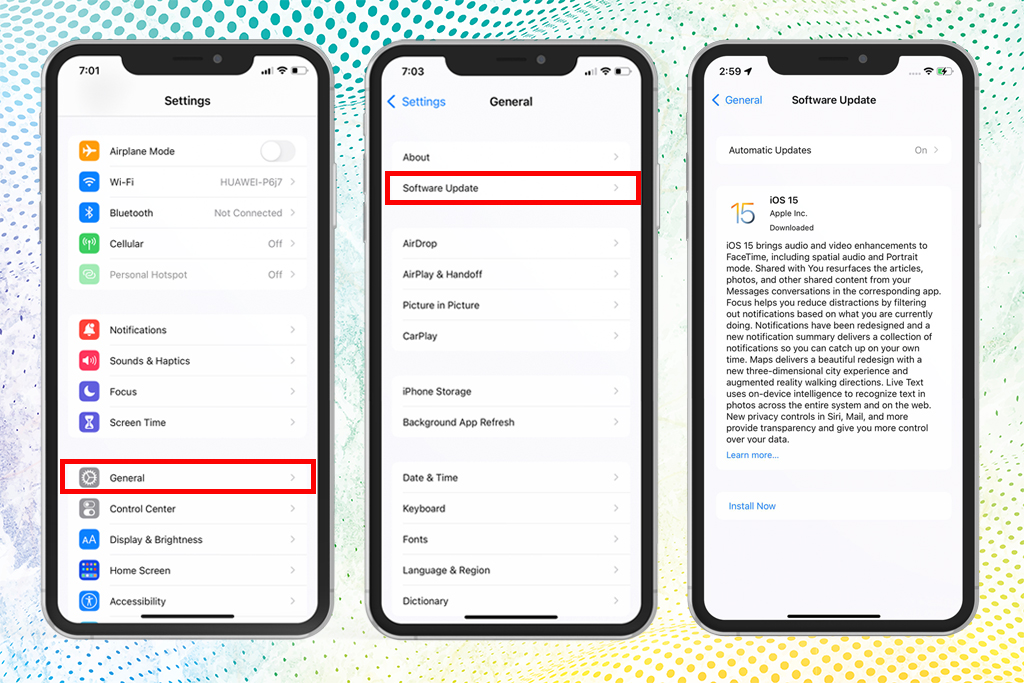
Go to Settings > General > Software Update. It will automatically check if your phone supports IOS 15, You’ll have an option to Click and Install. Otherwise, if your phone doesn’t have any updates available maybe your phone doesn’t support IOS 15 or you’re already updated to IOS 15.
Quick Overview Of iOS 15
Notifications Redesign
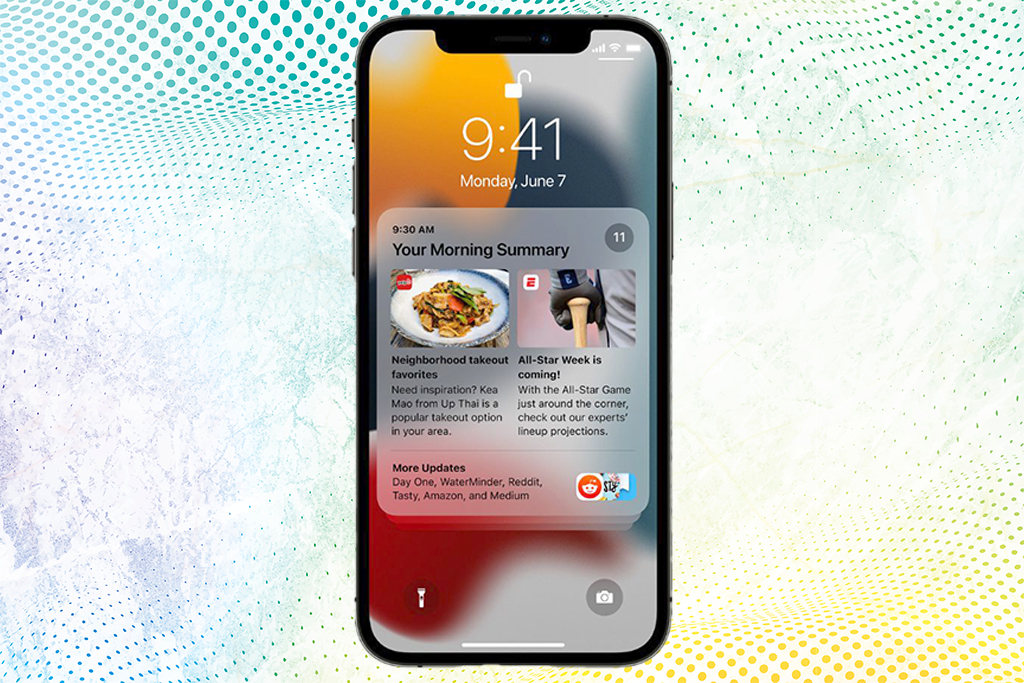
Notifications have a new look with larger icons for apps, to make them easier to identify, and a new notification summary.
Focus
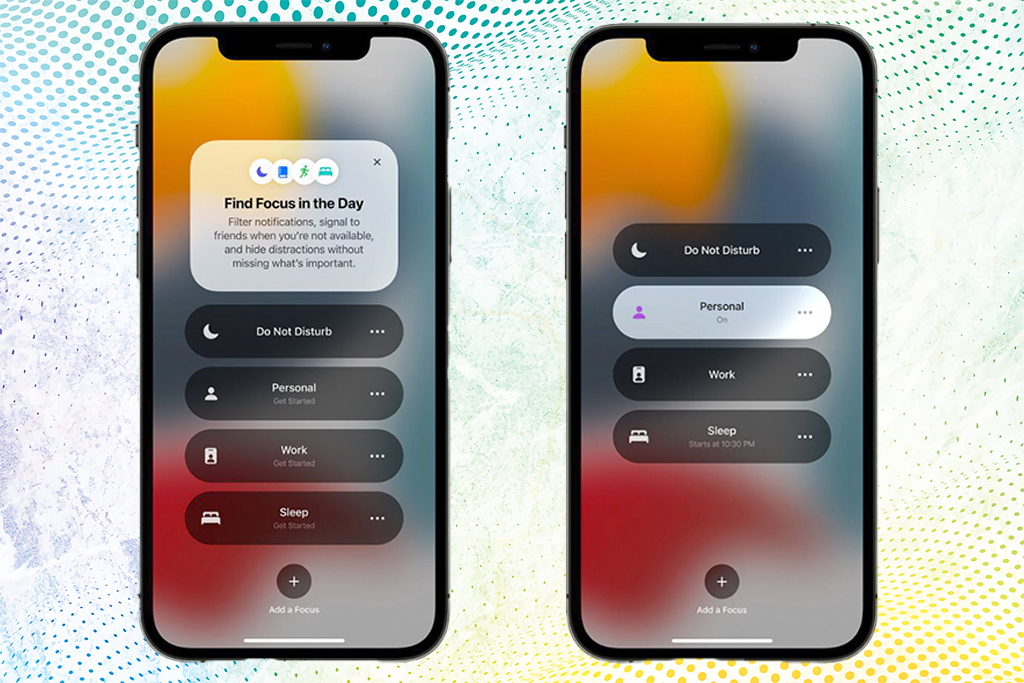
Focus helps users filter notifications to reduce distractions, using a custom Focus or a suggested Focus like Work or Sleep.
On-Device Intelligence Powers Live Text, Advanced Spotlight Search
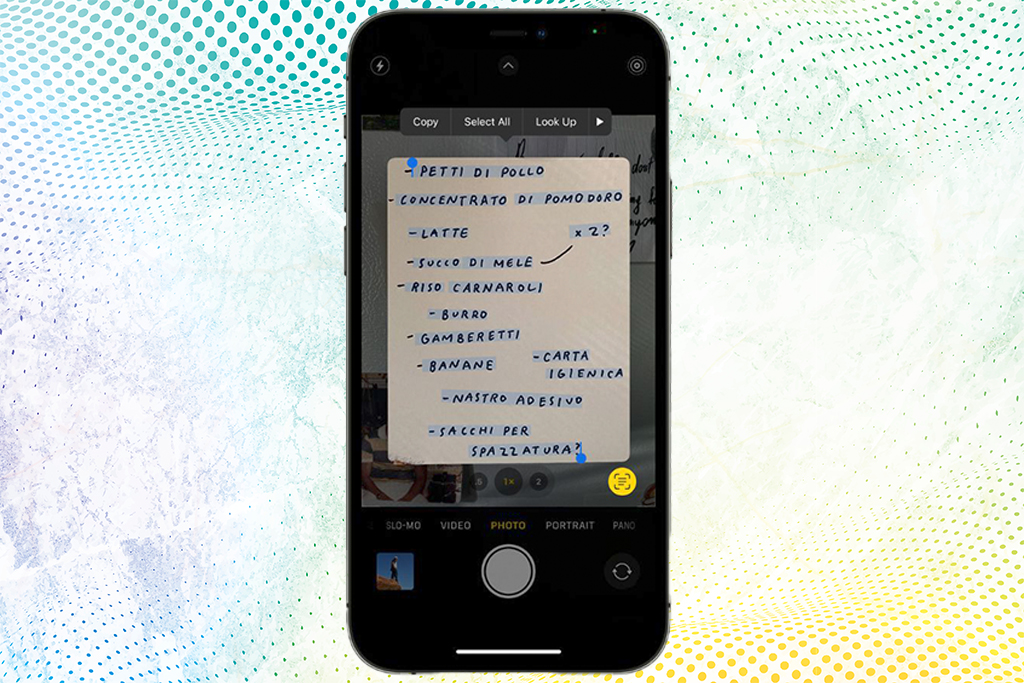
Live Text uses on-device intelligence to identify text and enhance the photos experience. Spotlight now searches photos by location, people, scenes, and objects.
FaceTime
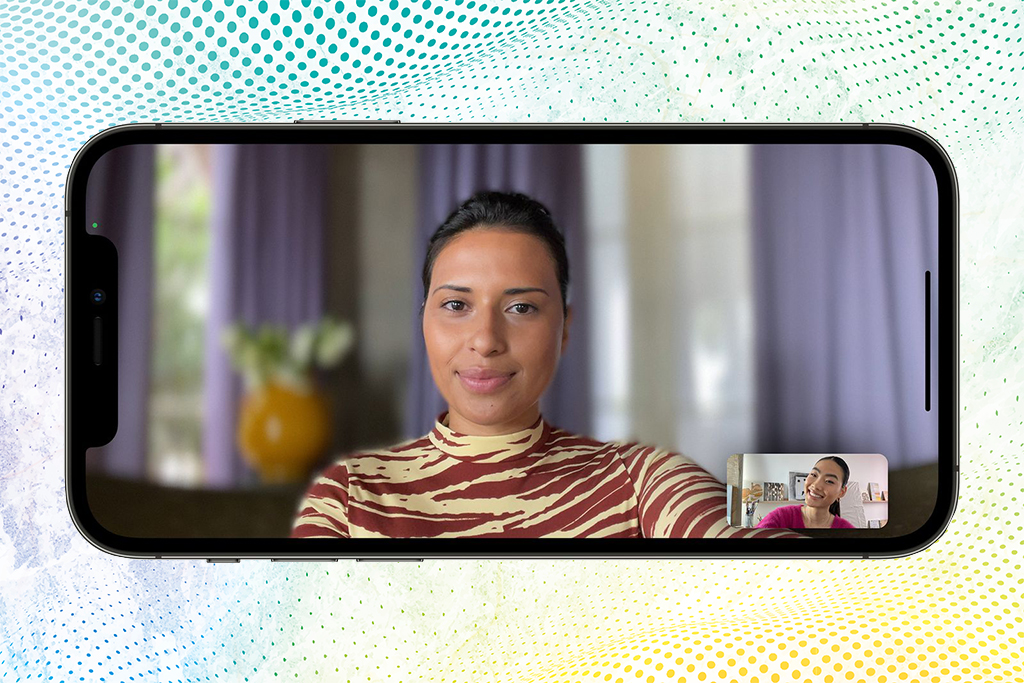
The stunning Portrait mode from the Camera app is now optimized for video calls in FaceTime.
SharePlay
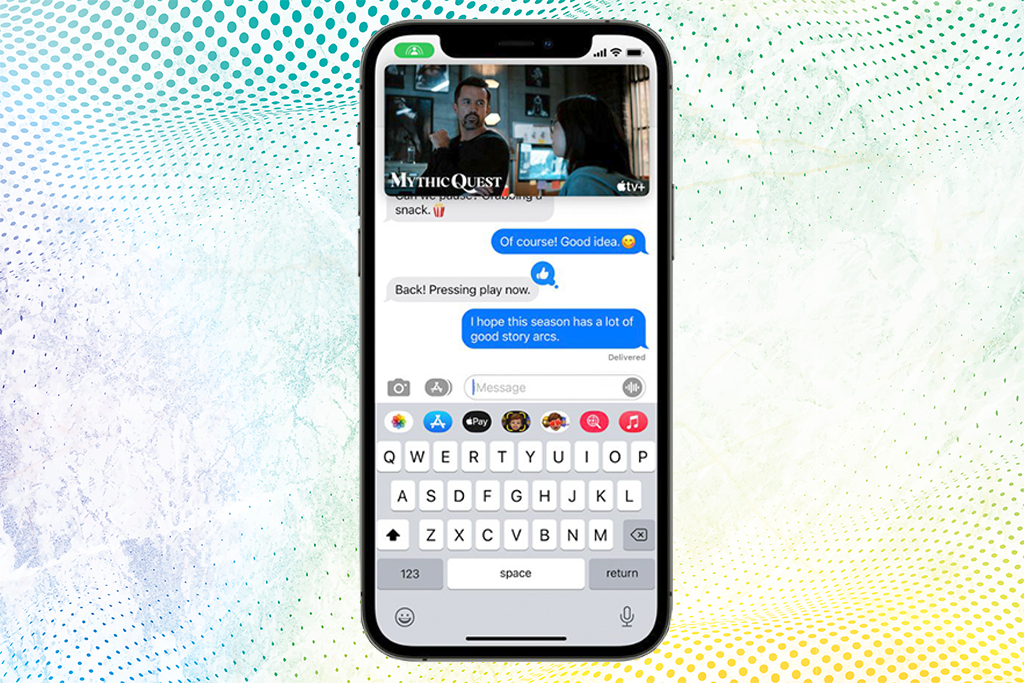
SharePlay makes it easy to listen to songs together in Apple Music while on a FaceTime call.
FaceTime Links
With SharePlay, users can now share experiences while connecting with friends on FaceTime, including watching a TV show or movie from Apple TV+ and other streaming services in sync, or sharing their screen to view apps together
Maps
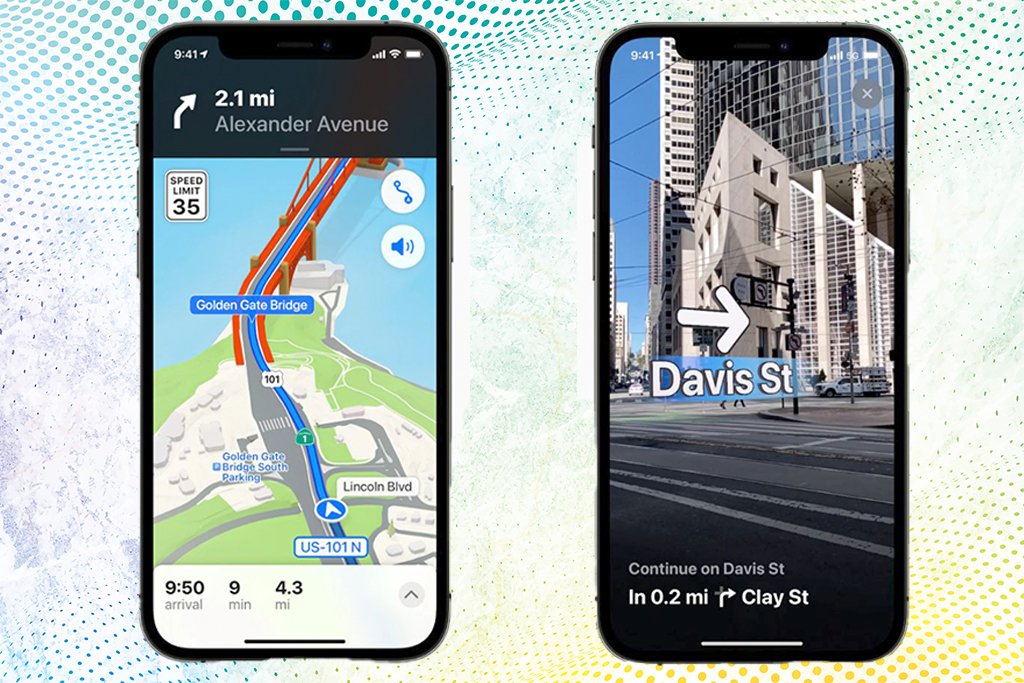
An all-new city navigation and exploration experience comes to Apple Maps with more realistic and colorful details.
Wallet
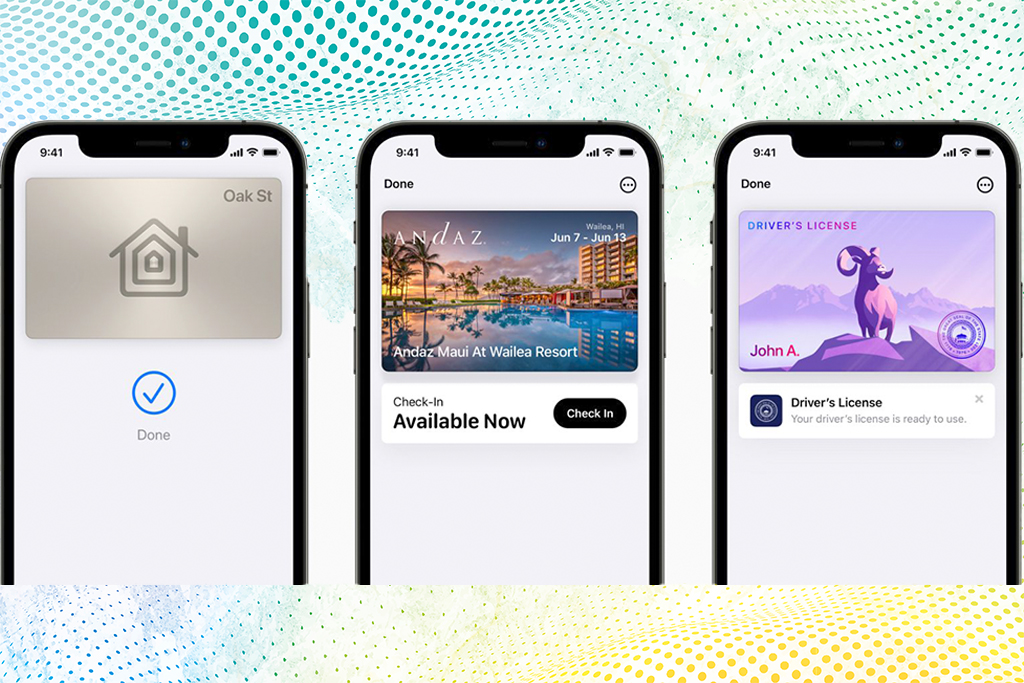
House and hotel room keys as well as ID cards come to Wallet for a simple tap-to-unlock experience for everyday places.
Safari
Safari is redesigned with a new tab bar and Tab Groups for an even better browsing experience.
Weather and Notes
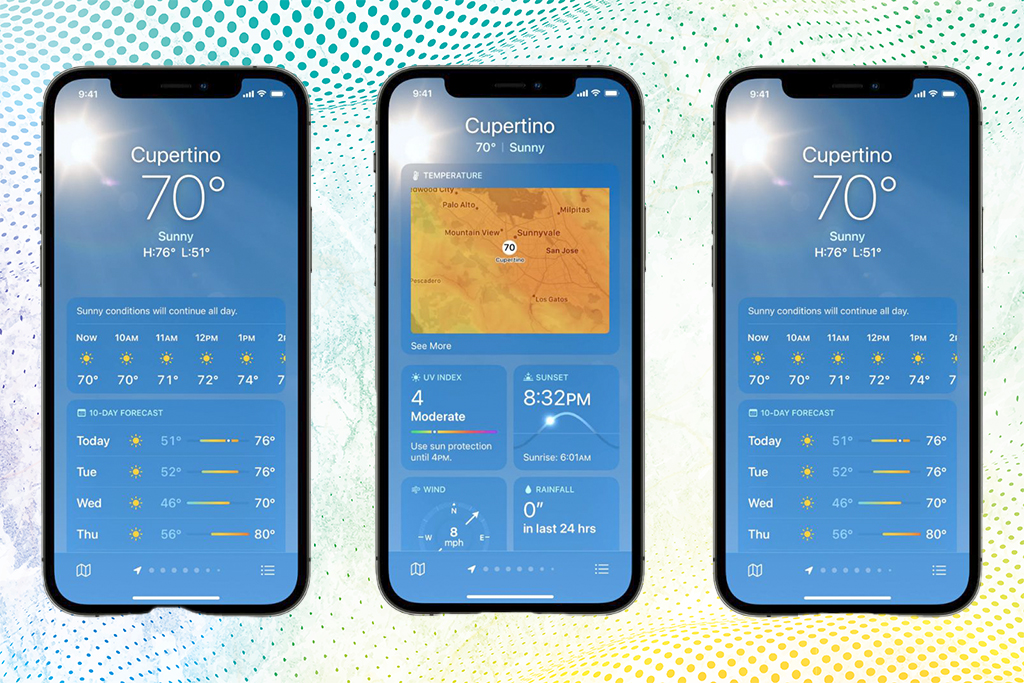
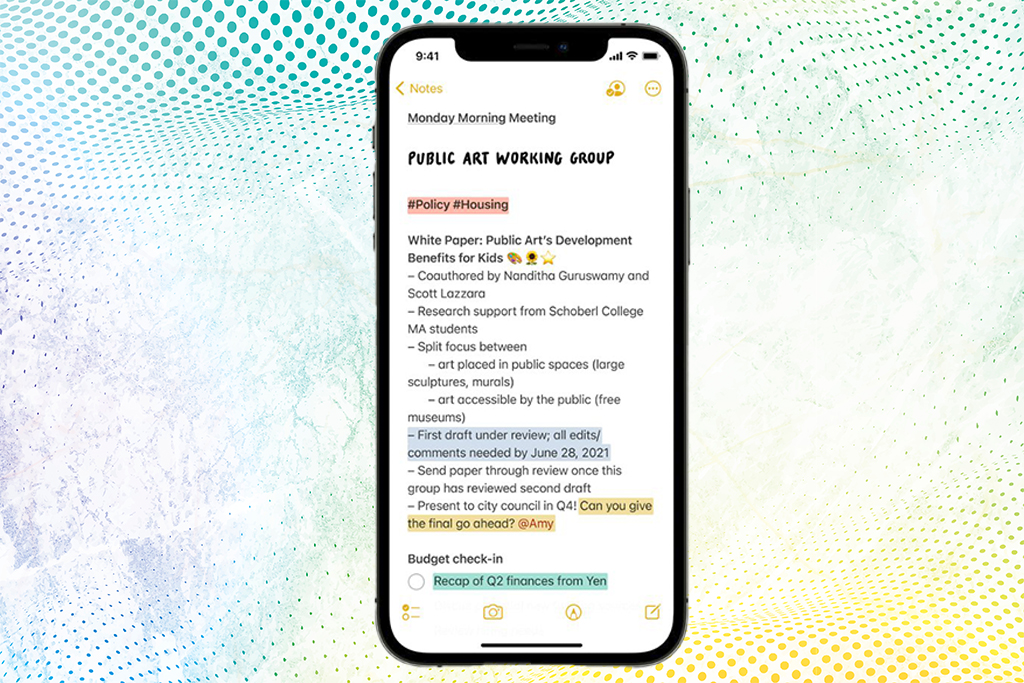
Weather is redesigned with data and layouts that change based on conditions, such as heavy rain. Notes adds user-created tags that make it easy to quickly categorize notes in line with relevant content.
And more additional Features!
Is your iPhone locked and can’t enjoy the full features of your phone? Get it unlocked here : https://www.unlockbase.com/unlock-phone/iphone/ Don’t let your carrier prevent you from enjoying and experiencing the full features of your iPhone! Unlock your iPhone today with Unlockbase
Is it worth the update?
YES! But we highly recommend backing up your device before you begin the download — it’s the safest move before any major update! And you’re going to experience a whole new set of features!
What’s the best feature of this operating system for you? Share your thoughts in the comment section below.
All products, and company names, logos, and service marks (collectively the "Trademarks") displayed are registered® and/or unregistered
trademarks™ of their respective owners.
The authors of this web site are not sponsored by or affiliated with any of the third-party trade mark or third-party registered trade mark owners,
and make no representations about them, their owners, their products or services.
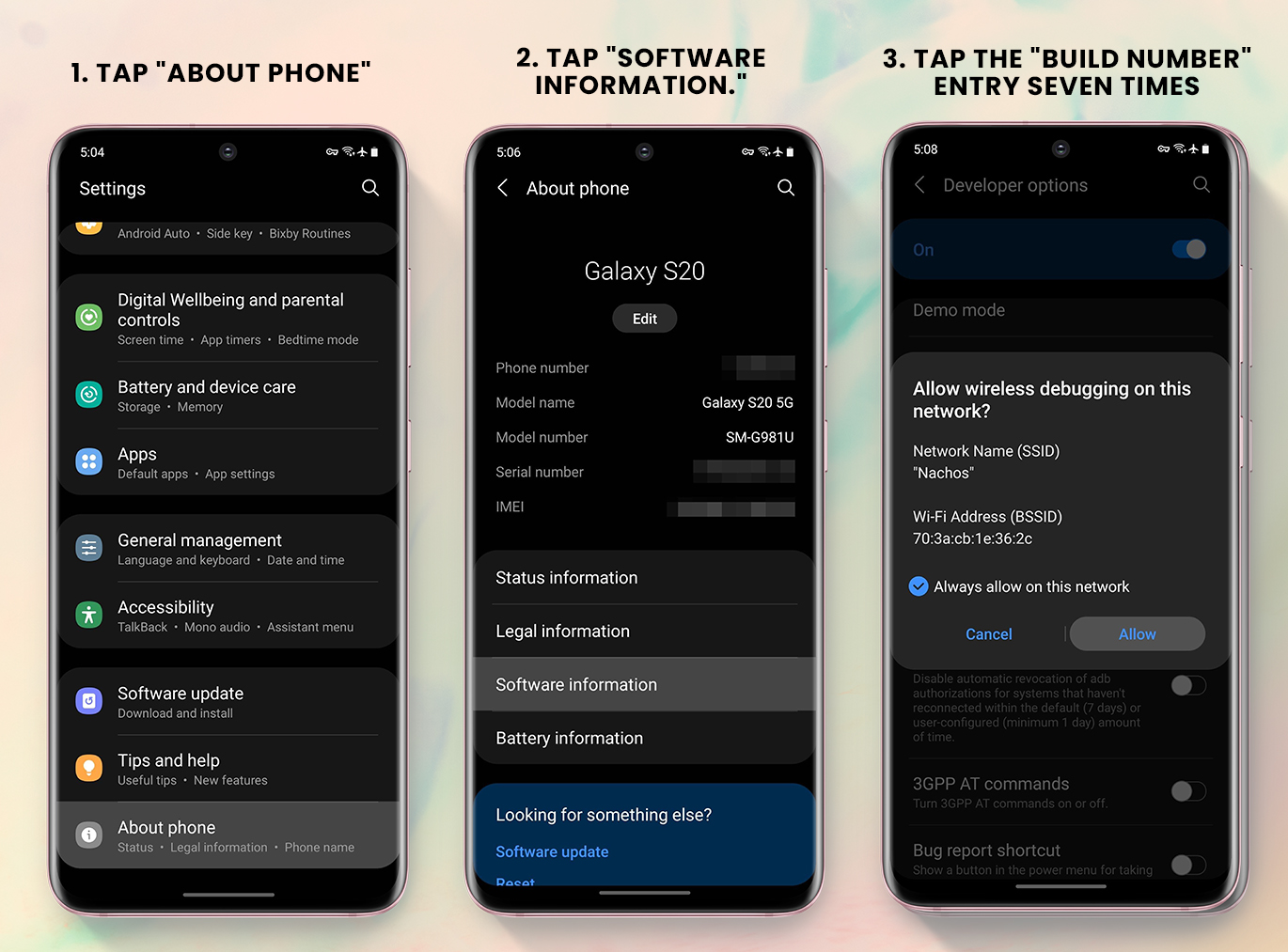
There are many reasons to enable ADB, from booting into Fastboot mode with a single command to installing mods without root access. The catch was that you had to be connected to a computer through USB. However, Android 11 includes a new functionality that allows you to perform ADB commands via Wi-Fi rather than being tethered.
Samsung’s One UI 3.0 is based on Google’s Android 11 open source code, so you get most of the standard functionality as well as some great Samsung-exclusive extras. However, if you send a lot of ADB instructions, it’s one of those basic AOSP capabilities that you might consider most handy.
Requirements :
Same Wi-Fi Device running with Android 11
SDK platform-tools with version ≥ 30.0.0. You download the tool here : (Windows | Mac | Linux),
Same Wi-Fi network for Android device and your PC
Steps on How how Enable Wireless ADB
Enable Developer Options
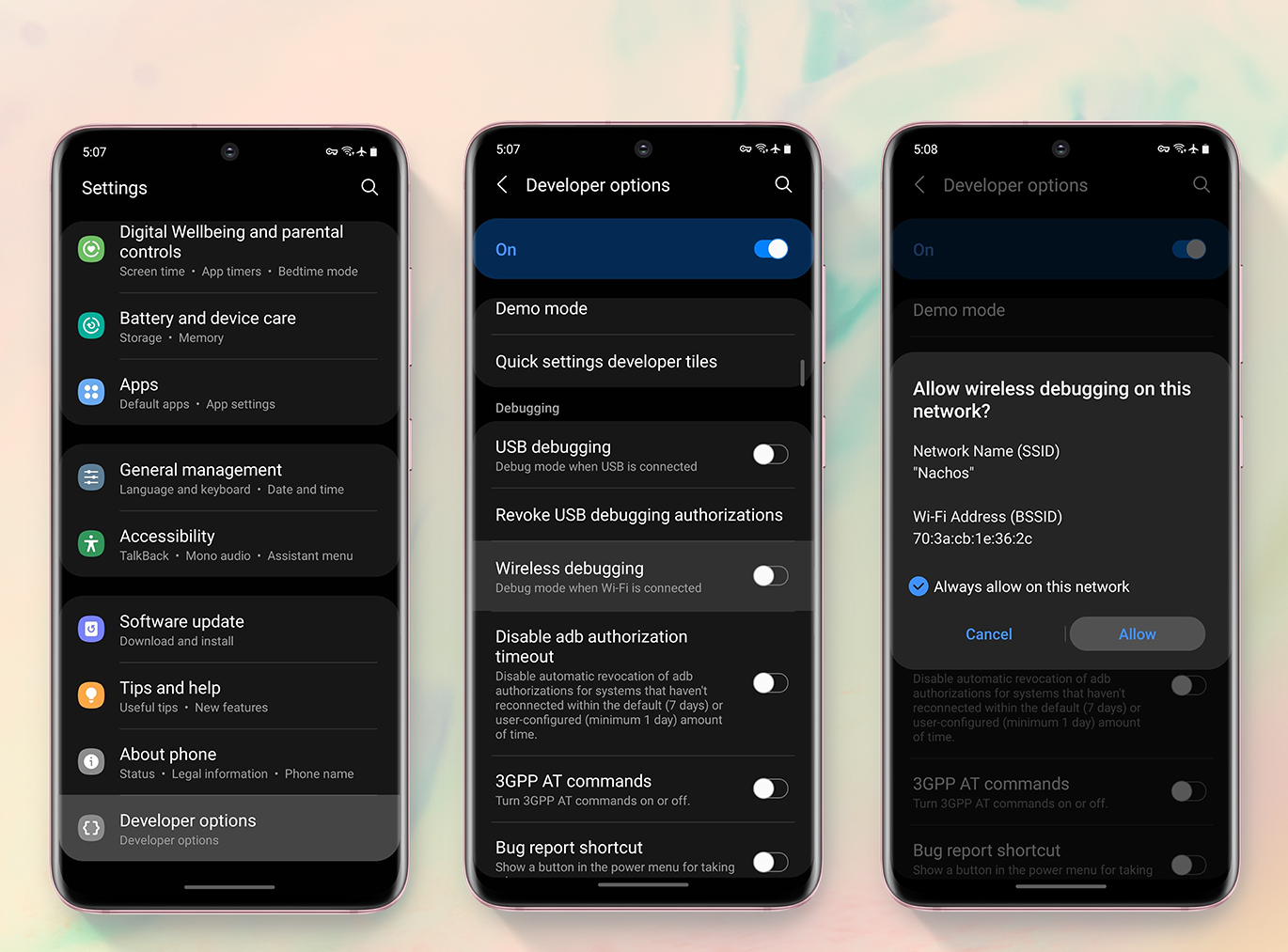
2. Enable Wireless Debugging
Note that you must be connected to a Wi-Fi network in order to use this feature. You’ll need to be on the same network as the computer from which you’re delivering ADB commands.
3. Set Up ADB on Your Computer
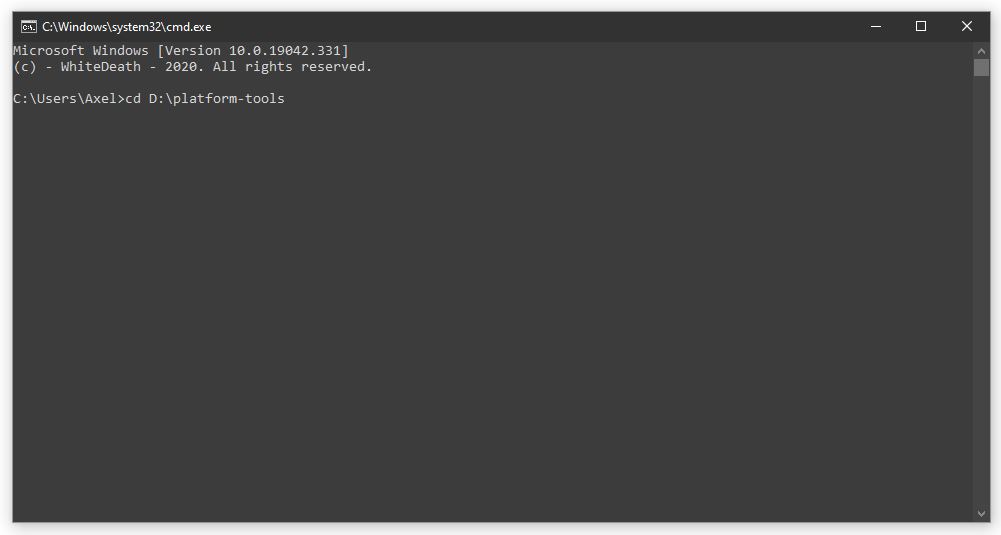
Simply download and unpack Google’s standalone platform-tools package ( link above ) to your desktop. Open Command Prompt, PowerShell, or Terminal from there, and then type “cd” followed by a space. Finally, to prepare the PC side of things, drag and drop the platform-tools folder into the command window and click enter
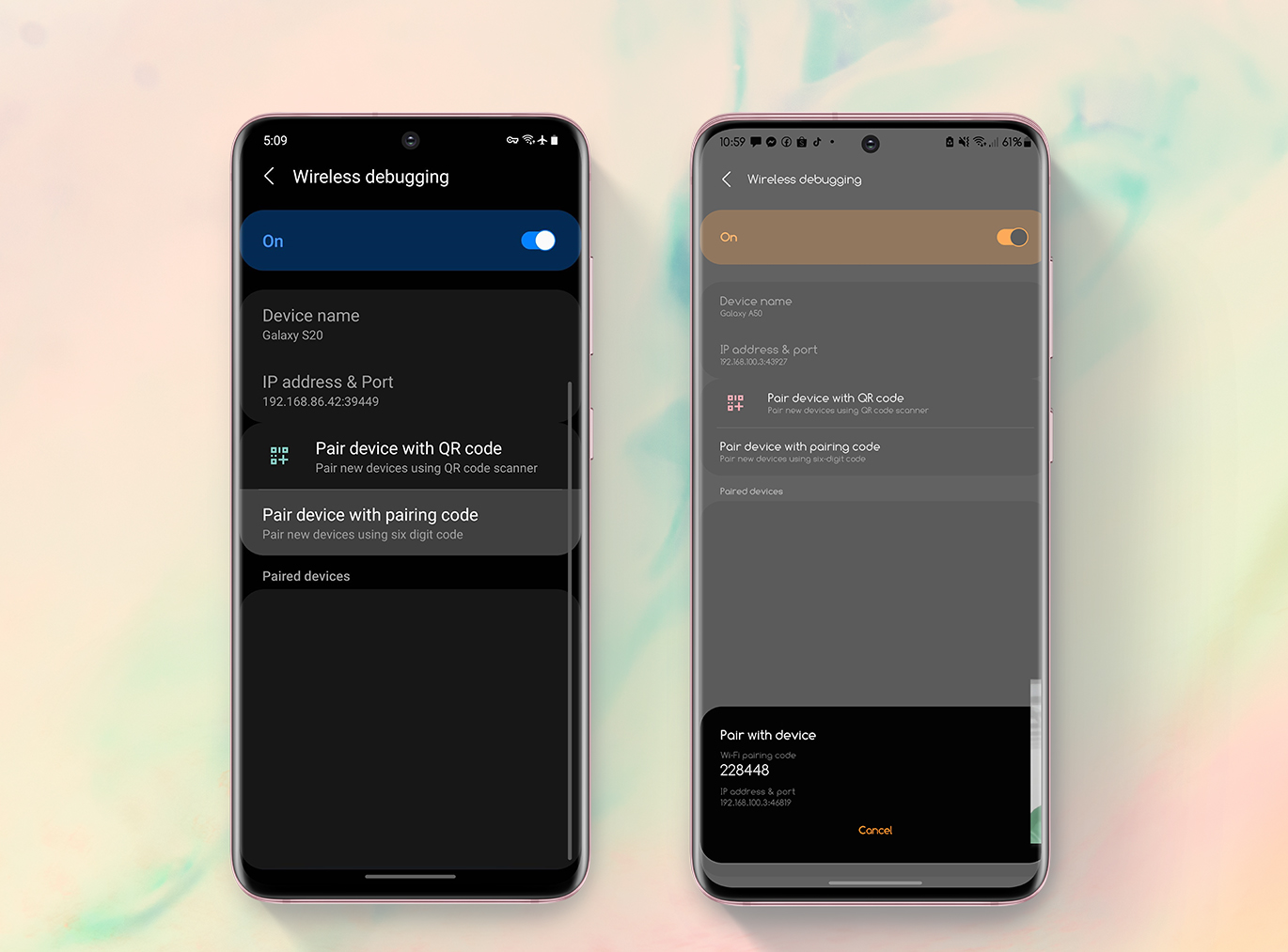
4. Get Your IP Address & Pairing Code
Tap “Pair device with pairing code” from the main wireless debugging screen to see what you’ll need to connect to your computer over Wi-Fi. The pairing code, IP address, and port number are all needed in the following steps, so leave the screen as is and move on to the next section below.
Send ADB Commands Wirelessly
From here, go to your phone’s main wireless debugging screen and look under the “IP address & Port” area for the numbers. The port number will most likely differ from the one used in the previous step, so make sure you use the correct one. Once you have the device information, open the platform-tools command window and run the following command, then press enter.
“Enter pairing code” should now appear on the screen. Simply type the code that appears in the popup on your phone, then press enter to join.
You’re ready to proceed when the popup returns the message Successfully matched to IP Address>. You’ll see a message on your phone that says “Wireless debugging connected,” which means you may use the prompt to run any ADB command.
You’ll have to switch the wireless debugging option back on in Developer Options if you wish to connect again in the future (assuming you didn’t “Forget” the connection yet). It resets after every reboot. If your PC is online, wait around 30 seconds and you should see the “Wireless debugging connected” indication automatically.
Conclusion
It’s pretty simple, and you don’t need to be an expert to do it. That’s it; your phone is now ADB enabled and ready for the next stage in the unlocking process. If you have any questions about this article, please leave them in the comments section below!
All products, and company names, logos, and service marks (collectively the "Trademarks") displayed are registered® and/or unregistered
trademarks™ of their respective owners.
The authors of this web site are not sponsored by or affiliated with any of the third-party trade mark or third-party registered trade mark owners,
and make no representations about them, their owners, their products or services.
Having trouble figuring out how to unlock TracFone? When there are so many useless and out-of-date ways on the Internet, how can you unlock a TracFone?
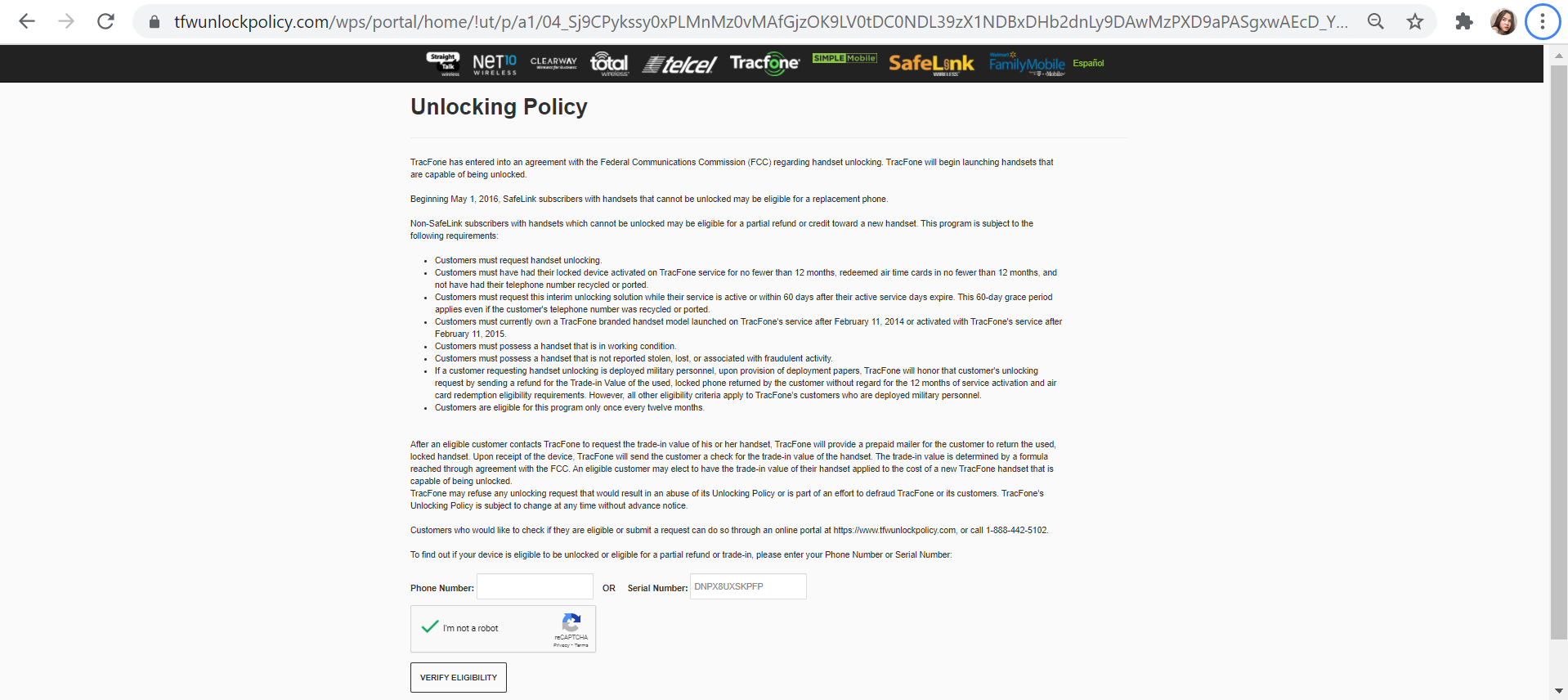
Tracfone is infamous for refusing to unlock its phones, however due to FCC guidelines and a judgement against the company, they are now obligated to unlock phones purchased after a particular date, issue a credit toward an exchange, or offer a partial cash refund for older handsets.
I understand how difficult it is, but don’t worry; we’ve done our stuff. Continue reading to learn everything you need to know.
What You Need To Know Before Unlocking a Tracfone Device
Carrier locks are inconvenient to use — there’s no other way to phrase it. It’s natural that some carriers have to use locks to prevent consumers from paying only a portion of their device’s agreed plan.
However, many carriers do not remove the lock once a certain amount of time has passed. In many circumstances, you will be trapped with the same carrier long after your contract has finished
What should I do to get ready to unlock my phone?
There are two things you need do to get ready for the unlocking process:
Find your IMEI number.
Check the phone’s blacklist status.
How to Unlock Tracfone Using Tracfone Website
Check your phone’s eligibility
The phone must be active on TracFone’s network for at least 12 months
The phone must not be indicated as stolen or lost
You must be within 60-days of being an active TracFone customer
The device should have been activated on the TracFone carrier after the February 11th, 2015
Your phone must be in great condition and not have any damage or faults
Military staff are eligible for carrier unlocks without any regard to the 12-month limit
You must be the previous owner of the TracFone phone
2. Contact Tracfone
Go to www.tfwunlockpolicy.com and enter your phone number at the bottom of the page. You can also call 1-888-442-5102 during normal business hours
3. Unlock Code
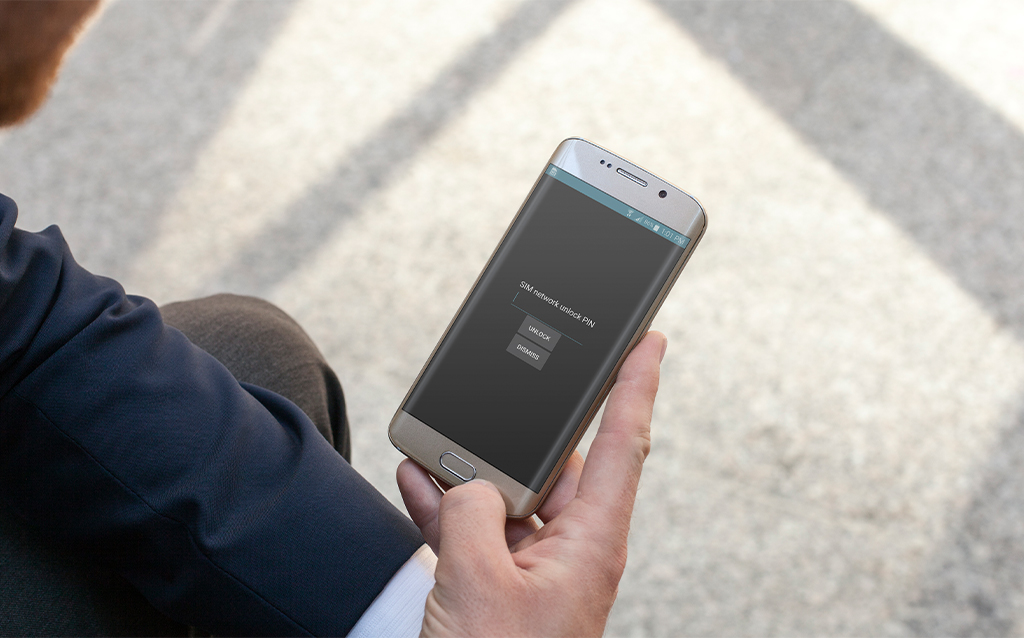
After receiving the Tracfone unlock code, acquire a SIM card from another carrier, turn off your phone, swap SIM cards, and turn it back on. You should receive a message indicating your phone is locked, with a space for you to input your unlock code. Your phone will be able to use the new SIM card when you enter the code. You may change SIM cards at any time; just remember to turn your phone off and back on before doing so.
All Tracfone (and its subsidiaries) devices, both GSM and CDMA, can now be unlocked through UnlockBase.
The process is fairly easy. Here’s how:
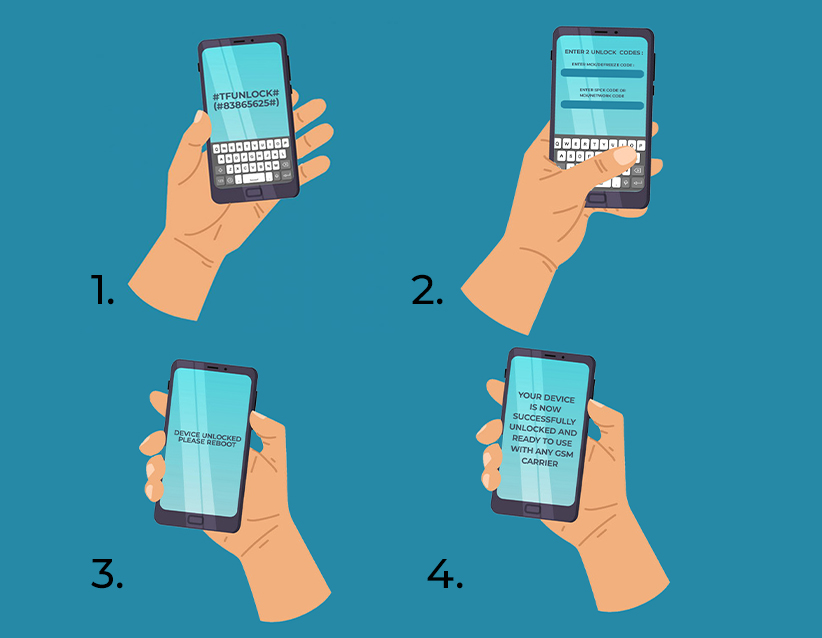
1. Dial #TFUNLOCK# (#83865625#) to open the Unlock Code menu
2. The device will ask for 2 Unlock Codes: In the first field, please enter the MCK/DEFREEZE Code. In the second field, please enter either the SPCK code OR (in case you did not receive an SPCK code), the NCK/NETWORK code.
3. Your device will show a “Device Unlocked“ message and may reboot.
4. That’s it – Your device is now successfully unlocked and ready to use with any GSM carrier worldwide!
Having your Tracfone phone unlocked is easy, the unlock codes for your device will be provided by UnlockBase! If you want to have your Tracfone phone unlocked, we have to know a little information from you in order for us to generate the unlock codes.
Conclusion
For the best experience with your unlocked Tracfone device, we recommend that you choose the carrier which has the best coverage in your area. Unlock Base is an ideal service for any mobile phone regardless of the carrier it is active on, and it provides an effortless experience
Moreover, please note that most of the world uses GSM, good to know if you want to travel outside the USA and want to use a Tracfone device.
All products, and company names, logos, and service marks (collectively the "Trademarks") displayed are registered® and/or unregistered
trademarks™ of their respective owners.
The authors of this web site are not sponsored by or affiliated with any of the third-party trade mark or third-party registered trade mark owners,
and make no representations about them, their owners, their products or services.
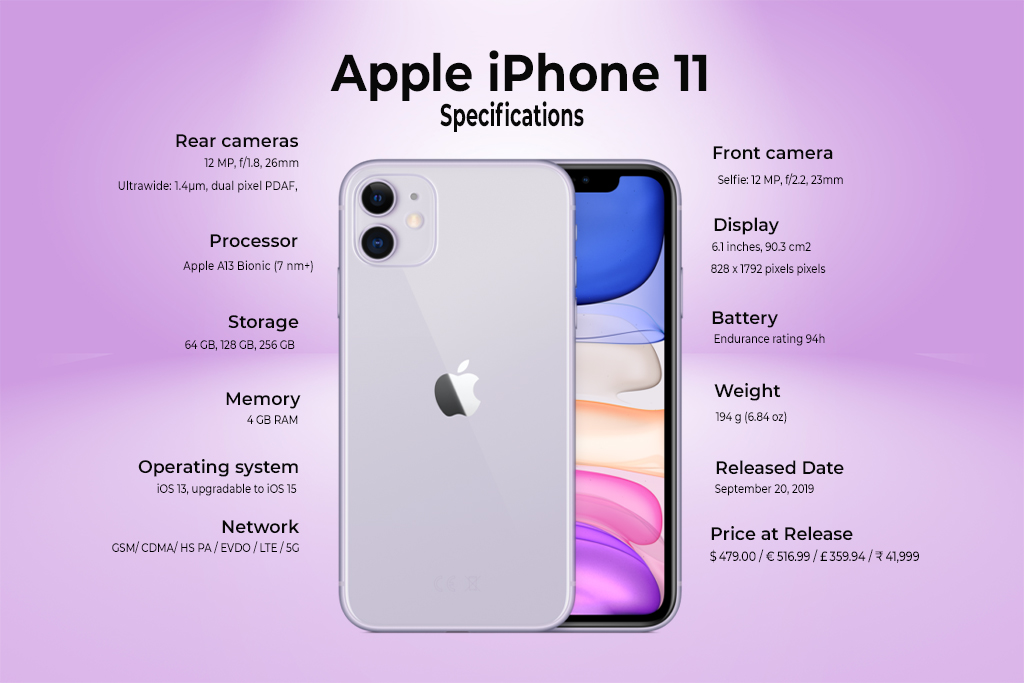
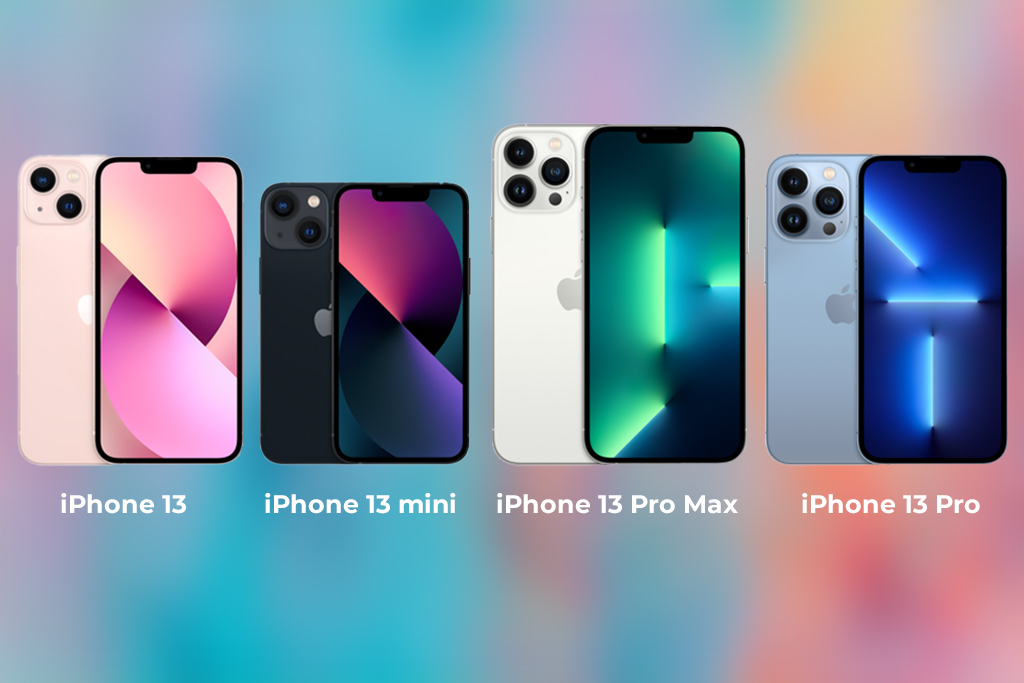
The iPhone 11 could be the ideal choice for you if you’re searching for a cheap iPhone with all of the essential features plus a few extras like a dual-lens camera. Unlocking iPhone 11 , it was released in September 2019, and while Apple’s flagship lineup has since expanded to include the iPhone 13, 13 Pro, 13 mini, and 13 Pro Max, the iPhone 11 remains a lower-cost choice with a starting price of $499.
Apple’s 2-year-old iPhone 11 should not be overlooked by consumers trying to save money. With a new beginning price of $499, the 64GB iPhone 11 is nearly $300 cheaper than the 128GB iPhone 13, which costs $800. (with a carrier activation discount).
Pros
More affordable than iPhone 12 and 13
Dual Camera System
Excellent all-day battery life.
More fun color options than most iPhone models
Cons
No upgrade in screen resolution
No telephoto lens
Ultra Wide lens lacks autofocus and Night Mode
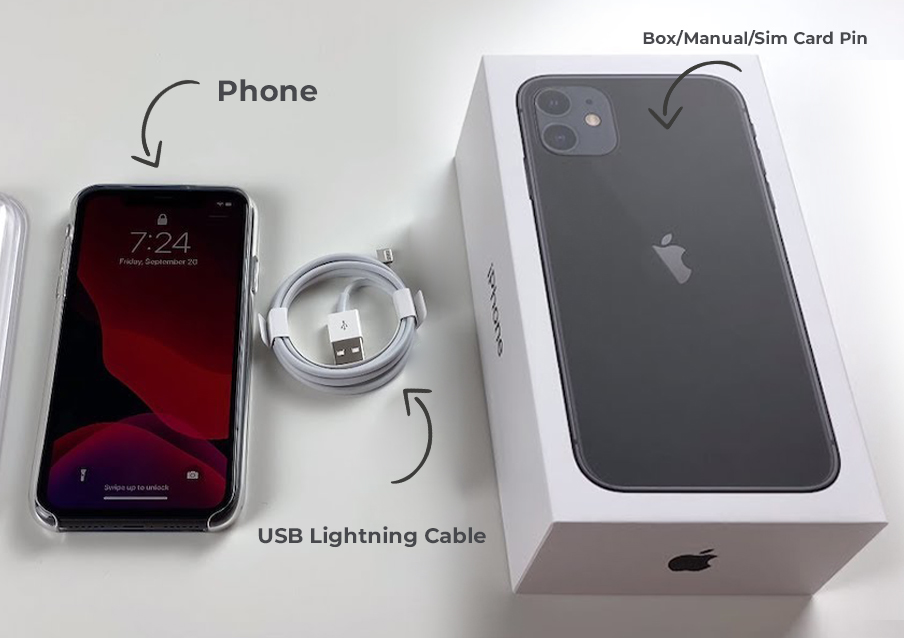
Fast-charge adapter not included
Limited storage.
Unlocking iPhone 11: Design and Build Quality
A precision-machined 7000 series aluminum frame wraps around an all-glass casing of the iPhone 11. The iPhone 11 sits between Apple’s 5.4-inch “small” iPhone models like the iPhone 13 mini and bigger versions like the 6.7-inch iPhone 13 Pro Max in size, with a 6.1-inch display.
The iPhone 11 boasts an edge-to-edge display with tiny bezels and no Home button, with the TrueDepth camera system housed in a notch at the top. The iPhone 11 features somewhat larger bezels than Apple’s most recent OLED-based models since it employs an LCD rather than an OLED display.
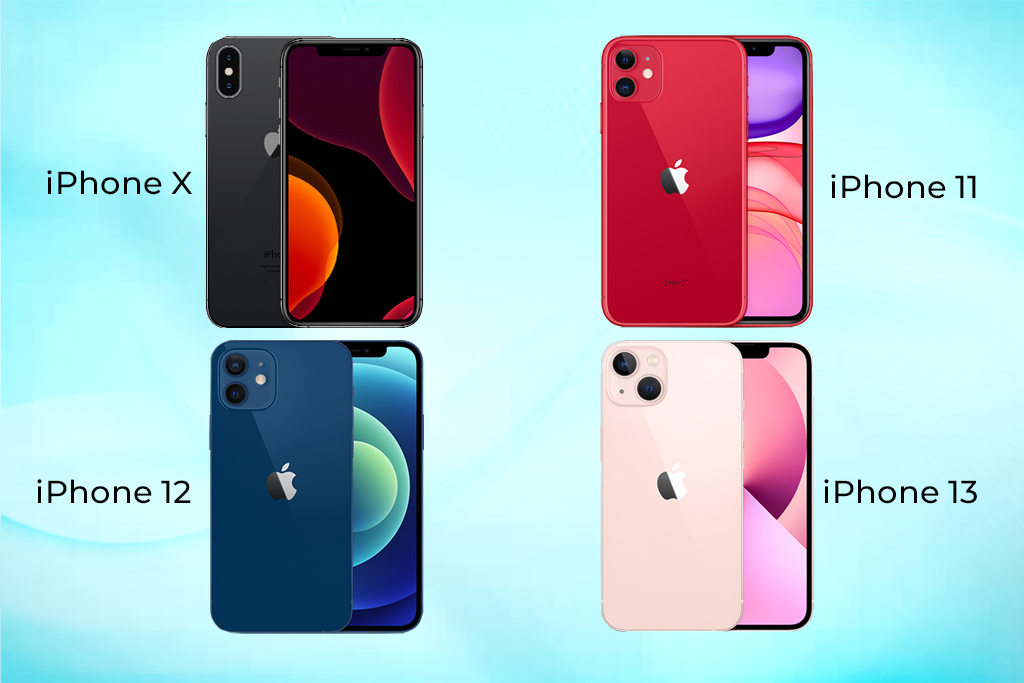
In comparison to the previous-generation iPhone X, the iPhone 11 comes in six hues, however Apple has introduced additional colors. It’s available in black, green, yellow, purple, red, and white, with the coral and blue colors from the iPhone XR no longer available.
An A13 Bionic 7-nanometer chip and a third-generation Neural Engine are found inside the iPhone 11. Apple claimed at the time of its release that the A13 Bionic was the fastest chip ever in a smartphone, having a 20% faster CPU and GPU than the A12. The A13’s Machine Learning Accelerators enable the CPU to perform over 1 trillion operations per second, and the Neural Engine is quicker than previous chips for real-time photo and video analysis.
An Intel modem chip with Gigabit-class LTE, 2×2 MIMO, and LAA, Wi-Fi 6 compatibility (802.11ax) with 2×2 MIMO, Bluetooth 5.0, Dual-SIM with eSIM, and an Apple-designed U1 Ultra Wideband chip that enhances spatial awareness and enables for improved indoor tracking are all included in the iPhone 11. The chip now supports directionally aware AirDrop suggestions in iOS 13.1, allowing you to drop files to someone you aim your iPhone at.
Is it worth the price tag?
So, is the iPhone 11 still worth buying? If you’ve got an iPhone older than the X and you’re looking to upgrade, I think the answer is yes. The camera is substantially improved, and you will get vastly better battery life than anything aside from X. That’s what most people care about, and Apple has really delivered here.
All products, and company names, logos, and service marks (collectively the "Trademarks") displayed are registered® and/or unregistered
trademarks™ of their respective owners.
The authors of this web site are not sponsored by or affiliated with any of the third-party trade mark or third-party registered trade mark owners,
and make no representations about them, their owners, their products or services.
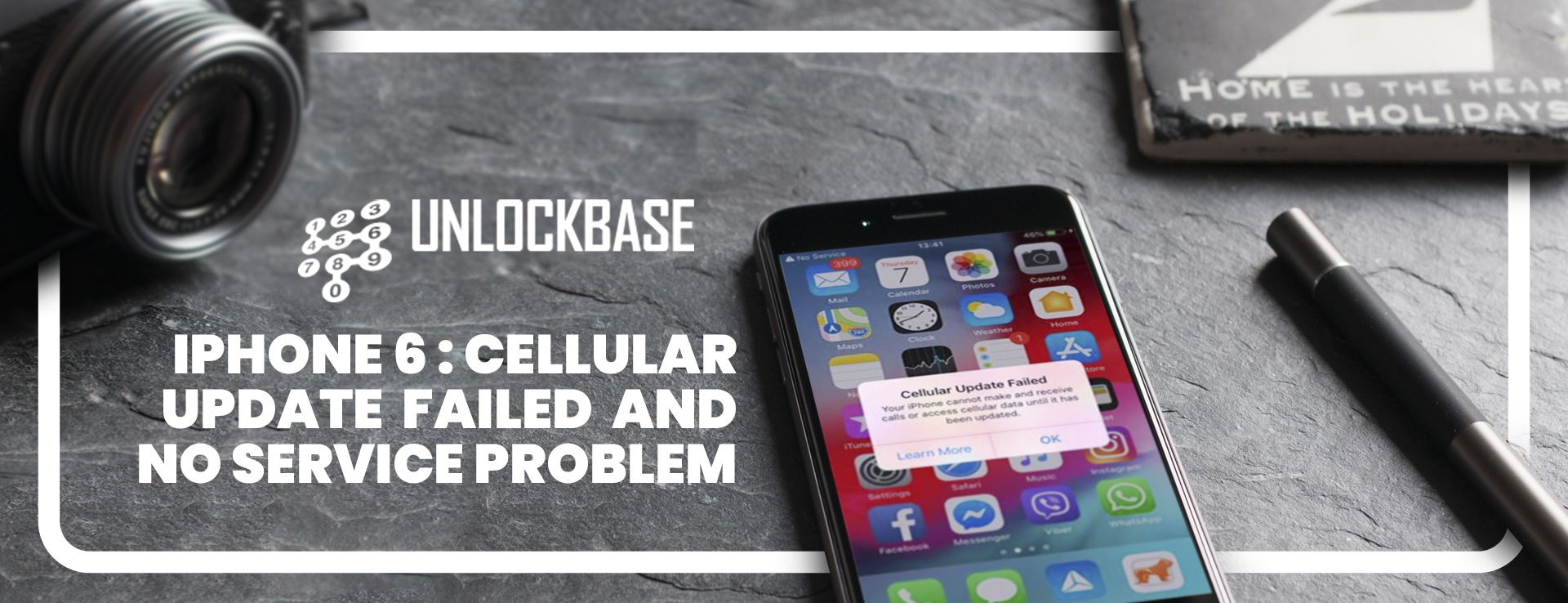
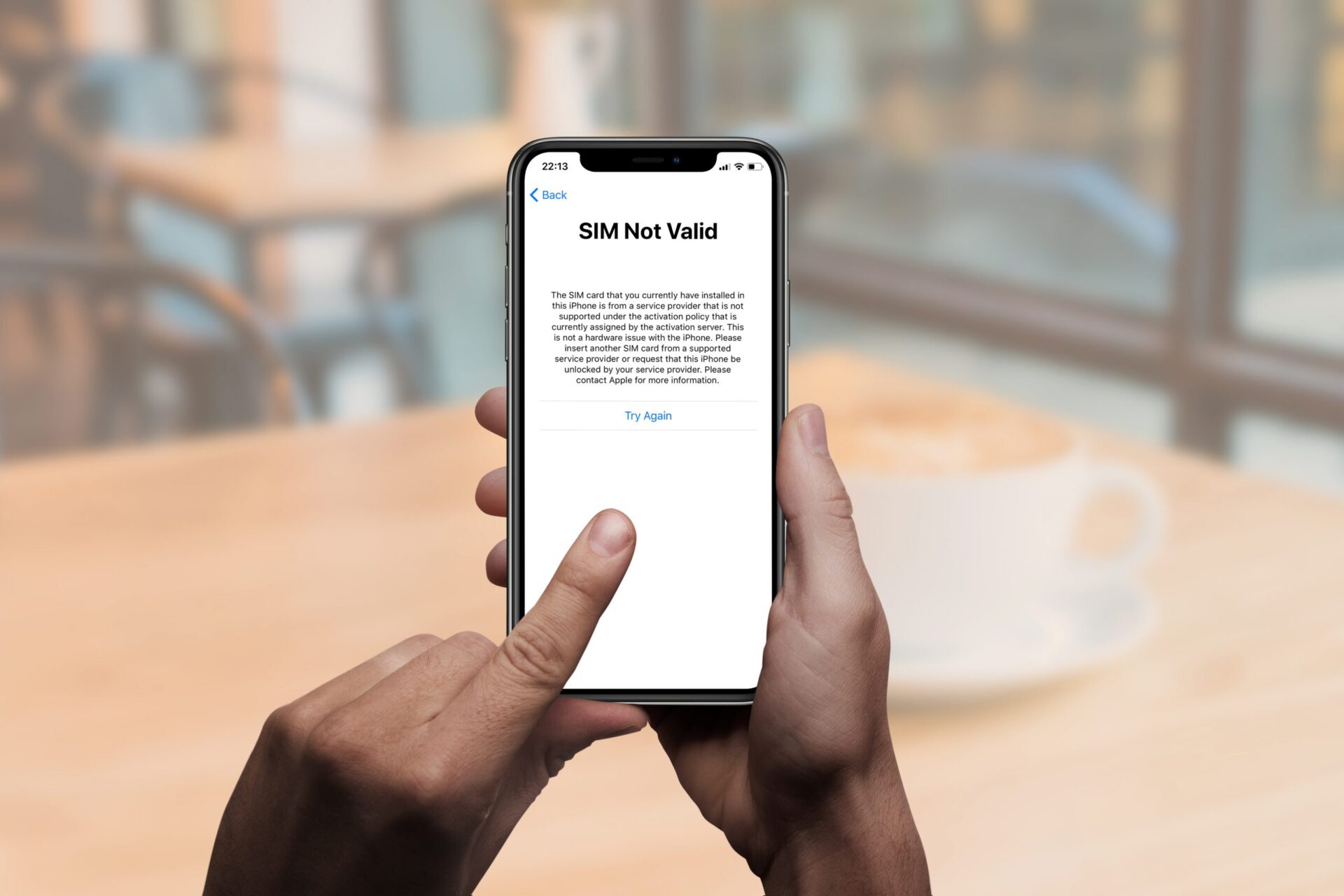
When an iPhone is unable to connect to a cell network, a “No Service” message appears in the upper left corner of the screen, where the carrier or reception signal is usually displayed, and an alert message appears on the iPhone screen that says “Cellular Update Failed – Your iPhone cannot make or receive calls or access cellular data until it has been updated.”
We’ll show you a couple solutions to try to get cellular data and cell service working again on an iPhone that’s experiencing these issues.
Ways to fix your iPhone 6 Cellular Update Failed and No Service Problem
You can use your iPhone with several carriers after you unlock it. It’s possible that your iPhone is carrier-locked. You can use your iPhone with several carriers after you unlock it.
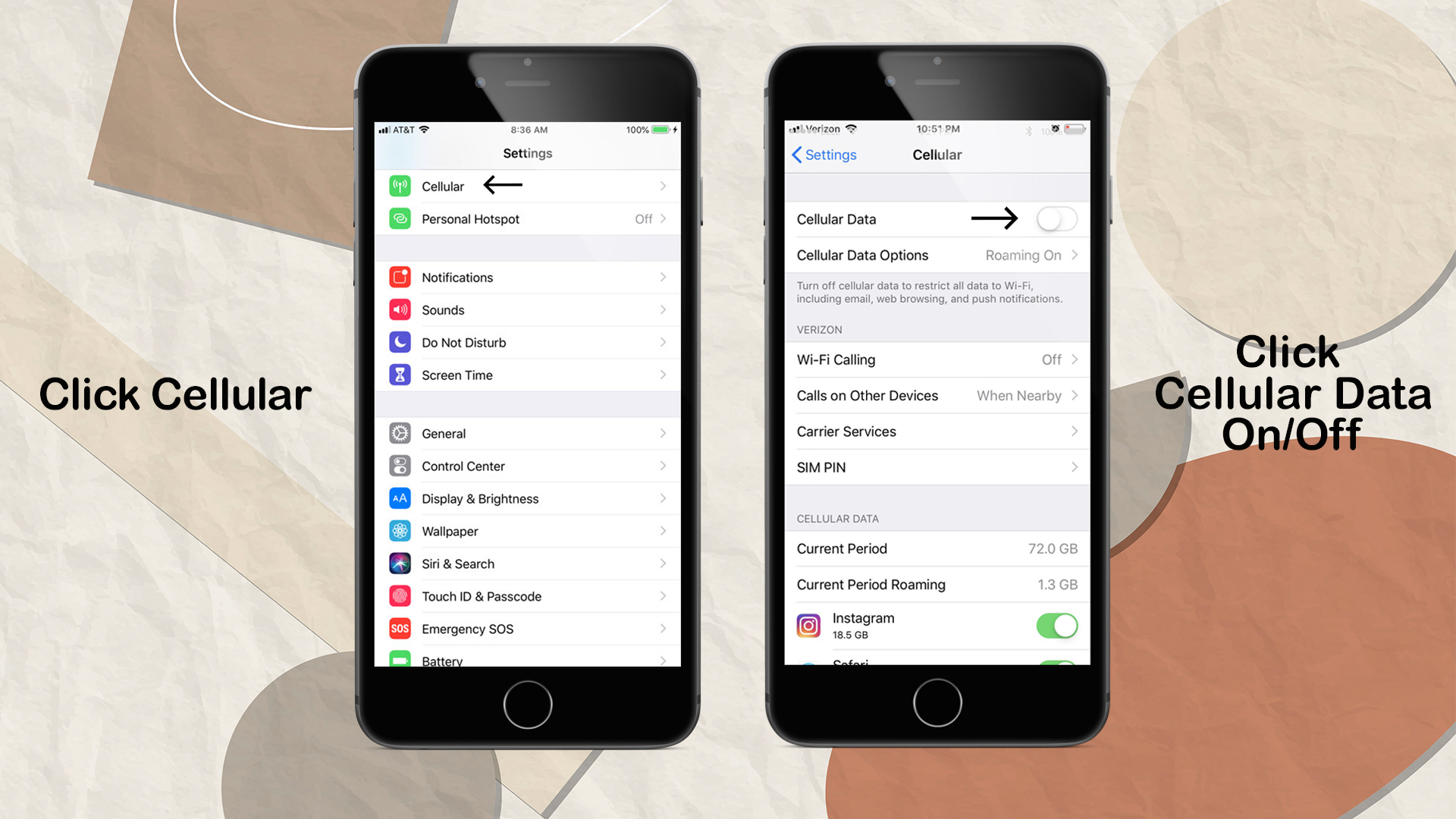
1. Check your coverage area
Go to Settings, then Cellular or Mobile Data to switch cellular data on or off. Settings > Cellular Data may appear if you’re using an iPad.
Make sure your smartphone is set up for data roaming if you’re traveling internationally. Data Roaming can be found under Settings > Cellular > Cellular Data Options > Data Roaming.
2. Restart your iPhone or iPad
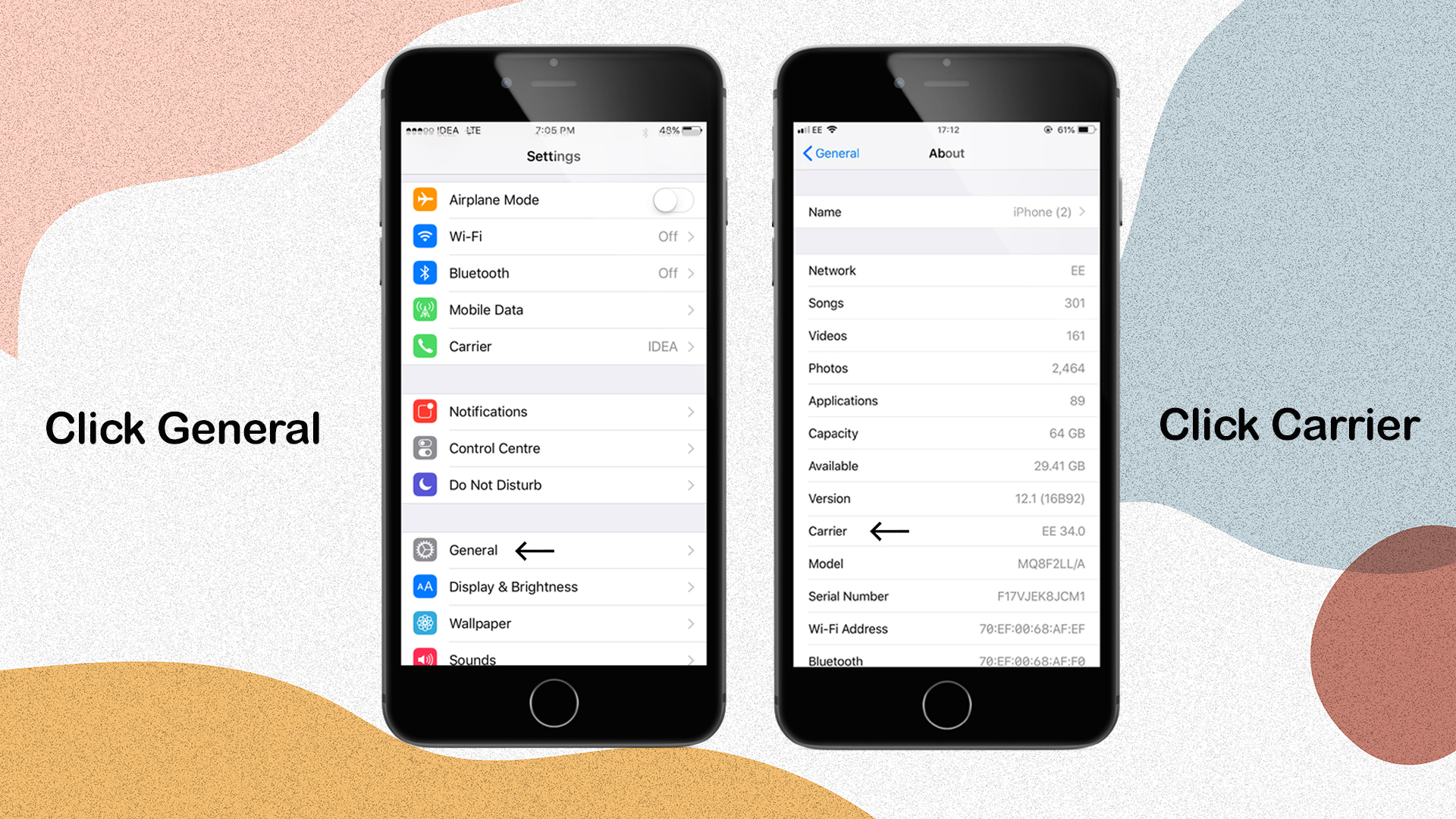
3. Check for a Carrier Settings update
To check for and install a carrier settings update manually, follow these steps: Make sure your device is connected to the internet via Wi-Fi or cellular service.
Select Settings > General > About from the drop-down menu. You’ll notice an option to update your carrier settings if an update is available.
Tap Settings > General > About and look next to Carrier to view the version of carrier settings on your device.
You must download the carrier settings for your new carrier if you insert a new SIM card into your iPhone or iPad.
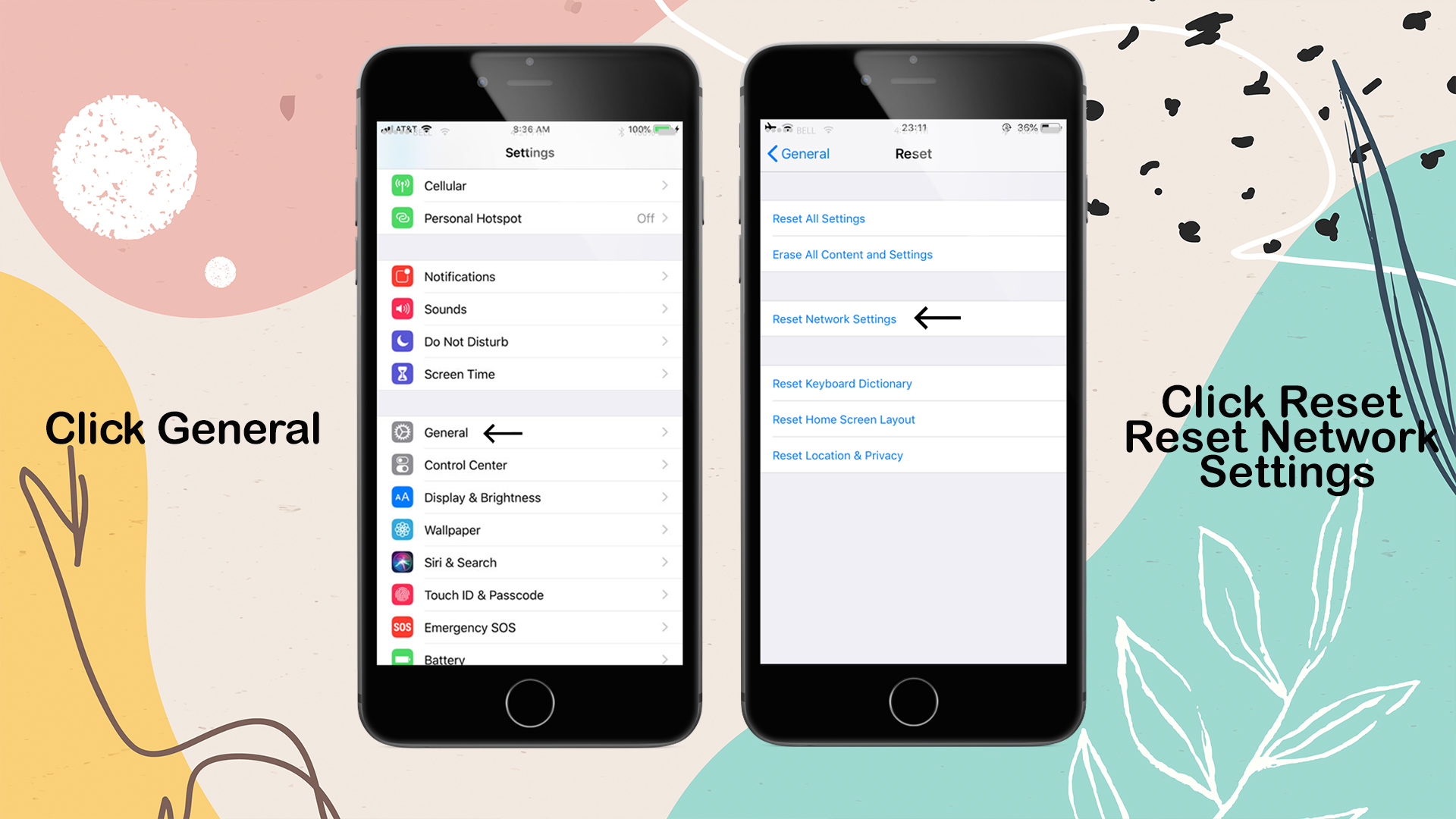
4. Reset your Network Settings.
Reset Network Settings by going to Settings > General > Reset > Reset Network Settings. This also resets any previously used Wi-Fi networks and passwords, cellular settings, and VPN and APN settings.
5. Update your iPhone or iPad
Install the most recent version of iOS on your iPhone or iPad.
6. Unlock Your Phone Using UnlockBase unlocking Service
If you tried the above steps and you continue to experience iPhone Cellular Update Failed, You still Experience No service after trying all the methods above, Maybe your phone is locked by your carrier. you may want to try the following additional troubleshooting steps:
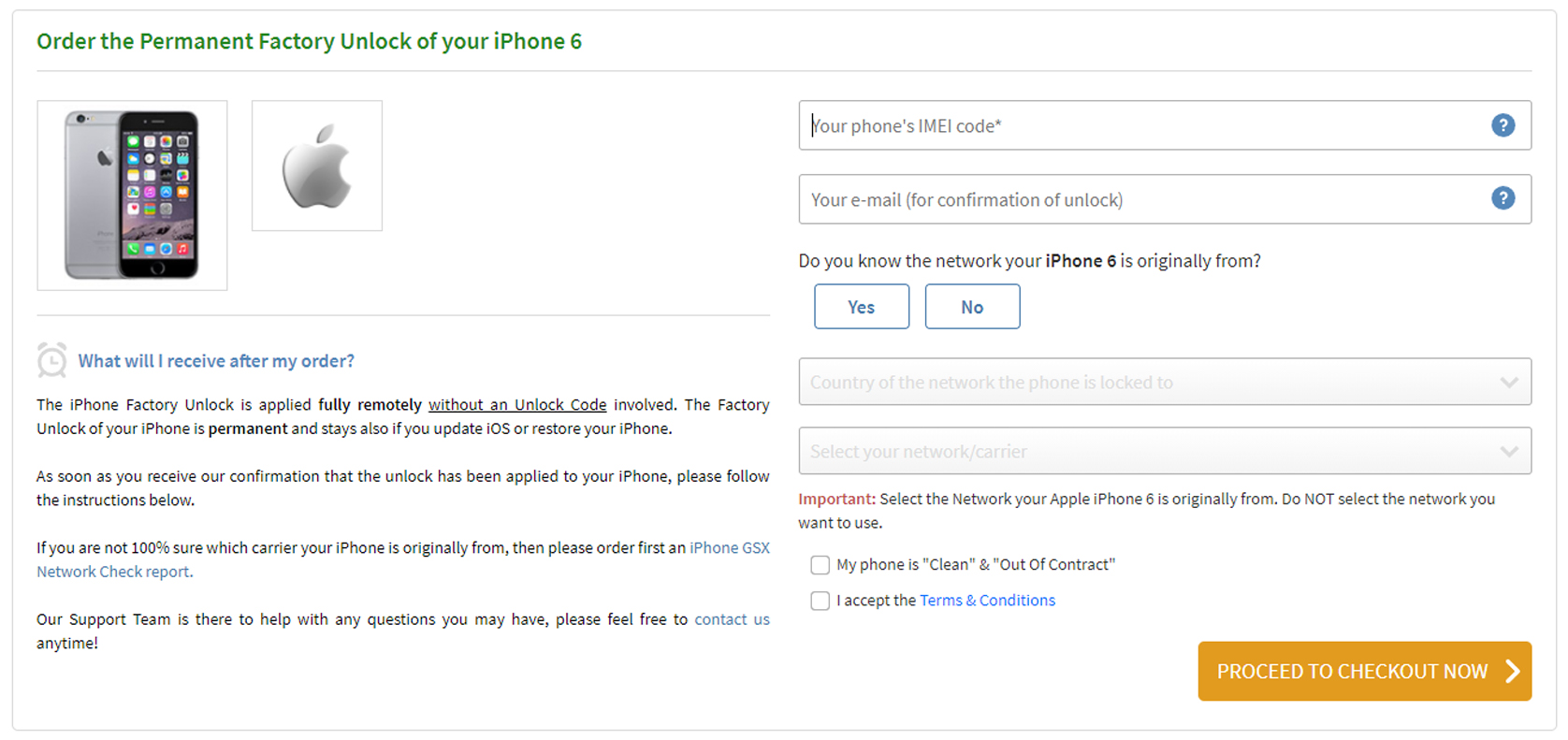
If you found out that your phone is locked and If you are not 100% which network your iPhone is originally from, then please order first an iPhone GSX Network Check report.
Without the use of an Unlock Code, the iPhone Factory Unlock can be completed completely remotely. Your iPhone’s Factory Unlock is permanent, and it will remain so even if you upgrade iOS or restore it.
Please follow the instructions below as soon as you receive confirmation that the unlock has been applied to your iPhone:
1. Insert a non-accepted SIM card into your iPhone and turn it on. If the SIM card you’re using isn’t from the initial network your iPhone was locked to, it’ll be marked as “non-acceptable.” The SIM card can be from any network carrier in the world, and it doesn’t have to be the same SIM card you’ll use in the future.
2. Your iPhone will be activated with your new SIM Card automatically. That indicates that your iPhone is now completely unlocked.
3. Your iPhone can now be used on any network carrier in the world!
Conclusion
If you take the safe and legal route, you can fix your iPhone 6 Cellular Update Failed Problem for smoother communication. You may have to pay a little money, but it will be for the benefit of your phone, and you will be able to take advantage of the convenience that an unlocked handset may bring you on your most exciting vacations abroad.
Did the preceding tips help you reactivate your iPhone’s cellular data and cellular connectivity? Did this fix your iPhone’s “No Service” issues and the “Carrier Update Failed” error messages? Is there another way for you to fix these issues with your iPhone service? Please let us know in the comments section below.
All products, and company names, logos, and service marks (collectively the "Trademarks") displayed are registered® and/or unregistered
trademarks™ of their respective owners.
The authors of this web site are not sponsored by or affiliated with any of the third-party trade mark or third-party registered trade mark owners,
and make no representations about them, their owners, their products or services.
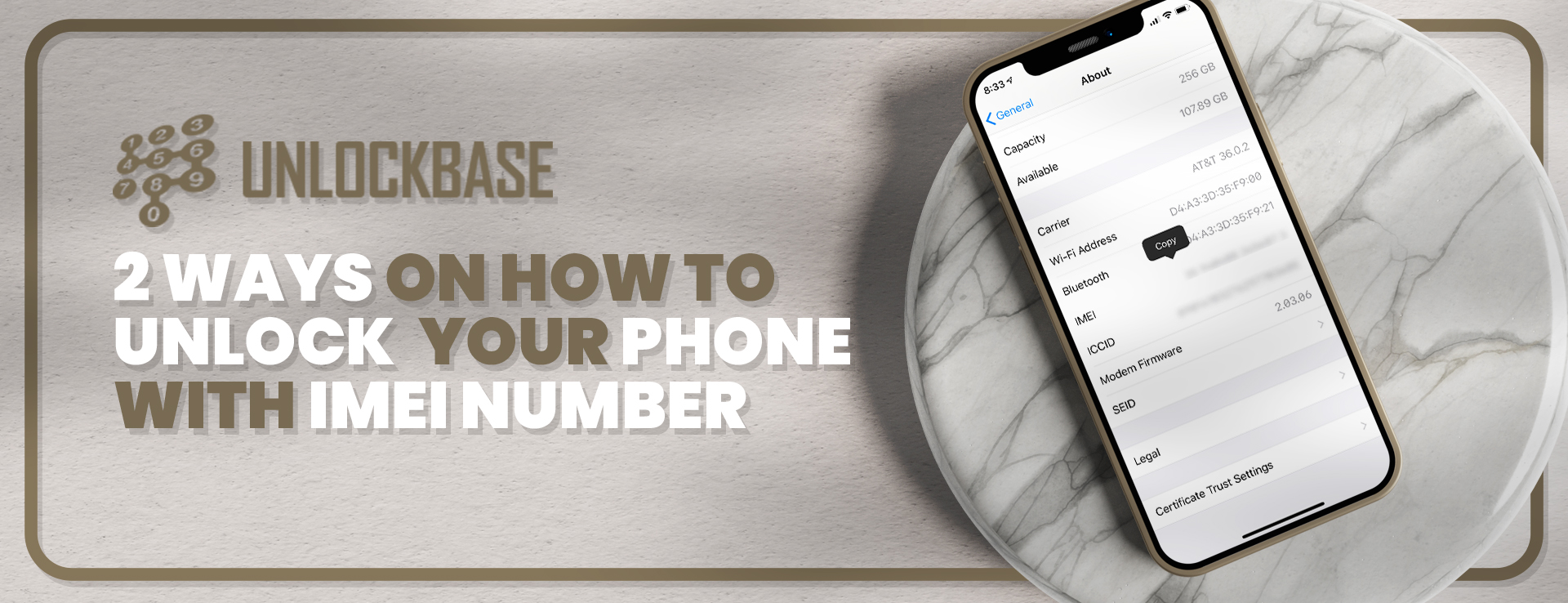
There are numerous advantages to Unlock Your Phone with IMEI. For starters, it allows you to switch to whatever carrier you want, giving you access to a wide range of internet services at the lowest price possible. The majority of people are unable to unlock their phones since they do not know how to do so. If you’re one of these users, this article will show you how to Unlock Your Phone with IMEI number for free or including a paying method.
How to find your Phone IMEI?
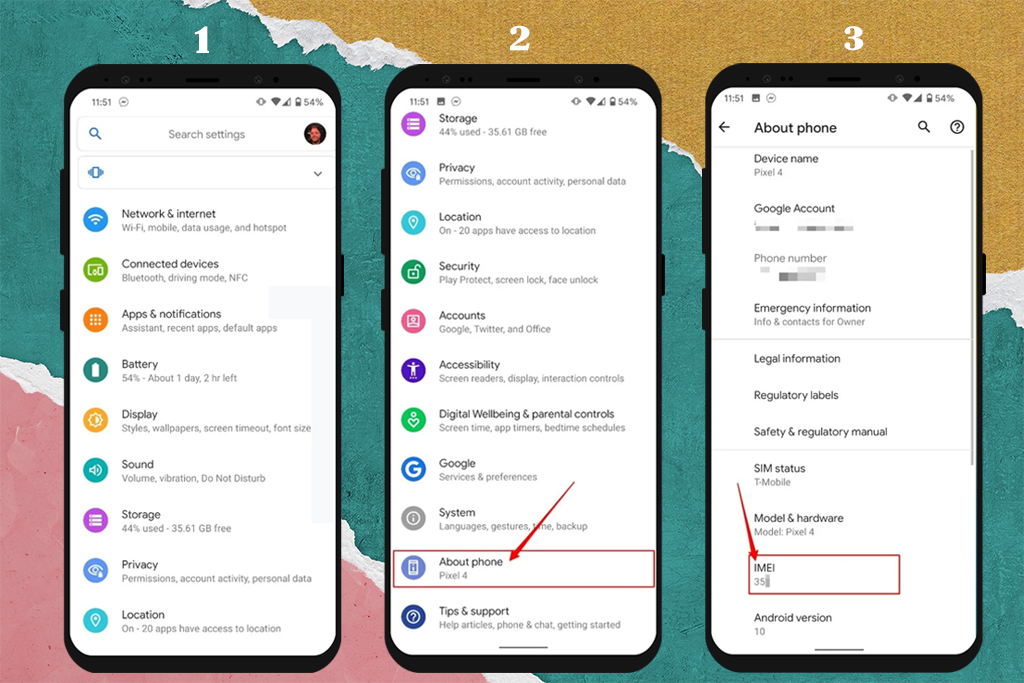
On an Android phone, the IMEI may be found in the Settings menu. Simply hit on About Phone, scroll down to the bottom of the menu, and the IMEI will appear
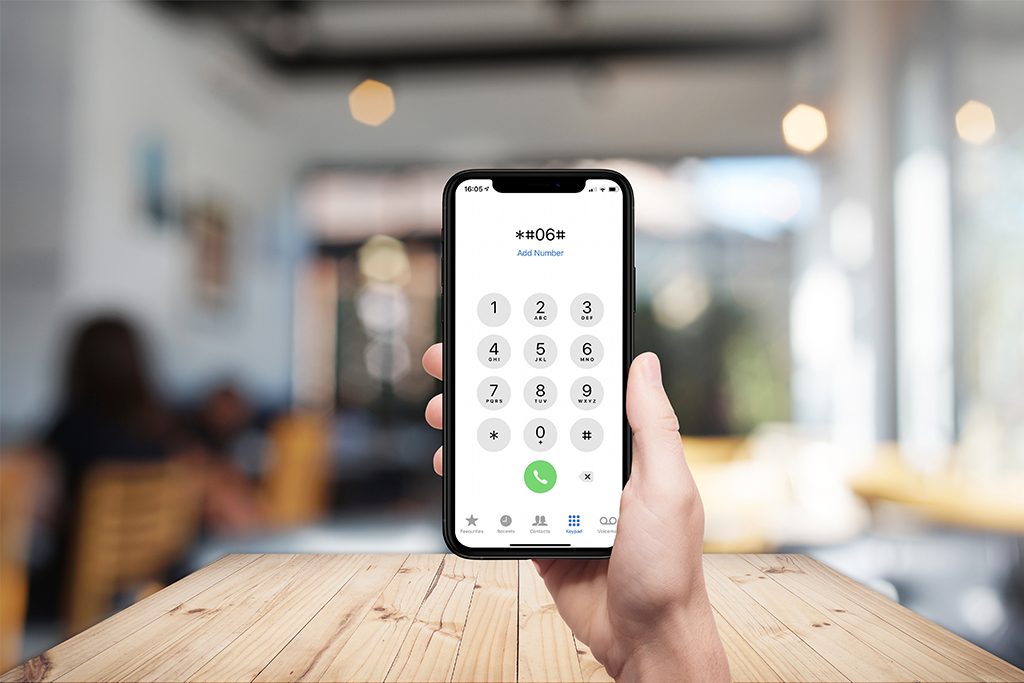
The IMEI can also be found in the Settings app on an iPhone. Scroll down to discover the IMEI by going to General and tapping on About and keep scrolling down until you can see the IMEI.
If the phone is Locked, we have an article for you to get your IMEI here Take down or Save your IMEI number, we will be needing it later during the process of unlocking your phone
Check the IMEI of the Phone to see if it’s on the Blacklist
After you’ve obtained your phone’s IMEI, validate that your phone is carrier locked, but more significantly, you can see if your phone has been blacklisted, by doing so. If your phone is found to be blacklisted, you will be unable to unlock it unless it is removed from the blacklist.
1. Unlock Your Phone with IMEI number For Free
Things You’ll Need Before Unlocking Your Phone
Your device’s manufacturer and Exact Model Number
The IMEI (International Mobile Equipment Identity) number of the phone
An active Email Address for the Unlock Code Delivery
We Offer Free Unlock Services!
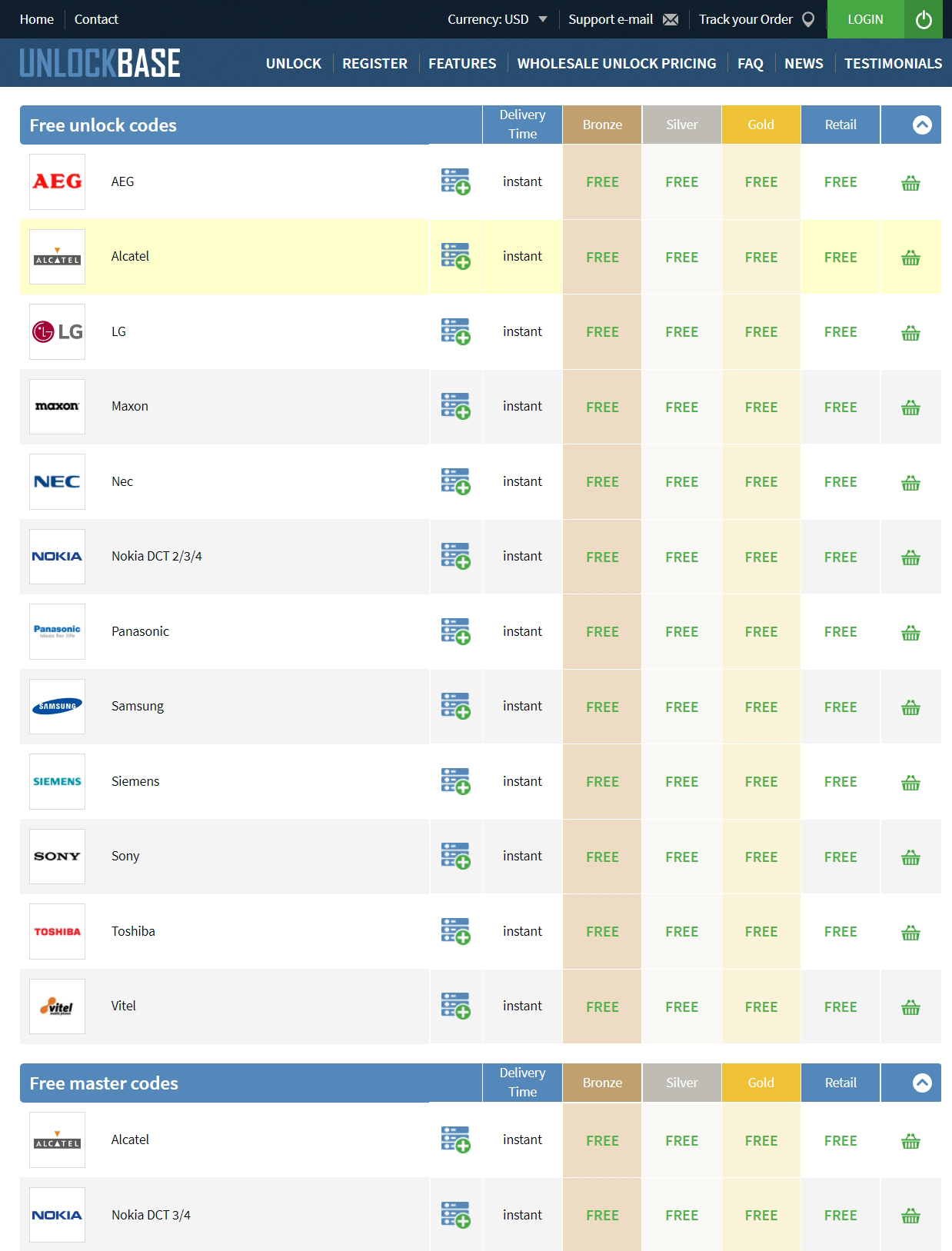
In case your old device is covered by our FREE services, we can unlock your old device without spending anything, you just need to check the exact model and manufacturer of your old phone and we can unlock it for you. Just go to this link : https://www.unlockbase.com/wholesale-phone-unlocking/
Scroll to the bottom where it says “Free Unlock Codes”. Here are some of the Manufacturers that we have for free unlock codes for old devices :
Just provide the information needed for your unlock request. Wait for us to send you the unlock code for your phone. We will provide you with an unlock code. We’ll walk you through how to enter the code and unlock your phone.
If your device is one of these old models, You can get the code for free, otherwise the second method of the article applies.
2. Unlock Your Phone Using UnlockBase unlocking Service
If you discovered that you don’t meet all of your carrier’s unlock criteria, this is by far the best choice.
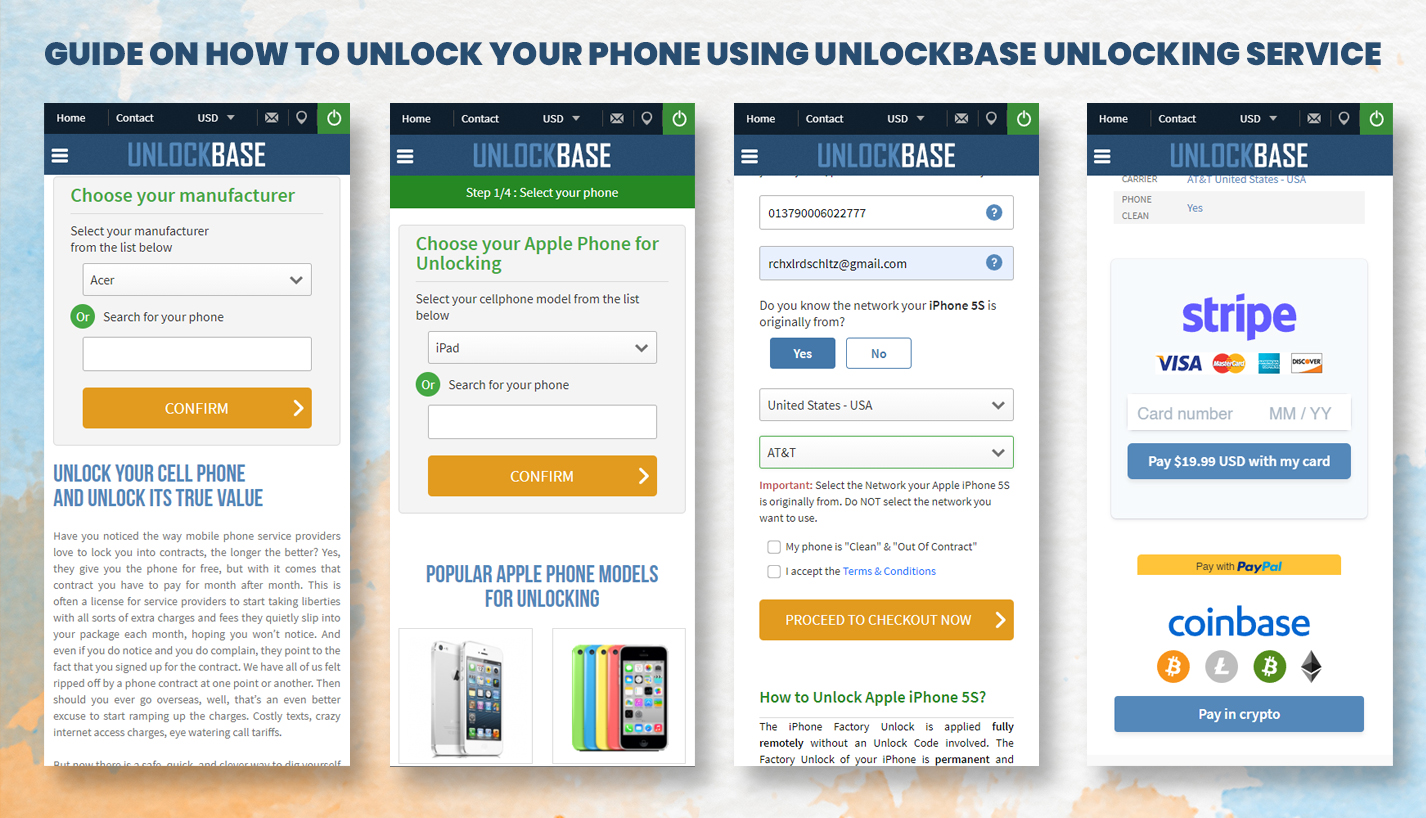
3. Select your cell phone model from the list after getting the right manufacturer of your phone
4. In the first part of the article, we asked you to write down your IMEI Number, Insert your IMEI on the website
5. Select your phone’s carrier. If you’re an Apple User and don’t have any idea what your phone carrier is, you can check it here.
6. Proceed to Check out and give you Account Information to Confirm your Payment.
Your order will begin to be processed once you have completed the payment. Within 24hrs, you will receive an email confirming that your phone has been successfully unlocked.
7. We’ll then send you an email to inform you that phone is unlocked
The main disadvantage of this strategy is that you will have to spend money on it. However, the advantages of using UnlockBase exceeds this disadvantage.
The main disadvantage of this strategy is that you will have to spend money on it. However, the advantages of using UnlockBase exceeds this disadvantage. You don’t have to wait 30 days for the unlocking; instead, you only have to wait hours!
Conclusion
There are numerous options available when it comes to unlocking a phone for free using the IMEI number. You have two options: use a direct carrier or pay for the UnlockBase Unlocking service.
In either case, you’ll be one step closer to unlocking your phone and having access to hundreds of internet services.
All products, and company names, logos, and service marks (collectively the "Trademarks") displayed are registered® and/or unregistered
trademarks™ of their respective owners.
The authors of this web site are not sponsored by or affiliated with any of the third-party trade mark or third-party registered trade mark owners,
and make no representations about them, their owners, their products or services.
Do you have an old T-Mobile phone that you want to use as your secondary phone for emergency use but it’s locked? or you purchased a used phone but the seller didn’t properly prepare it and improperly cleaned it so that it is protected by a carrier lock? But don’t worry, we’ll show you how unlocking T-Mobile phone without a T-Mobile account in this guide.
Things to Know Before Unlocking Your T-Mobile Phone
Before you unlock your T-Mobile Phone, there are a few things you should know.
1. Ensure your Phone isn’t blacklisted in T-Mobile
An IMEI checker is required to determine whether your Phone is on the blacklist. Because a blacklisted phone, especially one locked to T-Mobile, cannot be unlocked.
Probably won’t be able to unlock your phone if it has been blacklisted, perhaps because you reported it as lost and neglected to notify your carrier when you discovered it again.
2. Ensure your phone is T-Mobile-locked.
Over 20% of T-Mobile unlocking requests are invalid, according to a research, because the phone is not a T-Mobile device.
Unlock your T-Mobile phone without Account
1. Using a Hardware Unlock Solution
Unlocking a T-Mobile phone without a T-Mobile account is possible via adjusting the phone’s hardware. There are numerous techniques you may take with this strategy, but you’ll almost always need to contact a specialist to handle it, or you can use a sim card and a module that can be installed into your phone if it is an iPhone. The chip inside the hardware will bypass the carrier lock when you set the ICCID Code in ICCID mode.
But you should also know that messing around with phone hardware in any way will void your warranty. It’s not a permanent solution and you can’t unlock blacklisted phones.
Hardware unlock method is far riskier than most of the other options.
2. Using a Unlock Base Unlocking Service
We supply T-Mobile unlock codes for over 30k T-Mobile cell phone models. It doesn’t matter if it’s an old T-Mobile, or one of the latest releases, with Unlock Base you will find a solution to successfully unlock your T-Mobile, fast.
There’s no need to send us your phone, just provide us the Serial Number (IMEI) of your phone and we will promptly deliver your unlock code. You can click the link here, If at any stage you feel lost or unsure, our dedicated team of customer support staff are on hand to help you with your phone unlocking needs.
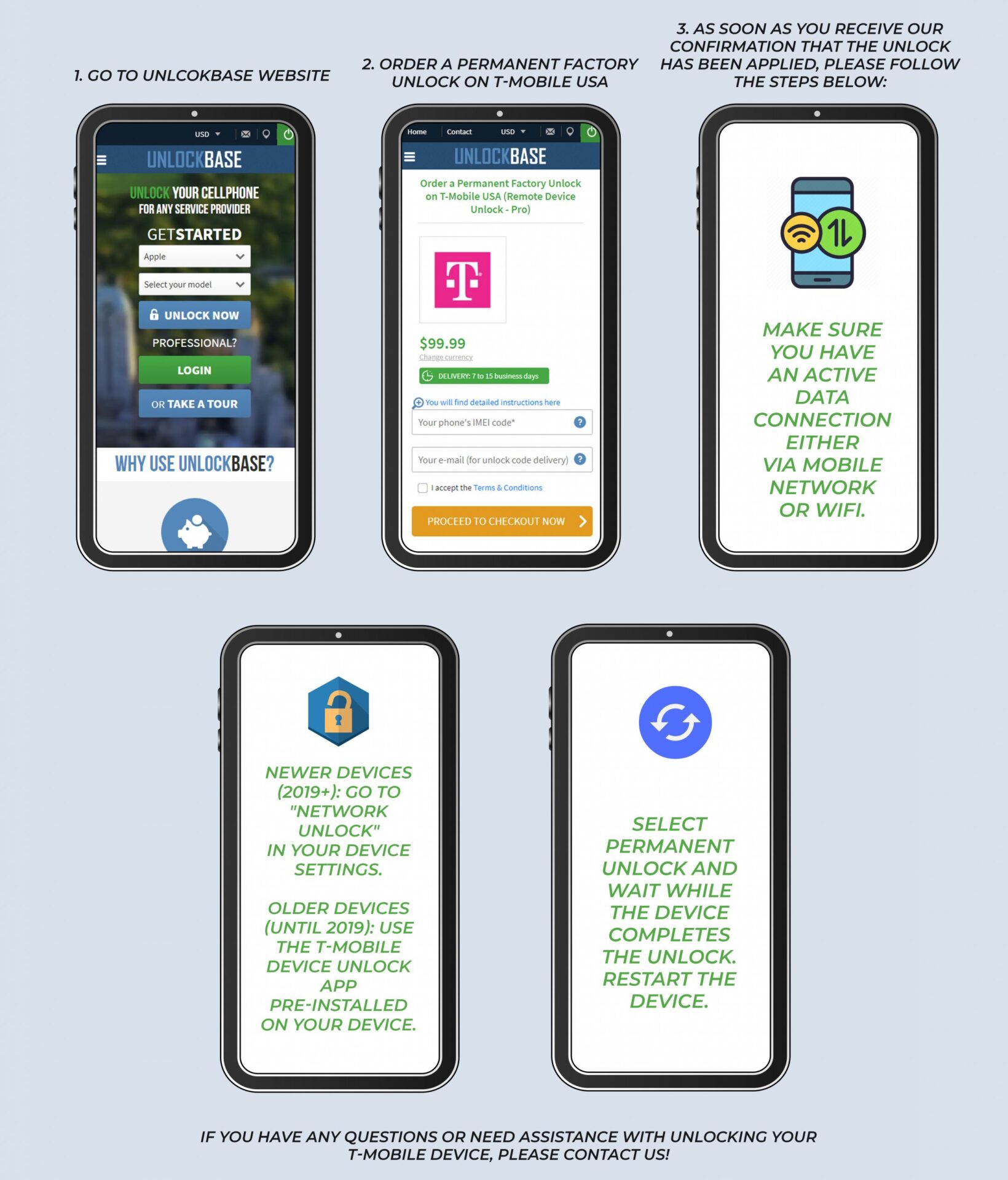
For Android devices The T-Mobile App Unlock service takes 5-15 business days and most importantly: All newer devices from 2019+ do not have an “App” anymore but the app functionality is integrated into the firmware.
If you are using an iOS (iPhone) device from T-Mobile, there’s also no need to enter an unlock code. However,unlocking an iPhone is a completely different process. Go here to see how it’s done.
To unlock your T-Mobile today, just select the correct phone model by using the drop down menu or typing the exact model in the search form below. In no time, we will present you with the solution(s) to free up your T-Mobile cell phone from any Network Lock once and for all, and at the most competitive rate too.
Conclusion
You should be able to unlock your phone regardless of whether or not you have a T-Mobile account linked with it.
There are ways to unlock a T-Mobile phone without a T-Mobile account, as we’ve shown in the solutions above, as well as ways to unlock the phone with a T-Mobile account — the latter techniques are, of course, easier.
Unlocking your phone from a carrier has numerous advantages, the most important of which is that it allows you to connect to another carrier without restriction. Don’t let carrier locks hold you back any longer; go to work unlocking your phone!
All products, and company names, logos, and service marks (collectively the "Trademarks") displayed are registered® and/or unregistered
trademarks™ of their respective owners.
The authors of this web site are not sponsored by or affiliated with any of the third-party trade mark or third-party registered trade mark owners,
and make no representations about them, their owners, their products or services.
As the digital landscape continues to evolve, online gaming has gained significant popularity. But, this rise has also brought about legitimate concerns about safety and security. For those venturing into the world of online casinos, understanding what makes a platform trustworthy is essential. This guide covers critical aspects that every player should evaluate to ensure a secure gaming experience.
Understanding Online Casino Safety
When players consider engaging with online casinos, safety becomes a paramount concern. It encompasses various factors that contribute to a secure gaming environment. Two of the most crucial aspects are licensing and regulation, as well as encryption and data protection.
Licensing and Regulation
The foundation of a safe online casino lies in its licensing and regulation. Reputable casinos typically hold licenses issued by recognized authorities. These regulators enforce strict guidelines to ensure that casinos operate fairly and transparently. Players should always check the issuing authority’s credibility, as this can significantly impact the overall safety of their gaming experience. Popular jurisdictions such as the United Kingdom, Malta, and Gibraltar are known for their robust regulatory frameworks. Alongside regulation, players are often drawn to No-deposit online offers, which provide a low-risk way to test a platform’s legitimacy and features before committing any personal funds.
Conversely, unlicensed casinos can pose serious risks, including unfair practices and lack of recourse in case of disputes. Players must prioritize platforms that display their licensing information prominently on their websites. This ensures that they are engaging with a legitimate operator committed to upholding industry standards.
Encryption and Data Protection
Encryption technology is another critical element of online casino safety. Safe operators employ advanced encryption protocols, such as SSL (Secure Socket Layer) encryption, to safeguard user data. This technology ensures that sensitive information, like personal details and financial transactions, is transmitted securely and remains confidential.
In today’s digital age, data breaches are a common concern among online users. Hence, players should verify whether an online casino possesses a robust security infrastructure to protect against unauthorized access. Reading privacy policies and understanding how personal data is used can further illuminate the safety measures taken by the casino.
Reputation and User Reviews
Beyond technical security measures, the reputation of an online casino plays a significant role in assessing its safety. Much of this reputation is shaped by user reviews and overall player experiences.
Common Signs of a Safe Online Casino
A well-established online casino often showcases a history of positive player experiences. Players can look for specific indicators that reflect a casino’s reliability. For instance, a strong presence on gaming forums, positive reviews, and awards from industry watchdogs indicate a trustworthy platform.
Also, responsive customer service is another sign of a safe online casino. If a player encounters issues, having access to effective customer support can make a significant difference. Checking for multiple contact methods, such as live chat, email, and phone support, can provide insight into the casino’s dedication to player satisfaction.
Payment Methods and Transaction Security
The payment methods offered by an online casino are crucial not only for convenience but also for security. Casinos that provide a variety of trusted payment options, such as credit cards, e-wallets, and bank transfers, often signal reliability. Besides, players should look for casinos that carry out secure payment processing systems. Trusted platforms take extra measures to ensure that financial transactions are safe, verifying the legitimacy of transactions before permitting withdrawals or deposits.
Responsible Gambling Practices
A reputable online casino not only promotes security but also fosters responsible gambling practices. This concern demonstrates the casino’s commitment to player well-being and its stance against gambling addiction.
Customer Support and Transparency
Access to responsive customer support can indicate a casino’s accountability towards its players. A platform that offers clear information on its policies, services, and promotion requirements reflects a strong commitment to transparency. Players should always familiarize themselves with a casino’s responsible gambling features, such as self-exclusion options, spending limits, and links to support organizations. These features empower players to manage their gambling habits effectively, ensuring a safer gaming experience.
Final Thoughts on Online Casino Safety
While the allure of online casinos continues to attract a wide audience, players must remain vigilant about their safety. By prioritizing licensing and regulation, enforcing strong data protection measures, and assessing a casino’s reputation through user reviews, players can significantly mitigate risks. Besides, casinos that actively promote responsible gambling practices and provide thorough customer support demonstrate a commitment to player safety.
Eventually, knowledge and due diligence are the best tools for players navigating the online gambling landscape, ensuring enjoyment without compromising security.
All products, and company names, logos, and service marks (collectively the "Trademarks") displayed are registered® and/or unregistered
trademarks™ of their respective owners.
The authors of this web site are not sponsored by or affiliated with any of the third-party trade mark or third-party registered trade mark owners,
and make no representations about them, their owners, their products or services.
Each year Apple releases a new iPhone series, we know that it only gets more expensive. However, this year is an exception. This year’s entry-level iPhone 13 in the series is priced just the same as the iPhone 12 and iPhone 12 Mini, and Apple dropped heir prices dropped so people are encouraged to buy the latest iPhones this year.
That should make you think just how fast the iPhone depreciates in value. The iPhone 12 and iPhone 13 only differ by $100, which makes the latter, being the latest, the more viable option for many. But is it really?
Before you upgrade to the iPhone 13, let’s take a look at what you’re actually buying and discuss any new features or new design upgrades versus the iPhones before it and the flagship Android devices within its price range.
Pros
Ceramic Shield for better protection
IP68 water and dust resistance
Updated 6-Core CPU and Chipset
Added new camera sensors
Better Camera stabilizers
Long battery life
Cons
The design didn’t change from last year’s iPhones
The new camera alignment didn’t offer any new value
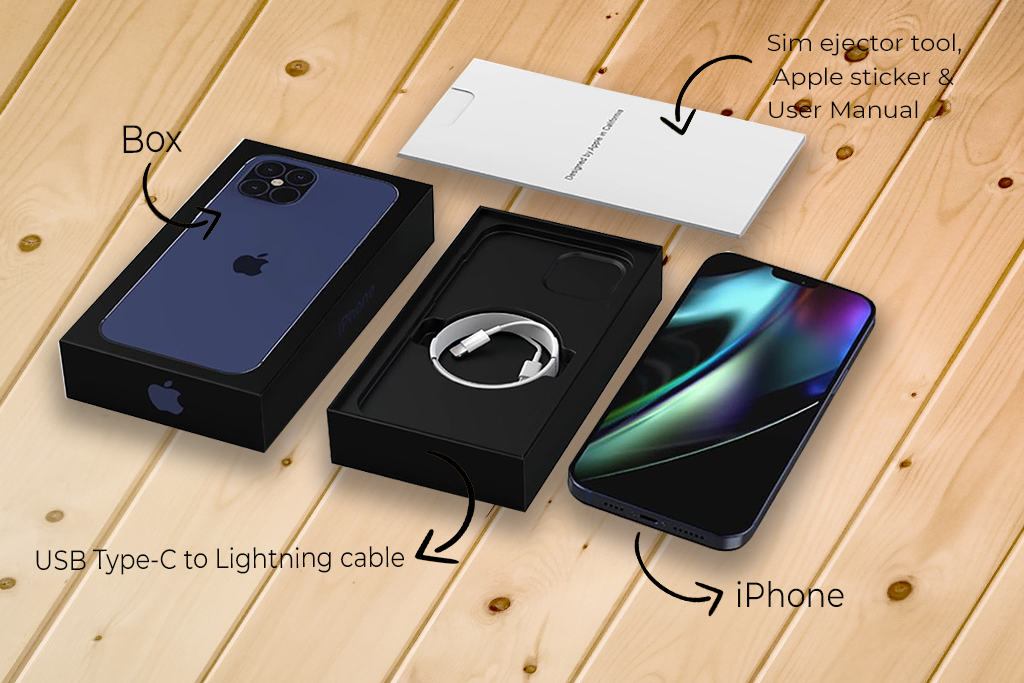
No power brick in the box
No plastic shrink wrap for added protection
The camera bump is still there and thicker
It is heavier than the iPhone 12
Unlocking iPhone 13: Design and Build Quality
There is a good reason why the iPhone 13’s price is just the same as the iPhone 12’s. It’s because they hardly changed anything on the outside. The design of the phone is just the same as the iPhone 12, even the build materials used are the same.
Can be argued, but we dare say the iPhone 13’s design is recycled from that of the iPhone 12.
Moreover, the aluminum frame and the corning glass front and back cover are just the same. Apple says there is a 1mm difference between the two, but you can hardly see that when both are laid flat on a surface.
The notorious camera bump in the back is still there, albeit with a little difference in the arrangement. The cameras are of the same quality.
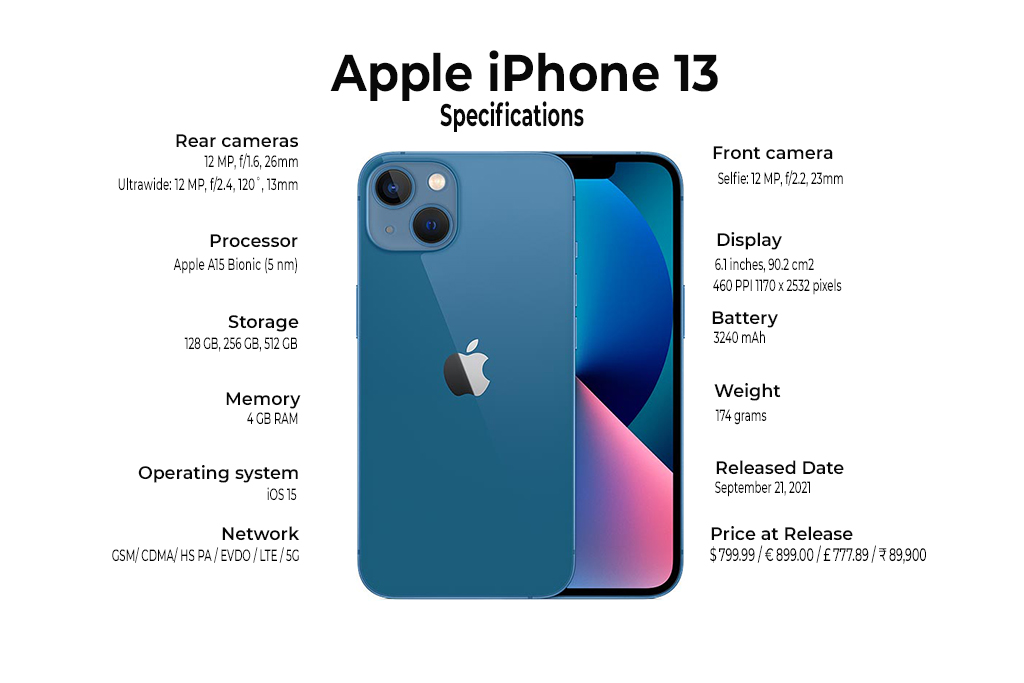
There is a substantial difference in the weight of the two phones because the iPhone 13 packs a bigger battery than that of the iPhone 12, which of course, explains why the iPhone 13 has longer battery life. The iPhone 13 has 3,227 mAh.
On the other hand, the iPhone 13 is sitting on Apple’s fastest and latest chipset and with a faster RAM and bigger internal memory.
iPhone 13 Tech Specs vs Iphone 12 vs Android Flagships
iPhone 12
iPhone 13
iPhone 13 Pro
Samsung Galaxy S21 5G
Battery life
2815 mAh
3,227 mAh
3,095 mAh
4,000mAh
RAM
4GB
6GB
6GB
12GB
ROM
64GB
128GB
128GB
128GB
Front Cam
12 MP, f/2.2
12 MP (f/2.2)
12 MP (f/2.2)
10 MP, f/2.2
Rear Cam
12-megapixel (f/1.6) + 12-megapixel (f/2.4)
12-megapixel (f/1.6) + 12-megapixel (f/2.4)
12 MP, f/1.5 + 12 MP, f/2.8 + 12 MP, f/1.8
12 MP, f/1.8 + 64 MP, f/2.0 + 12 MP, f/2.2
Build
Gorilla Glass Front & Back, Aluminum Frame
Gorilla Glass Front & Back, Aluminum Frame
Gorilla Glass Front & Back, Stainless Steel Frame
Glass front , plastic back, Aluminum Frame
Protection
IP68 dust/water resistant
IP68 dust/water resistant
IP68 dust/water resistant
IP68 dust/water resistant
Screen Size
6.1” OLED
6.1” OLED
6.1” OLED
6.2” AMOLED
Price
$729.99
$799.99
$999.99
$799.99
When it comes to the price and the features, it’s clear that the iPhone 13 is just so-so compared to the iPhone 12 and its Android competition. For the same price, Samsung Galaxy S21 has 3 high-powered cameras at the back with better aperture and higher megapixels than that of the iPhone 13.
Compared to iPhone 12’s memory capacity, iPhone 13 has more RAM and more internal memory, and with a faster chipset, there will be a huge difference when it comes to speed and real-time user experience.
Compared to its predecessor, the iPhone 13 does have features that might make it worth the consideration to upgrading. If you’re looking for a faster experience or better memory, it does hold a lot more power and memory than the iPhone 12.
Is it worth the $100 price difference? What do you think?
Let us know in the comments section!
All products, and company names, logos, and service marks (collectively the "Trademarks") displayed are registered® and/or unregistered
trademarks™ of their respective owners.
The authors of this web site are not sponsored by or affiliated with any of the third-party trade mark or third-party registered trade mark owners,
and make no representations about them, their owners, their products or services.