
One UI 8.5! Samsung is about to make your phone smarter. The new One UI 8.5 update brings AI network switching. Furthermore, your phone will know when to switch between Wi-Fi and mobile data.
Many Android phones already do this. However, Samsung is taking it further. Moreover, the new features learn from your habits. Let’s explore what makes One UI 8.5 different.
One UI 8.5 : Two New AI-Powered Switching Options
Reports from SammyGuru say One UI 8.5 has two AI toggles. Additionally, these features change how your Galaxy phone handles networks. Meanwhile, both work differently.
Intelligent Link Assessment: Speed-Based Switching
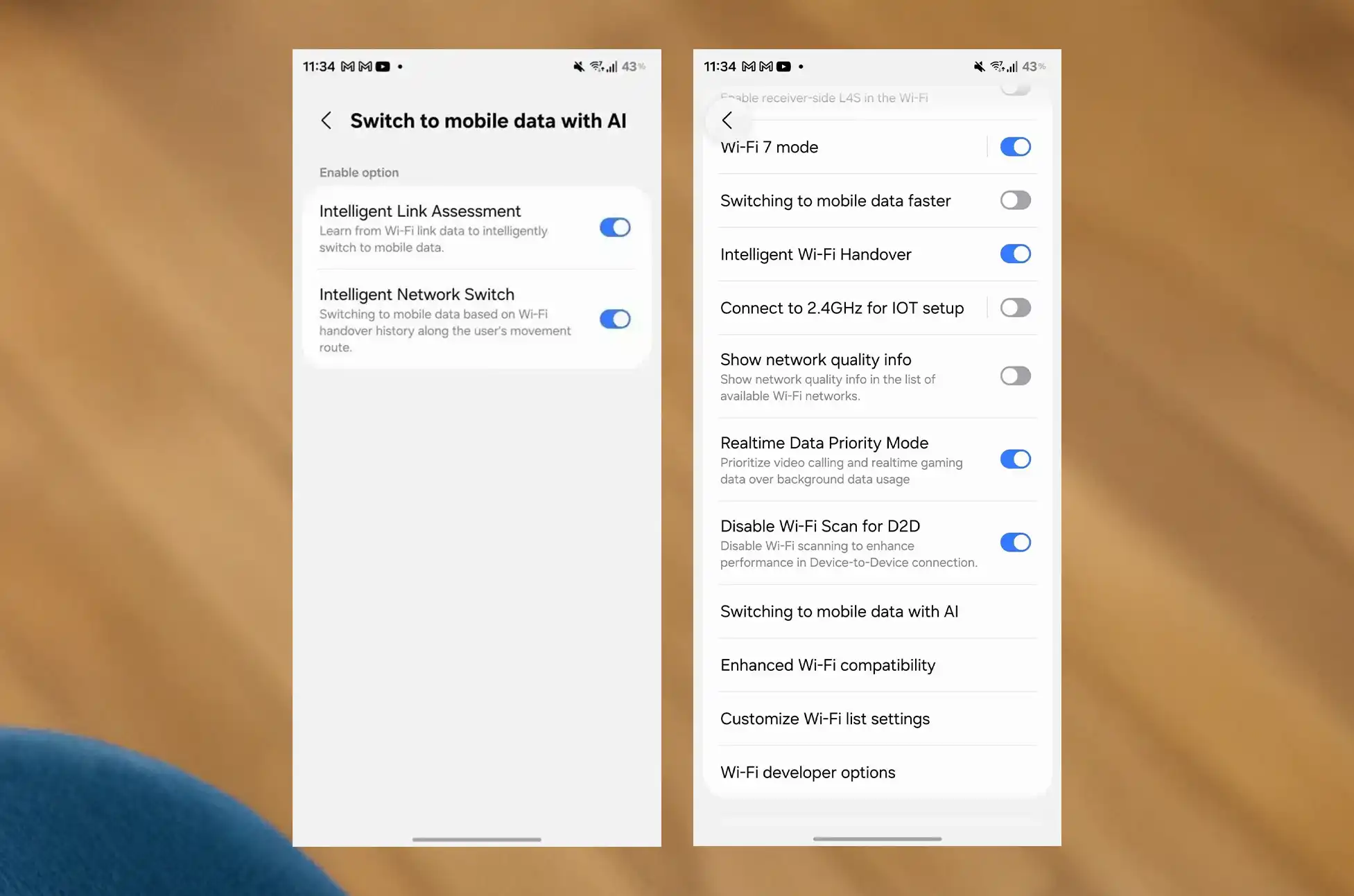
The first toggle is called Intelligent Link Assessment. It switches your phone from Wi-Fi to mobile data. Specifically, your phone checks speed. It also checks delay and signal strength. Then it decides whether to switch.
This is similar to other Android phones. Nevertheless, Samsung’s AI makes it more accurate. Therefore, you get fewer bad switches.
Intelligent Network Switch: Location-Based Learning
The second toggle is more interesting. It’s called Intelligent Network Switch. Additionally, this feature learns from your behavior.
How does it work? The phone tracks your switch history. Basically, it remembers where you usually switch networks. Then it does it by itself next time.
Here’s an example. You leave home every morning. Your phone switches from home Wi-Fi to mobile data. It happens at the same spot. After a few days, the phone learns this. Consequently, it switches by itself at that spot.
Realtime Data Priority Mode: Better Calls and Gaming
One UI 8.5 also brings Realtime Data Priority Mode. Furthermore, this toggle is in the Wi-Fi settings menu.
What does it do? It gives priority to video calls and gaming. First, your video calls get top priority. Next, gaming traffic comes second. Meanwhile, background downloads wait. Therefore, you get less lag and clearer calls.
This is similar to One UI 8’s Prioritize real-time data toggle. However, more Samsung phones will get this feature. Plus, it helps during important calls and games.
Additional One UI 8.5 Features
Network switching isn’t the only new thing. Additionally, here’s what else to expect:
- Double-Tap Back Gesture: Go back with a double-tap
- Privacy Display Feature: Better screen privacy
- Photosensitive Epilepsy Protection: Reduces triggers for users
Furthermore, these features show Samsung cares about users. Moreover, they make Samsung phones easier to use.
Feature Comparison Table
| Feature | How It Works | Best For |
| Intelligent Link Assessment | Checks Wi-Fi speed and signal | Users with weak Wi-Fi |
| Intelligent Network Switch | Learns your movement patterns | Daily commuters |
| Realtime Data Priority Mode | Gives priority to calls and gaming | Remote workers and gamers |
Conclusion:
One UI 8.5 shows Samsung’s commitment to smart software. The new network switching features use AI in helpful ways. Moreover, they solve real problems that users face daily.
Intelligent Link Assessment gives you speed-based switching. Meanwhile, Intelligent Network Switch learns your patterns. Additionally, Realtime Data Priority Mode makes sure important tasks get priority.
Do you own a Samsung Galaxy phone? Then One UI 8.5 looks like a good update. Furthermore, the AI learning and smart switching will improve your daily use. Therefore, this update is worth getting when it arrives.
All products, and company names, logos, and service marks (collectively the "Trademarks") displayed are registered® and/or unregistered trademarks™ of their respective owners. The authors of this web site are not sponsored by or affiliated with any of the third-party trade mark or third-party registered trade mark owners, and make no representations about them, their owners, their products or services.


Comments are closed.