When you try to unlock Huawei using UnlockBase, you may have noticed that recently certain IMEIs from new Huawei cell phone models are frequently returning the message “Not Available” even when you are using the correct Huawei Factory Code.
After some investigations we have since found out that these models are using a specific “Calculator” from Huawei and this explains why the Factory Code database is not returning the code. The Calculator has only recently been released and so hopefully we are now able to receive the Unlock Code in less than 3 hours for these Cell Phones.
Check out the list below for Huawei Cell Phones supported by the new Unlock Code Calculator.
All products, and company names, logos, and service marks (collectively the "Trademarks") displayed are registered® and/or unregistered
trademarks™ of their respective owners.
The authors of this web site are not sponsored by or affiliated with any of the third-party trade mark or third-party registered trade mark owners,
and make no representations about them, their owners, their products or services.
As smart phones continue to get smarter and smarter, they naturally become more and more indispensable. These days, airlines, buses, and trains are making things even easier by offering ticketless travel. Just show up, present the ticket details on your phone and board the transport of your choice. Apart from that, the smart phone can schedule your trip, find you the best car rental, book your hotel…and of course, phone home. It’s a must have accessory on any trip.
So since the smart phone is so smart, it’s time you became equally wise, and not sleep walk into exorbitant overseas call charges from your service provider. These charges will drain you of your money quicker than a beach pickpocket on overtime.
For example, did you know that if you were to send a picture home via conventional text message, it could cost you up to $40.00 with some plans! That’s outrageous and criminally dumb, especially in this day and age where there are so many better and cheaper alternatives available.
In fairness, many of the leading carriers have relented and started to offer free roaming charges to several destinations. They didn’t do it because they wanted to. The truth is that every year since 2007, the maximum rate for calling or texting any European Economic Area (EEA) number while roaming within the borders of the zone while on a mobile phone in the EU, has been lowered. This covers all 28 EU member states plus Iceland, Liechtenstein and Norway (the cap also applies to data). On July 1st this year another new cap will come into force, further reducing the cost of roaming in Europe.
This is following years of extremely high overseas charges where bills could easily run to thousands of dollars with the unaware cellphone owner having no idea as to the true cost of travelling overseas with a smart phone. But do not be deceived by some of these seemingly benevolent offers. Call charges overseas can still easily run to $3.00 or $4.00 a minute, and that doesn’t include data costs charged by the megabyte as you leisurely decide which restaurant to visit on your phone.
Also, forgetting to put your phone on roaming before you leave home is a big mistake. All of your home country voice mails, texts and other data are automatically “pushed” to your phone before you are out of the airport, or as soon as you have a signal. These can cost you a lot of money in a hurry.
But there is a better and much easier way. Here is a simple 5-step process for taking a smart phone with you when you travel overseas and how to save BIG money while doing so.
Step 1: Leave your contract smart phone home alone.
Just put it in a drawer and forget about it.
Step 2: Buy a SIM Free phone
Buy a SIM Free smart phone purely for travelling. Or if you have a second smart phone you don’t often use, get it unlocked by a reliable online unlock service such as UnlockBase. This will enable you to swap SIM cards easily as you travel and instantly enjoy local call rates in whichever country you visit. Friends and family will quickly get used to your new number while you are overseas.
Step 3: Buy a “World SIM” SIM card
As an alternative to swapping SIM cards wherever you go, consider a SIM card such as World SIM, which enables you to use your phone anywhere using just one number. This award-winning SIM card gives you free international roaming in 90+ countries, international phone calls for just a couple of cents a minute and competitive local call rates while you are at home.
Step 4: Investigate free Wi-Fi options
Whenever you travel, and wherever you are, try to avoid using too much data on your cell phone. The chances are you can get free WiFi in your hotel room, at an Internet cafe, or in a coffee shop. Check out JiWire WiFi Finder App for international Wi-Fi spots; searching by your destination makes it really easy to figure out which companies offer Wi-Fi services at your destination.
Step 5: Use Skype, WhatsApp, Twitter, and Facebook for free messaging
Once you are happily in your room with the free WiFi blazing, use these free apps on your SIM Free smartphone to send your holiday photos, instant catch ups, email messages and more. If you have to make calls, make them, it’s ok because you will be on local or World SIM rates. If you use a Lycamobile SIM card you can even make free calls provided you call another Lycamobile number.
So get smart and follow these 5 simple steps so you can have peace of mind while actually enjoying your vacation and not worrying about an eye watering cell phone bill from your carrier when you get home.
All products, and company names, logos, and service marks (collectively the "Trademarks") displayed are registered® and/or unregistered
trademarks™ of their respective owners.
The authors of this web site are not sponsored by or affiliated with any of the third-party trade mark or third-party registered trade mark owners,
and make no representations about them, their owners, their products or services.
Apple just released their iOS 9 Beta 1 firmware to developers for testing and feedback. If you want to have early access to iOS 9 Beta you just need to register the UDID as part of Developper program. We can do this for $4.9 and get your UDID Registered in less than 30 minutes from Monday to Friday during regular business hours. But first if you don’t know what’s UDID, please check this post to see How to find the UDID of any iPhone / iPad.
The whole process is not hard, but reserved to geek, we recommend that you do not order if you don’t understand what we explain in the comprehensive tutorial below as we won’t provide more guidelines / support if you’re stuck.
What steps should I take to install iOS 9 Beta
1. Order your UDID Registration with UnlockBase
2. Update to the latest version of iTunes.
3. Backup your device with iTunes (we are not responsible for any loss of data during the upgrade process).
4. Download the latest iOS Beta for your device (check the at the end of this post)
5. Upgrade to iOS 9 beta using the “Check For Update”.
For Mac: Hold down the “Alt/Option” key and hit “Restore” or “Update”.
For Windows: Hold down the “Shift” key and hit “Restore” or “Update”.
6. Select the firmware file (.ipsw) you downloaded in Step 4.
8. Enjoy your iPhone running on iOS 9 Beta:
iOS 9 Beta Download
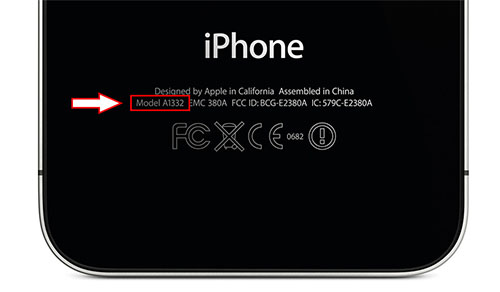
Make sure to download the version for your exact “Model Number“
All products, and company names, logos, and service marks (collectively the "Trademarks") displayed are registered® and/or unregistered
trademarks™ of their respective owners.
The authors of this web site are not sponsored by or affiliated with any of the third-party trade mark or third-party registered trade mark owners,
and make no representations about them, their owners, their products or services.
Cellpex is the next generation trade network for cell phones, tablets and accessories; they deal exclusively in wholesale lots. They have over 7 years of industry expertise with ambitions to become the largest industry platform with over 35,000 business accounts. Cellpex ranks no.1 on Google, Yahoo and Bing.
TThe idea behind the Cellpex Wholesale Trading Board is to cut out the middle man by purchasing from wholesale distributors, so as to negotiate better deals and secure better profits. Wholesale trade firms such as Cellpex are essential to the economy. They simplify product, payment, and information flows by acting as intermediaries between the manufacturer and the final customer. It’s fair to say, if you want it, Cellpex probably has it, as hundreds of new suppliers join us every day. Similarly, platforms like sky hills casino streamline the online gaming experience by cutting through unnecessary complexities—offering direct access to top-tier games, fast payouts, and seamless service without third-party interference.
In the past decade, markets have blossomed hugely and they act on behalf of the buyers and sellers of goods.
While Cellpex cuts out the middle man and subsequently cuts the cost of doing business, it does mean you are no longer dealing with a friendly, familiar sales rep who comes to you and discusses business face to face. It’s a familiar scenario with anyone who deals on the internet: how do you trust your supplier if you have never met them?
Here are five key steps to safe trading on the site that will help you to safely start negotiating some great deals and get prompt delivery of your goods.
1) First find the models and stocks you want. Take your time to refine your search using the Advanced Search options. Be sure to register first and start sourcing afterwards. By doing this you can post a purchase request which will be available online immediately and check out some of the members’ details. It’s a great way to find new business opportunities. Also, make sure you browse the Members Directory, as it might reveal local business opportunities.
2) Always perform your due diligence. Cellpex has many of the world’s leading on its database, but as with any business, if you find a supplier who is selling what you want, first do your homework. Cellpex works hard to screen all new suppliers, and places bad suppliers on a blacklist, but you should protect yourself with your own research about the company or dealer on the internet. Have other traders had a good or bad experience with them?
3) Understand the compliance issues. Get to know all the relevant import compliance regulations of your home country before you buy. Besides customs and border protection, other government authorities also regulate the importation of all kinds of goods including cellphones, tablets and other electronic devices. You should seek the services of a customs house broker before placing any order and learn the ropes.
4) Know your trade buzzwords. Called , they refer to shipping procedures such as FOB (Free On Board), CIF (Cost, Insurance and Freight) and EXW (Ex-Works). These terms are used to divide transaction costs and responsibilities between buyer and seller and reflect best practices in transportation procedures. They closely correspond to the U.N. Convention on Contracts for the International Sale of Goods.
5) Never pay for online services or goods via Western Union. It doesn’t matter where the store claims to be based, once you send money it can be picked up anywhere in the recipient’s country, with no way of tracing the person who picked it up. Criminals therefore remain anonymous. And of course, be suspicious if the seller is using a free email service such as Gmail, Yahoo or Hotmail.
There is of course more to learn, but these steps will certainly help you to get going. For further information visit www.cellpex.com.
All products, and company names, logos, and service marks (collectively the "Trademarks") displayed are registered® and/or unregistered
trademarks™ of their respective owners.
The authors of this web site are not sponsored by or affiliated with any of the third-party trade mark or third-party registered trade mark owners,
and make no representations about them, their owners, their products or services.
It’s a bit like a Social Security Number: specific to each unit; it enables Apple to immediately find the phone in its database of millions of mobile data from iPod, iPad etc. However, there’s a much simpler way to do this, and the good news is you don’t have to be a geek to understand it. We will explain how to find the UDID of your iPhone easily.
Method # 1: Conventional method: UDID via iTunes
The best known method is to find the UDID from iTunes. Nothing could be easier: connect your iPhone via USB cable, open iTunes, click your device, then on the screen summarizing the information on your iPhone, simply click the serial number. Each click will cycle and reveal clean data on your phone. Once the UDID is displayed, right click the mouse button to copy, as shown here:
This method is very easy except when your iPhone is locked by iCloud, in which case you cannot access this screen because iTunes will immediately ask you for the email and password of your iCloud account. This is where we offer a second method.
Method # 2: Recover an iPhone UDID without iTunes with Windows
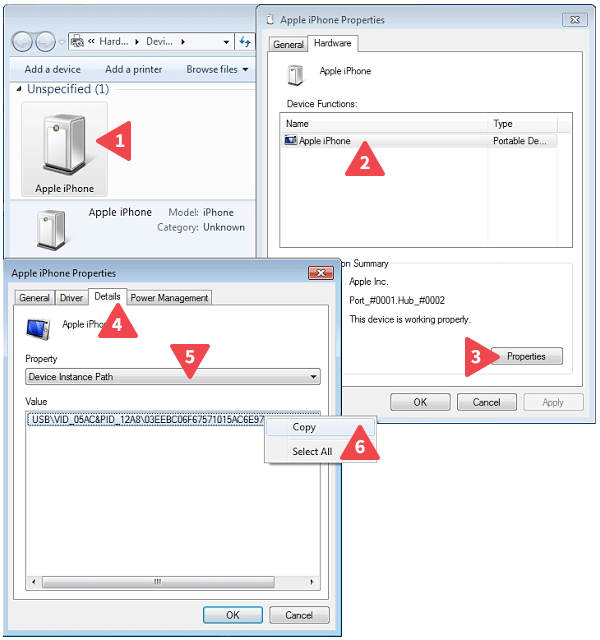
Nothing could be simpler, just plug your iPhone with a USB cable into your PC and follow these instructions:
Open the “Windows Control Panel”
Open “Devices and Printers” (under “Hardware and Sound”)
Find and double-click “Apple Mobile Device USB Driver” (1)
A properties window will open, select the “Hardware” tab
Click “Apple Mobile Device USB Driver” (2) and then “Properties” (3)
A 3rd window opens, select the “Details” tab (4)
In the drop down list of properties, locate the “Device Instance Path” (5)
Once selected, the “Value” is displayed below, simply right click and select “Copy” (6)
You will see something like this: USB\VID_05AC&PID_12A8\81130C21720C887B991F2181369C201A24DFFF65 It’s the last part that interests us: 81130C21720C887B991F2181369C201A24DFFF65
Method # 3: Recover an iPhone UDID without iTunes with MAC
First, power on your iDevice and plug it into your Mac. Select the Apple icon at the top-left of the Menu Bar, hold the Option key on the keyboard, and select “System Information” (this menu entry replaces “About This Mac” when the Option key is depressed).
When the System Information window loads, look under the Hardware section on the left and select the entry for USB. A list of your Mac’s USB ports and any attached USB hubs will appear on the right. Find your iPhone in this list and look at the bottom panel. You’ll see a long string of numbers and letters listed for “Serial Number.” Despite the name, this is not your iPhone’s serial number; it’s the UDID.
Why find the UDID of my iPhone could be useful?
Thanks to this unique identifier, we are able to offer UDID Registration to get early access to iOS 11, you’ll get quick UDID Registration that let you join our development team so you are authorized to test out iOS beta firmwares. Our fee is cheaper than registering as a developer yourself.
All products, and company names, logos, and service marks (collectively the "Trademarks") displayed are registered® and/or unregistered
trademarks™ of their respective owners.
The authors of this web site are not sponsored by or affiliated with any of the third-party trade mark or third-party registered trade mark owners,
and make no representations about them, their owners, their products or services.
In the past, unlocking a cellphone used to be a hazardous and risky undertaking that could void the warranty on your phone, but in recent years all that has changed. Nowadays you can have the phone of your choice and quickly acquire the necessary unlock code to unlock your phone and not void the warranty.
Not surprisingly, in a counter measure to this, many of the key cellphone carriers now offer attractive ‘sim only’ deals to tempt you to stay with them. They definitely do not want to lose your business, but the chances are, no matter what they may offer, it’s quite possible you can find a better deal elsewhere; should you choose to unlock your phone.
Freedom to decide on your carrier
The cellphone business has moved on, and where in the past many manufacturers had locks on the phones that prevented you from switching your carrier (such as iPhones); these days, due to growing public demand not to be tied down to a particular carrier and locked into a contract, it is not only possible to unlock your cell phone, it’s actually incredibly simple. It can be achieved online in a matter of minutes through trusted online cellphone unlocking specialists such as UnlockBase.
Why service providers have had to change their tune
The days of high charges and long service contracts from the major service providers are over, and thankfully so! And while a monthly contract can still offer you good value for your money, with generous free call minutes and all you can eat data, contracts have had to change because in the last few years the way we use cellphones has changed dramatically too, and for once, things have not worked in the mighty carrier’s favor.
Widely available free apps have altered the way we use our cellphones. Walk into any cellphone service provider today and they will be happy to offer you virtually unlimited texts, but in this era of free WhatsApp, Facebook, Twitter, Skype and other instant communications apps, frankly, who bothers to send text messages? Maybe your auntie.
Service providers are still desperately keen to push you into a 24 month contract by offering you a seemingly free phone, but in reality you pay for the phone within the first year and then you are still locked into the contract.
With a pay as you go plan you consume only what you need. You decide how many phone calls you make and how much data you use, and provided you have a WiFi broadband plan at home, you don’t need to rely on the data allowance the carrier decides to give you as part of your package.
This not only saves you income on your monthly fees, it also enables you to decide on the phone you want, rather than having to limit yourself to what’s available as a locked phone from your contract provider.
No contract, no commitment
An unlocked phone may present a larger up front cost, as you have to purchase the phone sim free. With your contract plan the phone can be given to you, but as you know, there is no such thing as a free lunch. Those 24 months of contract billing will be landing on your doormat long after you have decided you want to upgrade. With an unlocked phone you are the master of your destiny, controlling your expenditure on your phone, and not being constantly surprised by mystery add-on charges that contract providers love to put on your bill, especially if you choose to go abroad. In fact, carriers want to keep you so badly that they are even willing to sacrifice their biggest cash cow, the exorbitant cost of overseas calls. A lot of carriers now offer free calls in many overseas destinations. A few years ago, this would have been unheard of.
Freedom to download what you want
Another reason to opt for a pay as you go plan is the fact that certain suppliers offer you a locked phone but limit you to certain apps in the iTunes store. Why? Because they don’t want you to use free communications devices! But if you have an unlocked phone, you can obtain any app, from any site, or download any free app from anywhere on the web.
Your sim free, pay as you go phone also enables you to easily swap sim cards to whatever your heart desires. You can try out several new ‘value you’re your money’ sim card offerings such as Lycamobile and Lebara and quickly discover that they offer far cheaper overseas call rates, competitive local call rates, and even free calls to overseas if calling from one Lycamobile number to another.
You can also opt for dual, tri, or quad band networks wherever you decide to travel. Simply switch your sim card to a local provider and you avoid high-priced roaming charges. Freedom of mobility, freedom of choice, freedom to use your phone the way you wish. These are they key advantages of pay as you go.
Privacy and confidentiality
And finally, if privacy and anonymity is important to you, a pay as you go phone is the smart option. Unless you register the sim card, the supplier doesn’t know who you are or what calls you are making. With a contract plan, everything you do, every number you dial, every site you visit is traceable.
All products, and company names, logos, and service marks (collectively the "Trademarks") displayed are registered® and/or unregistered
trademarks™ of their respective owners.
The authors of this web site are not sponsored by or affiliated with any of the third-party trade mark or third-party registered trade mark owners,
and make no representations about them, their owners, their products or services.
Exclusively for UnlockBase server we are now able to offer a new service to unlock any iPhone from 3 Hutchison Ireland. Turnaround of delivery is up to 15 Business days (with average time of delivery in 7 days) and support absolutely all iPhone from Three Hutchison Ireland, including the 6 and 6 Plus ! This is a new exclusive service from UnlockBase Server, all we need is the IMEI of your iPhone and it will be registered as “Unlocked” on iTunes server (Permanent Factory Unlock).
Service Name:3 Hutchison Ireland – All iPhone including 6 and 6 Plus – [Tool ID: 832]
All products, and company names, logos, and service marks (collectively the "Trademarks") displayed are registered® and/or unregistered
trademarks™ of their respective owners.
The authors of this web site are not sponsored by or affiliated with any of the third-party trade mark or third-party registered trade mark owners,
and make no representations about them, their owners, their products or services.
If you’ve been thinking about unlocking your phone so that you can use it on any GSM network, but simply haven’t got around to doing anything about it, here’s an added incentive: Film the process of you unlocking your phone, and we’ll give you an unlock code absolutely FREE!
It’s simple. All you have to do is video the process of unlocking your phone. You can do it by yourself or ask a friend to help you. To qualify, simply email us at info@unlockbase.com and we’ll let you know if you are eligible for the FREE unlock code. The only reason why you may not qualify is if we already have a suitable video testimonial for a similar phone. So please be sure to check with us first before you start to create your cellphone unlock video masterpiece.
We’re offering this promotion as a way to help us create instructional videos to put on the UnlockBase YouTube Channel. Assuming you qualify, all you have to do is follow these three basic steps:
Video how to order the unlock code from UnlockBase: Just film yourself going through the order process online to obtain the unlock code. For security reasons you can blur out your email address and personal information. (this step is NOT mandatory).
Video yourself receiving the email from us: When you receive an email back from us, be sure to film the process of you opening the email and reading it. (Note: the video can start with this step if you did not record yourself ordering the Unlock Code on our website.
Video what you do with the code: This is the most important part of the video, the entering of the code into your phone. This step usually involves several processes (just follow the guidelines of our Code Entry FAQ). You will need to follow email directions and film all of it.
How to Title Your Video
You are responsible for uploading the video to YouTube. Once it’s live, please email us the link and we’ll reimburse you for the unlock code. When writing the title of your video, make use of the following format:
“How to Unlock [your phone model] from [the network carrier & country the phone is locked to]”
For example, if you have a Samsung S6 that is locked to Nextel Mexico, your title would be:
“How to Unlock Samsung S6 from Nextel Mexico“
If possible, we would like for you to add the following tags to the video that you upload:
Unlock
Phone
Cell Phone
Tutorial
Model of your phone (ie: Samsung Galaxy S6)
Network carrier & country phone was locked to (ie: Nextel Mexico)
Unlock Code
Instructions
Shoot Clearly and Keep it Simple!
Remember to keep your video as simple and straightforward as possible. Shoot in clear lighting conditions and make sure any sound is not muffled or inaudible. We are not looking for a feature film, just a short and easy to understand video of how to obtain the unlock code for your particular cellphone model.
Below is a sample of a very nice Video Testimonials we recently received from one of our happy customers:
Are You a Writer for a Blog / Magazine?
Do you own your own website or blog? Are you a writer for a magazine? If so, please contact us to find out more about the perks and privileges you can receive by giving us some good PR about our firm and by all means share with your audience your own experience in unlocking your phone with UnlockBase .
Want to Give Us a Testimonial?
If you’re willing to provide a Video Testimonial about our services, we’d love to provide you with a Free Unlock code or Discount.
Get Your Free Unlock Code Today
At UnlockBase, we also offer a variety of other ways to receive a Free Unlock or Discount. You can do this by mentioning us on Facebook or Twitter, by leaving positive messages about us on various forum communities, via testimonials on third-party platforms etc, we will always reward your loyalty and support.
All products, and company names, logos, and service marks (collectively the "Trademarks") displayed are registered® and/or unregistered
trademarks™ of their respective owners.
The authors of this web site are not sponsored by or affiliated with any of the third-party trade mark or third-party registered trade mark owners,
and make no representations about them, their owners, their products or services.
Most Android phones are quite simple to navigate. Best of all, they feature access to a variety of apps that you can use to simply your life. But what happens if you need to unlock your phone from your network carrier? The best answer is to contact UnlockBase for an unlock code. Whether you’re traveling overseas and need your phone unlocked or you simply want to switch carriers, UnlockBase simplifies the process of making your phone compatible with other networks.
“SIM Network Unlock Pin Means” You Need an Unlock Code
When you go to unlock your phone, all you need to do is insert a SIM card from the carrier you want to switch to. If your phone is locked, it will likely display the message SIM Network Unlock PIN. This means that you’ll need to buy an unlock code from a reputable service provider.
You’ll Need Your IMEI Number to get an Unlock Code
Keep in mind that you’ll need your phone’s IMEI number to buy the unlock code. On most phones, you can easily identify your IMEI number by typing *#06# and hitting the send or call button. You’ll receive a message with the IMEI number.
Unlocking Your Phone is Simple
After giving your IMEI number to an unlock code service provider and receiving the code, you’ll enter it into your phone and hit the unlock button. It’s as simple as that. If for some reason the unlock code doesn’t work, this most likely means there have been too many failed attempts. To overcome this problem, you’ll need to do a full reset on your phone. You’ll also want to make sure that your new SIM card is valid. For more information on how to unlock your phone, simply contact us today.
The Takeaway
Basically, if your phone displays “SIM Network Unlock PIN”, it’s asking for an unlock code, which you can purchase from UnlockBase. We will provide you with a detailed tutorial on how to unlock your phone, and best of all, we provide discounts on many of our unlocking options.
All products, and company names, logos, and service marks (collectively the "Trademarks") displayed are registered® and/or unregistered
trademarks™ of their respective owners.
The authors of this web site are not sponsored by or affiliated with any of the third-party trade mark or third-party registered trade mark owners,
and make no representations about them, their owners, their products or services.
Whether you’re traveling across the country or simply down the road to your grandma’s, it’s important that you take advantage of technology. Here’s a quick look at 21 tech travel hacks that will make your life so much easier. And don’t forget that UnlockBase can take care of all your cellular unlocking needs.
1) Travel in style
If you can’t afford a first-class ticket with access to a personal TV, simply use a plastic bag to turn your smartphone or tablet into a mini TV. Put your device in the plastic bag and hang it from the tray hook on the back of the seat in front of you.
Travel in Style 🙂
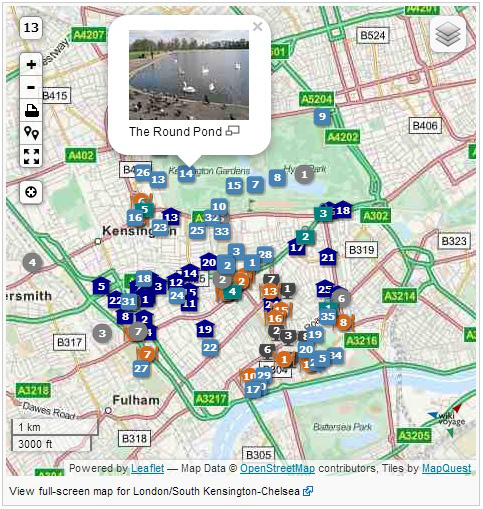
2) Do a screenshot of a map
When traveling abroad, roaming data rates can be enormous. When you take a screenshot of a map you’re needing, though, you can save it for later when you don’t have access to WiFi; this will help ensure you don’t use any unnecessary data while overseas.
London map screenshot
3) Use cord retracting headphones
To keep your headphone cords from getting tangled, purchase a pair with retractable cords.
4) Save on data
Did you know you can use Foursquare to identify locals who don’t care to share their WiFi passwords? By doing this, you can keep your data usage to a minimum when traveling.
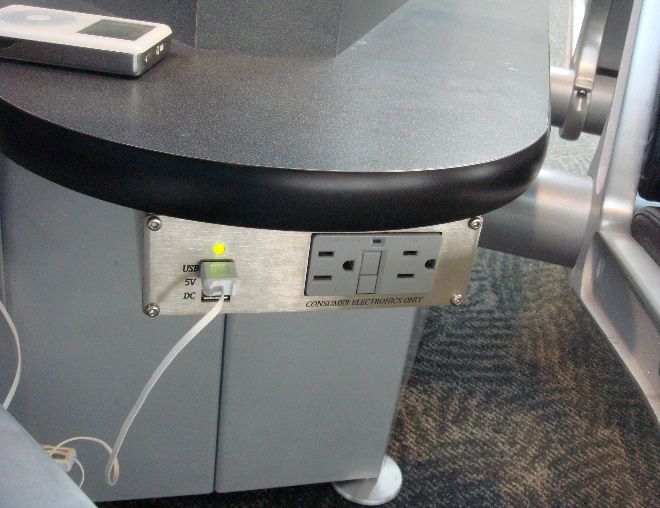
5) Use airport outlets
Most airports these days are full of USB and electrical outlets. By using these outlets, you can stay charged when traveling by air.
Take advantage of Airport Outlet
6) Improvise with hotel furniture
Does your hotel room not come with a desk for your laptop? If not, simply put your room’s ironing board at the end of the bed.
7) Keep all important documents on your phone
From your Passport to your birth certificate, take pictures of these documents and save them to your phone. Make sure to delete them after you’ve returned home.
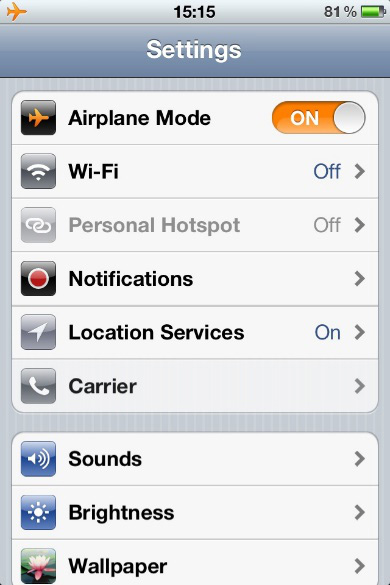
8) Boost your charge
Often when traveling, you’ll have limited opportunities to charge your phone. By putting it in Airplane Mode, however, you can charge your phone faster.
iPhone Airplane Mode
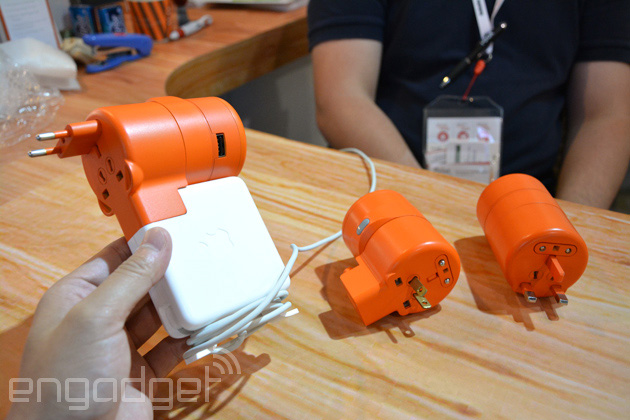
9) Bring along adapters
Depending on where you’re traveling to, you may need adapters for your electronics. Fortunately, there are all-in-one adapters that can meet almost all of your international adapter needs.
Smart Power Adapters
10) Pack a power strip
Since you’ll likely have several devices you want to charge at once — phone, tablet, laptop, camera, etc. — make sure to pack a miniature power strip.
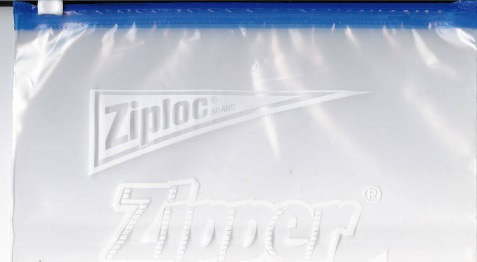
11) Plastic bags work well for water proofing
Going on a cruise? For a walk on the beach? When it comes to water proofing your tech gadgets, simply put them in a sealable plastic bag.
Ziplock or cheap efficient waterproof bag ?
12) Use cloud storage
When taking pictures and videos while traveling, use WiFi at your hotel to upload the pictures to the cloud. This ensures if something happens to your phone, you’ll still have your media.
13) Use WiFi to make phone calls
Download an easy-to-use use voice app, such as Google Voice, to make free calls back home using WiFi. You can also use this type of app to send texts and much more.
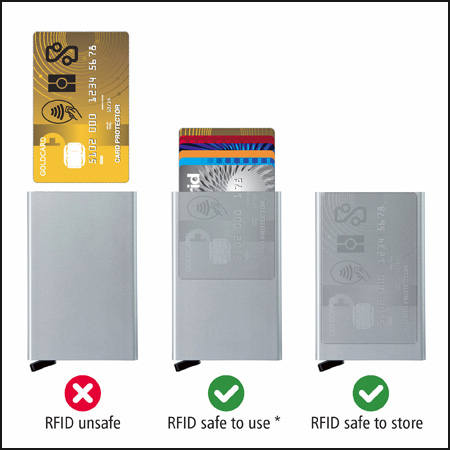
14) Buy a wallet that is RFID proof
With an RFID-proof wallet you’ll deter data thieves from accessing the information on your credit and debit cards.
SecrID Card Protectors
15) Download a travel app
Almost all major cities have unique travel apps. Make sure to use them to find interesting attractions and activities.
16) Check in using your phone
When traveling by air, you can usually use your phone to check in. All you need to do is present the QR code you receive on your phone and you’ll be allowed to go through security.
17) Find Airbnb lodging options
If you’re traveling to an area that is lacking in hotel options, use your phone or tablet to search for Airbnb homes and condos. You might find you can rent a home for cheaper than a hotel room.
18) Download credit card apps
For each credit card that you take with you, download its app to your smartphone; this will help you keep your finances in check.
iPhone Credit Card App
19) Consider roaming services
If you know you’re going to use your phone a lot while traveling abroad, make sure to take advantage of a roaming services provider.
20) Invest in screen protection
From in your home to around the world, a tempered glass screen protector protects your phone’s screen from cracks and chips. You can also find screen protectors that fit your other gadgets.
21) Bring an extra battery
By bringing along an extra battery for your phone and laptop, you can rest assured you’ll have power when you need it most.
All products, and company names, logos, and service marks (collectively the "Trademarks") displayed are registered® and/or unregistered
trademarks™ of their respective owners.
The authors of this web site are not sponsored by or affiliated with any of the third-party trade mark or third-party registered trade mark owners,
and make no representations about them, their owners, their products or services.